
Bing: Chat with AI & GPT-4

10,000,000+
Installs
Microsoft Corporation
Developer
-
Productivity
Category
-
Rated for 3+
Content Rating
-
sapphirefeedback@microsoft.com
Developer Email
-
https://go.microsoft.com/fwlink/?LinkID=248686
Privacy Policy
Screenshots
editor reviews
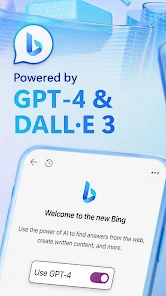
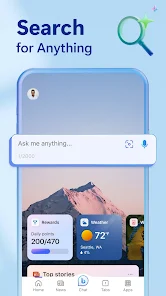
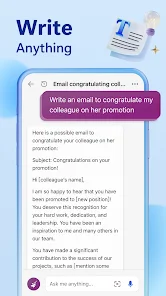
Bing: Chat with AI & GPT-4 is a search and assistant app from Microsoft that blends a standard web browser with a powerful AI chatbot. You mainly use it to search the internet, but instead of just getting a list of links, you can have a real conversation with an AI that summarizes information, writes text, or helps you brainstorm ideas. A normal user might download it because they're curious about AI tools or want a faster way to get answers without clicking through multiple websites. The first time you open it, the interface feels clean and a bit minimal—there's a search bar at the bottom and a few suggested prompts. It's free to download from both Google Play and the App Store, and it's already been installed hundreds of millions of times because it comes built into Microsoft's ecosystem. You don't need to register separately if you already have a Microsoft account, but you can sign in with one to get the full experience. There are no forced in-app purchases or annoying ads right away, which makes the first impression pretty smooth.
After starting to use it, the experience is surprisingly conversational. You type a question, and the AI responds in a chat-like format, often with footnotes linking to sources. The onboarding is simple—just a quick explanation that this is an AI-powered version of Bing. In daily use, I usually ask it to summarize articles, draft emails, or compare products. The interface has a top area for web results and a bottom chat section, so you can toggle between traditional search and AI chat. Sometimes the AI gets confused if you ask something very recent or niche, but overall the flow feels natural. One practical tip: you can use the microphone button for voice queries, which is handy when you're cooking or driving. The app also remembers your conversation history, so you can pick up where you left off, though this can feel a bit cluttered after a while.
After using it for a few weeks, I think this app is great for people who need quick, summarized answers and don't want to sift through pages of search results. Students, office workers, or anyone who writes a lot will probably enjoy it. But if you prefer browsing manually or feel skeptical about AI accuracy, you might not need it. What sets it apart from Google is the chat-based interaction—Google's search is still more about links, while Bing feels like you're talking to a helpful assistant. Compared to other AI apps like ChatGPT, Bing has the edge of being integrated with live web search, so it can give you current info. I'd keep it installed because it saves time, but I can see someone uninstalling it if they find the AI responses too generic or limited by Microsoft's content filters.
features
- 🤖 Advanced AI chat with GPT-4 integration, so responses are more nuanced than standard search engines like Google's basic snippets.
- 🔍 Live web search embedded directly in the chat, meaning it can pull current news or data, unlike standalone ChatGPT which might be limited to older info.
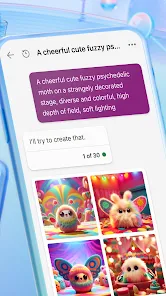
- 📝 Multi-functional abilities like drafting emails, writing code, or creating shopping lists, making it more versatile than typical search apps.
pros
- ✅ Seamless integration with Microsoft services like Office and Edge, giving it an edge over ChatGPT for users in that ecosystem.
- ✅ Free to use without a subscription, whereas ChatGPT's advanced models often require a paid plan.
- ✅ Source citations in responses, which adds credibility compared to Google Bard's sometimes vague answers.
cons
- ❌ Strict content filters that can block harmless questions, making it less flexible than ChatGPT for creative or sensitive topics.
- ❌ Occasional slow response times during peak hours, while Google Search stays consistently fast.
- ❌ Conversation history can get messy without a clear delete option, unlike ChatGPT's cleaner thread management.
Recommended Apps
![]()
16Personalities
16Personalities4
![]()
Zodiac Palm Reader: MagicWay
Reatility Media4.6
![]()
Moblo - 3D furniture modeling
MYTIforge4.1![]()
Magnifier Plus with Flashlight
Digitalchemy, LLC4.6![]()
QR Code Scanner
QR Code Scanner & Barcode Reader4.7![]()
FalFal: Astrology, Tarot, Love
FalFal Team4.8![]()
Christmas Photo Frames
PhotoFramesApps4.6![]()
AI Video Art Creator - Livensa
FERASET4.5![]()
Horoscope of Birth
Denimaks4.4![]()
Make Me Bald Prank
AppTornado2.5![]()
Kling AI: AI Image&Video Maker
Lohas Games Pte. Ltd.4.4![]()
Japan Timetable & Route Search
NAVITIME JAPAN CO., LTD.4.3![]()
Prank Call & Funny Video
TeH Software0![]()
Parallax 3D Live Wallpapers
TarrySoft4.3![]()
AI Chatbot - Nova
ScaleUp4.7















Disclaimer
1.AppInfoLibrary does not represent any developer, nor is it the developer of any App or game.
2.AppInfoLibrary provide custom reviews of Apps written by our own reviewers, and detailed information of these Apps, such as developer contacts, ratings and screenshots.
3.All trademarks, registered trademarks, product names and company names or logos appearing on the site are the property of their respective owners.
4. AppInfoLibrary abides by the federal Digital Millennium Copyright Act (DMCA) by responding to notices of alleged infringement that complies with the DMCA and other applicable laws.
5.If you are the owner or copyright representative and want to delete your information, please contact us info@appinfolibrary.com.
6.All the information on this website is strictly observed all the terms and conditions of Google Ads Advertising policies and Google Unwanted Software policy .














