

Instagram Lite

100,000,000+
Installs
Instagram
Developer
-
Social
Category
-
Rated for 12+
Content Rating
-
android-lite-support@instagram.com
Developer Email
-
http://instagram.com/legal/privacy/
Privacy Policy
Screenshots

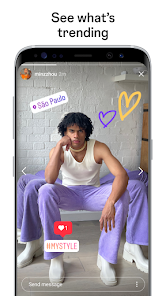
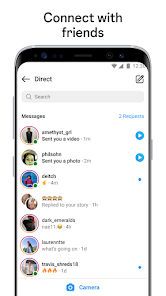

editor reviews
Instagram Lite is a stripped-down version of the main Instagram app, designed specifically for slower networks and older phones. It belongs to the social media and photo-sharing genre, and people download it to scroll through feeds, post photos, share Stories, and send DMs without the heavy storage requirements or lag of the full app. I first heard about it when my phone started running out of space, and after downloading it from Google Play, I noticed it installed in seconds rather than minutes. The first impression after launch was surprisingly refreshing — it looked and felt almost exactly like the regular Instagram, just a bit more basic. Registration wasn't required since I logged into my existing account, and there were no annoying first-time ads, which made the experience feel cleaner and faster.
Using Instagram Lite day-to-day is pretty straightforward. The interface keeps the same bottom navigation bar with the home, search, reels, shop, and profile tabs, so nothing feels unfamiliar. During onboarding, the app quickly synced my existing feed and DMs, which was a relief. My main actions are tapping through Stories at the top, double-tapping to like photos, and swiping up to check messages. One confusing moment was when I tried to upload a Story filter — some of the more complex AR effects simply weren't there, which took a second to figure out. A small practical tip I picked up is that the Lite version loads images noticeably faster on 3G or spotty Wi-Fi, so I actually prefer it when I'm commuting. It also helped reduce data usage, which is a nice bonus if you're on a limited plan.
After using Instagram Lite for a couple of weeks, I think it's a solid choice for anyone with a low-end device or limited storage. People who only use Instagram for basic scrolling and posting will hardly notice the difference. But if you rely heavily on Reels editing tools or shopping features, you'll miss them here. Compared to the standard Instagram, this version feels like a deliberate trade-off — you lose some bells and whistles but gain speed and efficiency. I've kept it installed because it runs smoothly on my older phone, and I can see myself uninstalling it only if I upgrade to a newer device. For now, it does everything I need without the bloat, which is rare in today's app world.
features
- 🌟 Lightweight Performance — Instagram Lite takes up only about 2 MB of storage compared to the full app's 30 MB or more. On my phone, this meant faster installs and less lag, especially when opening the app after a few hours.
- 🌟 Core Features Work Well — You can still post photos, share Stories, browse Reels, and send DMs. It even supports dark mode. I found that basic functions like scrolling through the feed and liking posts were just as smooth as the main app, which surprised me.
- 🌟 Data Saving Mode — This is the standout feature for me. Instagram Lite automatically compresses images and videos, reducing data consumption by up to 50%. When I switched from the full app to Lite, my monthly data usage dropped noticeably, and I didn't notice much quality loss in feeds.
- 🌟 No Extra Bloat — Unlike the full Instagram, this version skips features like IGTV, shopping tabs, and advanced Reels editing. While some might miss these, I appreciated the cleaner interface without the clutter.
pros
- 👏 Storage Friendly — At under 10 MB, Instagram Lite is a lifesaver for phones with 16 GB or 32 GB of space. In contrast, Snapchat often takes up over 100 MB after caching, making this app much more manageable for daily use.
- 👏 Speed on Low-End Devices — On my Moto E with 2 GB RAM, the standard Instagram lagged when loading Stories. Instagram Lite loaded everything almost instantly, which feels like a luxury compared to Facebook Lite, which can still stutter on similar hardware.
- 👏 Minimal Ads — I noticed fewer sponsored posts and video ads in my feed compared to the full Instagram. This might be because Lite loads simpler ad formats, but it made my scrolling experience feel less cluttered and more focused on actual friends' content.
cons
- ⚠️ Missing Reels Editing Tools — The full Instagram has a robust Reels editor with music sync, timers, and effects. In Lite, you can only view Reels, not create them. If you're a content creator, you'll still need the main app for that.
- ⚠️ No Shopping or Checkout — I couldn't browse tagged products or buy items directly in Lite. For someone who shops through Instagram regularly, this is a deal breaker compared to the standard version's integrated storefront.
- ⚠️ Limited Filters for Stories — The collection of filters and effects in Lite is smaller. I tried to use a popular AR filter from a friend's Story, but it just showed a placeholder. If you're into creative Stories, you'll miss the variety here.
- ⚠️ Occasional Sync Delays — A few times, my messages took longer to appear in Lite compared to the full app. It wasn't constant, but it happened enough to notice when I was having a quick conversation via DMs.
Recommended Apps
![]()
16Personalities
16Personalities4
![]()
Zodiac Palm Reader: MagicWay
Reatility Media4.6
![]()
Moblo - 3D furniture modeling
MYTIforge4.1![]()
Magnifier Plus with Flashlight
Digitalchemy, LLC4.6![]()
QR Code Scanner
QR Code Scanner & Barcode Reader4.7![]()
FalFal: Astrology, Tarot, Love
FalFal Team4.8![]()
Christmas Photo Frames
PhotoFramesApps4.6![]()
AI Video Art Creator - Livensa
FERASET4.5![]()
Horoscope of Birth
Denimaks4.4![]()
Make Me Bald Prank
AppTornado2.5![]()
Kling AI: AI Image&Video Maker
Lohas Games Pte. Ltd.4.4![]()
Japan Timetable & Route Search
NAVITIME JAPAN CO., LTD.4.3![]()
Prank Call & Funny Video
TeH Software0![]()
Parallax 3D Live Wallpapers
TarrySoft4.3![]()
AI Chatbot - Nova
ScaleUp4.7















Disclaimer
1.AppInfoLibrary does not represent any developer, nor is it the developer of any App or game.
2.AppInfoLibrary provide custom reviews of Apps written by our own reviewers, and detailed information of these Apps, such as developer contacts, ratings and screenshots.
3.All trademarks, registered trademarks, product names and company names or logos appearing on the site are the property of their respective owners.
4. AppInfoLibrary abides by the federal Digital Millennium Copyright Act (DMCA) by responding to notices of alleged infringement that complies with the DMCA and other applicable laws.
5.If you are the owner or copyright representative and want to delete your information, please contact us info@appinfolibrary.com.
6.All the information on this website is strictly observed all the terms and conditions of Google Ads Advertising policies and Google Unwanted Software policy .














