

Uber Eats: Food Delivery

100M+
Installs
Uber Technologies, Inc.
Developer
-
Food & Drink
Category
-
Everyone
Content Rating
-
support@uber.com
Developer Email
-
https://www.uber.com/privacy
Privacy Policy
Screenshots


editor reviews
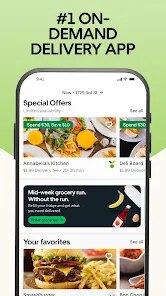
Uber Eats is a food delivery app owned by Uber Technologies, Inc., designed to let you order meals from local restaurants straight to your door. Honestly, it's one of those apps you download because you had a long day, it's raining, or you just don't feel like cooking. After installing it from Google Play or the App Store — it's free to download with millions of installs — you open it up and immediately see a map or a list of nearby places. The first impression is pretty clean: big food photos, estimated delivery times, and clear prices. You don't need to register right away; you can browse first, which is nice. But once you actually want to order, you'll need to sign up or log in, and yes, there are in-app purchases for the food itself and optional subscription plans like Uber One, which cuts delivery fees. Ads aren't super aggressive, but you'll see promotional banners for certain restaurants or discounts.
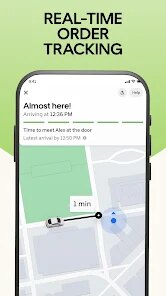
Once you start using it, the flow makes sense. You type in your address or let the app use your location, scroll through the options, and pick what you're craving. The interface is pretty straightforward: search for a cuisine, filter by price or rating, and add items to your cart. The onboarding experience isn't complicated, but it can feel a bit messy if you're new — there are a lot of pop-ups asking you to join Uber One or rate a restaurant you haven't tried yet. When you place an order, you get real-time tracking, which is actually satisfying because you can watch the driver move on the map. One small tip: if your order is taking longer than expected, check the "Help" section in the app rather than calling the restaurant, because they won't be able to help you. A common pain point is that delivery fees and service fees add up quickly, so your $10 meal can easily become $18. But the process itself is smooth — payment is saved, tipping happens after delivery, and you can even schedule orders for later.
After using Uber Eats for a while, I think it's a solid choice for people who want convenience and variety, especially in big cities where many restaurants are available. It's not the cheapest option, though, so if you're on a tight budget, you might prefer cooking or picking up food yourself. Compared to DoorDash or Grubhub, Uber Eats feels a bit more polished and the tracking is often more accurate. But the fees can be a letdown, and sometimes the delivery driver takes a different route than expected. What keeps me using it is the sheer number of restaurants and the Uber One subscription, which saves money if you order often. On the flip side, I've uninstalled it before when I was trying to save money, because the temptation to order in is strong. It's a genuinely useful app, but not essential for everyone.
features
- 🍔 Live Order Tracking: Uber Eats has a standout feature where you can follow your driver's location in real-time on the map. Unlike DoorDash, which also offers tracking, Uber Eats seems to update more frequently and show more detailed steps — like when the driver is picking up your order versus heading your way. It makes waiting a bit less boring.
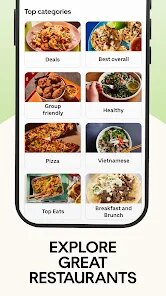
- 🍔 Wide Restaurant Selection: The app covers a huge range of options, from fast food chains to local hidden gems. In many cities, it feels like there are more choices than on Grubhub, especially for smaller and newer spots. You can also filter by cuisine type, rating, or dietary restrictions easily.
- 🍔 Uber One Subscription: This is a big plus if you order often. For a monthly or yearly fee, you get free delivery and lower service fees on eligible orders. DoorDash has DashPass, but Uber One also works across Uber rides, which gives it an edge for people who use both services regularly.
- 🍔 Scheduled Orders: You can plan ahead and schedule a delivery for later, which is handy for busy days. It's not a unique feature — Grubhub and DoorDash have it too — but Uber Eats makes it very simple with a clear time picker and confirmation screen.
pros
- ✅ App Performance: Uber Eats runs smoothly without crashing, and the search function is fast. Compared to DoorDash, which sometimes lags when loading menus, Uber Eats feels snappier and more responsive overall.
- ✅ User Interface: The design is modern and intuitive, with clear fonts and large images. Grubhub's interface can feel cluttered with too many buttons and promotions, but Uber Eats keeps things simpler and easier on the eyes.
- ✅ Payment Options: It supports a wide range of payment methods, including credit cards, PayPal, Apple Pay, and Google Pay. DoorDash and Grubhub also have these, but Uber Eats handles them more seamlessly during checkout without extra steps.
cons
- ❌ High Fees: Service fees, delivery fees, and small order fees can make a meal much more expensive than expected. DoorDash and Grubhub also charge fees, but Uber Eats sometimes adds a "service fee" that feels less transparent and harder to predict.
- ❌ Driver Reliability: Sometimes the driver takes a longer route or delivers to the wrong address, which is frustrating. DoorDash seems to have better driver communication options, while Uber Eats support can be slow to resolve these issues.
- ❌ Limited Support: Customer service is mostly through chat or automated messages, and getting a human on the phone is difficult. Grubhub offers phone support more readily, which makes a difference when there's a problem with an order.
- ❌ Restaurant Availability: In smaller towns or suburbs, the selection can be thin, with fewer options and longer wait times. DoorDash often has better coverage in less dense areas, making it a more reliable choice outside of big cities.
Recommended Apps
![]()
16Personalities
16Personalities4
![]()
Zodiac Palm Reader: MagicWay
Reatility Media4.6
![]()
Moblo - 3D furniture modeling
MYTIforge4.1![]()
Magnifier Plus with Flashlight
Digitalchemy, LLC4.6![]()
QR Code Scanner
QR Code Scanner & Barcode Reader4.7![]()
FalFal: Astrology, Tarot, Love
FalFal Team4.8![]()
Christmas Photo Frames
PhotoFramesApps4.6![]()
AI Video Art Creator - Livensa
FERASET4.5![]()
Horoscope of Birth
Denimaks4.4![]()
Make Me Bald Prank
AppTornado2.5![]()
Kling AI: AI Image&Video Maker
Lohas Games Pte. Ltd.4.4![]()
Japan Timetable & Route Search
NAVITIME JAPAN CO., LTD.4.3![]()
Prank Call & Funny Video
TeH Software0![]()
Parallax 3D Live Wallpapers
TarrySoft4.3![]()
AI Chatbot - Nova
ScaleUp4.7















Disclaimer
1.AppInfoLibrary does not represent any developer, nor is it the developer of any App or game.
2.AppInfoLibrary provide custom reviews of Apps written by our own reviewers, and detailed information of these Apps, such as developer contacts, ratings and screenshots.
3.All trademarks, registered trademarks, product names and company names or logos appearing on the site are the property of their respective owners.
4. AppInfoLibrary abides by the federal Digital Millennium Copyright Act (DMCA) by responding to notices of alleged infringement that complies with the DMCA and other applicable laws.
5.If you are the owner or copyright representative and want to delete your information, please contact us info@appinfolibrary.com.
6.All the information on this website is strictly observed all the terms and conditions of Google Ads Advertising policies and Google Unwanted Software policy .














