
Calendar

10,000,000+
Installs
Calendar Date
Developer
-
Productivity
Category
-
Rated for 3+
Content Rating
-
jcapps.anro@gmail.com
Developer Email
-
https://www.privacypolicycenter.com/view_custom.php?v=ZnJXa2hCQVlTWTRwamFTYUY3V2VxUT09&n=Calendar-Privacy-Policy
Privacy Policy
Screenshots
editor reviews
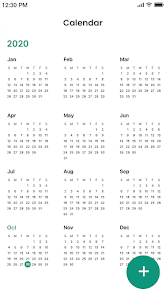
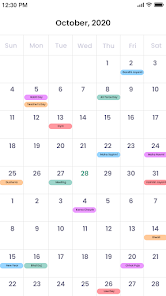
Calendar Date is exactly what it sounds like — a no-nonsense calendar app built for people who need quick access to dates, holidays, and time-related tools. Unlike standard calendar apps that focus on event management, this one feels more like a reference tool you'd keep handy rather than a full-on scheduler. I downloaded it because I kept needing to check what day of the week a certain date falls on, or how many days are left until New Year's, without opening my bulky system calendar. The first time I launched it, I got a clean year-at-a-glance view with national holidays marked clearly. No registration, no tutorials, just a straightforward grid. It's free on both Google Play and the App Store, though there are some optional in-app purchases if you want extra themes or customization. I never really noticed ads popping up in an annoying way, which was a pleasant surprise.
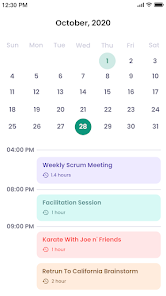
Spending a few minutes with Calendar Date shows you pretty quickly what it's good at. The interface is mostly one big calendar grid, with buttons at the top to switch between year, month, and day views. Tapping on any date brings up a small info panel showing the day of the week, week number, and how many days remain in the year. I found myself using the countdown feature more than I expected — like checking how many weeks until my vacation or when the next long weekend lands. Scrolling through months feels smooth, and you can jump to specific years instantly. A minor tip: the app stores your recently viewed dates in a small history bar, so if you're checking multiple dates in a row, you won't have to tap back and forth. The only confusing part was finding the setting to change the first day of the week from Sunday to Monday — it's buried in a side menu rather than the main display.
After using it for a couple of weeks, I can see exactly who this app is for and who might skip it. If you're someone who deals with planning projects, booking trips, or just likes having date information at your fingertips without the clutter of tasks and reminders, Calendar Date hits that sweet spot. But if you already rely on something like Google Calendar or Fantastical for both scheduling and reference, this app probably won't replace them — it's missing event creation features entirely. The design is minimal to the point of being plain, which some people might find boring but others will appreciate for its speed. What makes it different from similar apps like Date Calculator or Days Counter is that all the info lives in one screen without extra tabs. I'll probably keep it installed for quick lookups, but I wouldn't be surprised if someone who doesn't check dates often uninstalls it after a week.
features
- 📅 The week number display is the standout feature here. Google Calendar doesn't show week numbers natively on mobile, so having them visible right on the grid for every single week of the year is a huge convenience for anyone who works with project timelines or school semesters.- 🔄 The countdown tool is refreshingly simple. You pick a future date and it instantly tells you how many days, weeks, or even hours remain. Apps like Time Until or Countdown+ often make you set up separate timers, but Calendar Date just shows it from any date you tap, no setup required.- 🌍 The global holiday database covers way more countries than I expected. While Apple's built-in Calendar lets you add a few national holiday calendars, Calendar Date includes regional observances, school breaks, and even astronomical events like equinoxes — all preloaded and tagged neatly.- ⚡ It opens instantly with no loading screen. Compared to heavier apps like aCalendar or DigiCal, which sometimes pause to sync or load widgets, Calendar Date boots up ready to use, which matters when you just need one quick date check.
pros
- 🎯 The biggest strength is the no-frills speed. While Google Calendar loads your events, Calendars 5 syncs across devices, and Fantastical parses natural language input, Calendar Date doesn't bother with any of that — it's just pure date lookup. If you only need to know what day of the week March 17th falls on, you get the answer in under a second.- 📌 The app doesn't require any account or data permissions. Unlike many calendar apps that ask for contacts, location, or sync access immediately, you can use Calendar Date completely offline and without giving away personal info — which feels rare these days.- 👁️ The layout remains readable even on small screens. Apps like Business Calendar squeeze multiple columns and event blocks into the view, but Calendar Date keeps dates large and bold, making it easier to read at a glance without squinting.
cons
- ❌ There's no event creation or reminder system. Google Calendar and Fantastical let you tap a date and immediately create an event with a notification, but Calendar Date just shows you information about that date. If you realize you need to set a reminder, you have to switch to another app entirely.- 🔔 No widget support on most devices. While apps like Today Calendar and aCalendar offer home screen widgets that show upcoming dates or month grids, Calendar Date doesn't have any widget at all, so you're forced to open the app every time you need a quick check.- 🎨 The visual customization is extremely limited. You can change the accent color and toggle dark mode, but compared to Yearly or Timepage which let you alter fonts, layouts, and icon packs, Calendar Date's interface looks pretty bare and doesn't feel personal at all.- 🗓️ It doesn't sync with any external services. If you use Outlook, iCloud, or Exchange for your work calendar, this app won't pull that data in. That's fine for a reference tool, but users expecting any kind of integration will find it lacking compared to Spark Mail or Microsoft Outlook's calendar integration.
Recommended Apps
![]()
16Personalities
16Personalities4
![]()
Zodiac Palm Reader: MagicWay
Reatility Media4.6
![]()
Moblo - 3D furniture modeling
MYTIforge4.1![]()
Magnifier Plus with Flashlight
Digitalchemy, LLC4.6![]()
QR Code Scanner
QR Code Scanner & Barcode Reader4.7![]()
FalFal: Astrology, Tarot, Love
FalFal Team4.8![]()
Christmas Photo Frames
PhotoFramesApps4.6![]()
AI Video Art Creator - Livensa
FERASET4.5![]()
Horoscope of Birth
Denimaks4.4![]()
Make Me Bald Prank
AppTornado2.5![]()
Kling AI: AI Image&Video Maker
Lohas Games Pte. Ltd.4.4![]()
Japan Timetable & Route Search
NAVITIME JAPAN CO., LTD.4.3![]()
Prank Call & Funny Video
TeH Software0![]()
Parallax 3D Live Wallpapers
TarrySoft4.3![]()
AI Chatbot - Nova
ScaleUp4.7















Disclaimer
1.AppInfoLibrary does not represent any developer, nor is it the developer of any App or game.
2.AppInfoLibrary provide custom reviews of Apps written by our own reviewers, and detailed information of these Apps, such as developer contacts, ratings and screenshots.
3.All trademarks, registered trademarks, product names and company names or logos appearing on the site are the property of their respective owners.
4. AppInfoLibrary abides by the federal Digital Millennium Copyright Act (DMCA) by responding to notices of alleged infringement that complies with the DMCA and other applicable laws.
5.If you are the owner or copyright representative and want to delete your information, please contact us info@appinfolibrary.com.
6.All the information on this website is strictly observed all the terms and conditions of Google Ads Advertising policies and Google Unwanted Software policy .














