

Steam

100M+
Installs
Valve Corporation
Developer
-
Entertainment
Category
-
Teen
Content Rating
-
steamandroidapp@valvesoftware.com
Developer Email
-
http://store.steampowered.com/privacy_agreement/
Privacy Policy
Screenshots


editor reviews
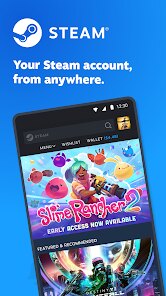
Steam isn't really a simple app you just download and open; it's the backbone of PC gaming for millions of people. Valve Corporation built this digital storefront and launcher to be the one-stop shop for buying, downloading, and playing games, but it has slowly morphed into a full-blown social network for gamers. When you first install it on a PC (the mobile companion app is separate), the initial impression is honestly a bit overwhelming. You're greeted by a massive store page with sales, recommendations, and community news, all layered on a dark, dense interface that feels more functional than flashy. It's free to download and create an account, though the real draw is obviously the games themselves. The install base is enormous, with hundreds of millions of active users, which makes a lot of sense once you realize almost every major PC game outside of Microsoft or Epic exclusives ends up here.
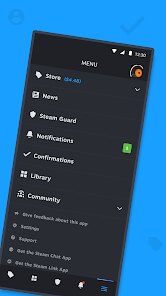
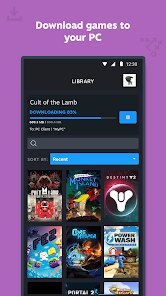
Getting into the actual hands-on experience, the main flow is pretty straightforward once you get past the visual clutter. You browse the store, maybe check out a sale or a friend's recommendation, click "Add to Cart," pay (or add funds from a gift card), and then the game starts downloading. The library tab is where you spend most of your time, organizing your ever-growing collection and launching titles. A common smooth moment is the seamless overlay that pops up in-game, letting you chat with friends or browse the web without alt-tabbing. On the flip side, the interface can feel sluggish navigating huge libraries, and the built-in web browser inside the overlay is still pretty mediocre. A practical tip is to use the "Categories" feature to sort your games by genre or mood. Also, the auto-update feature is a double-edged sword—it's great for having the latest patches, but annoying when a huge update starts right when you want to play a quick round of something.
After using Steam for a while, it's easy to see why it's the industry standard. It's almost impossible to talk about a specific app in the "game launcher" category without comparing it to the Epic Games Store or GOG. Steam just has more features: the community workshop for mods, detailed user reviews (that can be hilariously helpful or frustratingly vague), and the social features like groups and voice chat. The main reason someone would keep it installed is the sheer size of their library and the fact that it's where their friends are. The biggest reason someone might uninstall it would be if they switched completely to console gaming or got tired of the bloat—Steam can be a resource hog if you have hundreds of games installed. Overall, it's a powerful tool that works exceptionally well, but it definitely prioritizes feature density over a clean, simple experience. You use it because you have to, not because it's particularly beautiful.
features
- 💡 The biggest standout feature is Steam Workshop, a native modding system that lets you browse and install user-created content directly inside the store. GOG and Epic Games Store both lack this completely, so if you want to mod a game like Cities: Skylines or Stellaris, you have to hunt down third-party sites. Steam just does it automatically.
- 💡 Another major differentiator is the deep social framework. Friends lists, group chats, voice channels, screenshots, and game-specific hubs are all integrated into the launcher. Epic Games Store has basic friends and chat now, but it feels tacked-on compared to Steam's robust community ecosystem built over fifteen years.
- 💡 The refund policy is also a clear win. You can request a full refund for any game played less than two hours and owned for less than two weeks, no questions asked. GOG has a similar policy but only for unplayed games, and Epic's process is significantly less user-friendly and more manual.
- 💡 Finally, the Big Picture mode and Steam Link options let you play on a TV or stream to a phone effectively. This is a boon for people who want PC gaming in the living room without a separate console, something neither Epic nor GOG has attempted to replicate properly.
pros
- 👍 The game selection is unmatched. You can find almost any PC game ever released here, from AAA titles down to obscure indie experiments. GOG focuses on DRM-free classics, and Epic misses tons of releases because developers skip their store.
- 👍 The frequency of sales and seasonal events is a huge plus. Steam Summer and Winter sales offer deep discounts on thousands of games, plus fun collectible cards and mini-games. Epic gives away free games weekly, but Steam's sales have a bigger, more consistent impact on your wishlist.
- 👍 The download infrastructure is rock solid. Steam's servers are fast and reliable everywhere, with easy region switching and proper pre-loading for big releases. GOG and Epic can have slower speeds or more connection issues, especially during peak hours.
cons
- 👎 The interface is cluttered and bloated. Navigating the store or your library feels like wading through a marketing page with too many banners and pop-ups. The Epic Games Store is much cleaner and faster to browse, even if it has fewer features.
- 👎 Customer support is almost entirely automated. If you have a serious issue like a hacked account or a billing error, it can take days or weeks to get a real human. GOG has a much better reputation for actually solving problems with live agents.
- 👎 The app is a resource hog. It runs many background processes (like the overlay, web browser, and update manager) that can eat CPU and RAM, slowing down older PCs. The Epic Games Launcher is lighter and only really uses resources when it's actively downloading something.
- 👎 The curation is nonexistent. Anyone can dump a broken, asset-flipped game on the store with very little checking. This means you have to read reviews carefully. GOG and even the Microsoft Store have stricter quality control to avoid outright scams.
Recommended Apps
![]()
16Personalities
16Personalities4
![]()
Zodiac Palm Reader: MagicWay
Reatility Media4.6
![]()
Moblo - 3D furniture modeling
MYTIforge4.1![]()
Magnifier Plus with Flashlight
Digitalchemy, LLC4.6![]()
QR Code Scanner
QR Code Scanner & Barcode Reader4.7![]()
FalFal: Astrology, Tarot, Love
FalFal Team4.8![]()
Christmas Photo Frames
PhotoFramesApps4.6![]()
AI Video Art Creator - Livensa
FERASET4.5![]()
Horoscope of Birth
Denimaks4.4![]()
Make Me Bald Prank
AppTornado2.5![]()
Kling AI: AI Image&Video Maker
Lohas Games Pte. Ltd.4.4![]()
Japan Timetable & Route Search
NAVITIME JAPAN CO., LTD.4.3![]()
Prank Call & Funny Video
TeH Software0![]()
Parallax 3D Live Wallpapers
TarrySoft4.3![]()
AI Chatbot - Nova
ScaleUp4.7















Disclaimer
1.AppInfoLibrary does not represent any developer, nor is it the developer of any App or game.
2.AppInfoLibrary provide custom reviews of Apps written by our own reviewers, and detailed information of these Apps, such as developer contacts, ratings and screenshots.
3.All trademarks, registered trademarks, product names and company names or logos appearing on the site are the property of their respective owners.
4. AppInfoLibrary abides by the federal Digital Millennium Copyright Act (DMCA) by responding to notices of alleged infringement that complies with the DMCA and other applicable laws.
5.If you are the owner or copyright representative and want to delete your information, please contact us info@appinfolibrary.com.
6.All the information on this website is strictly observed all the terms and conditions of Google Ads Advertising policies and Google Unwanted Software policy .














