
Google Translate

1,000,000,000+
Installs
Google LLC
Developer
-
Books & Reference
Category
-
Rated for 3+
Content Rating
-
translate-mobile-support@google.com
Developer Email
-
http://www.google.com/policies/privacy/
Privacy Policy
Screenshots
editor reviews
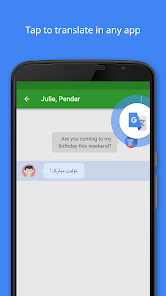
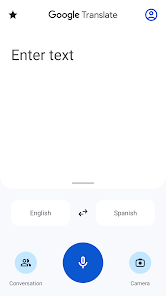
Google Translate is a translation app developed by Google LLC, widely recognized as one of the most downloaded tools on both Google Play and the App Store. People turn to it for translating text, speech, images, or even real-time conversations between dozens of languages. I downloaded it months ago because I often need quick translations for work messages, emails, and reading foreign websites, and the app is completely free to install. The first time I opened it, I was greeted with a clean, minimal interface — just a language selector and a text box staring back at me. No sign-up wall, no forced registration, just instant utility. There are in-app purchases for some extra features, but the core is free. With over a billion installs, you can tell it's become a must-have for travelers, students, and anyone who crosses language barriers.
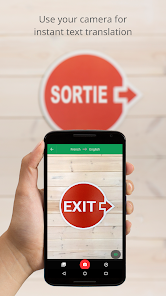
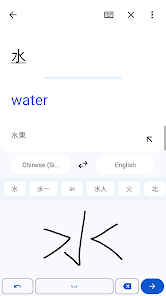
Using Google Translate day to day feels almost second nature. You pick your source and target languages, type or paste your text, and translations pop up in a fraction of a second. For longer paragraphs, the app also shows alternative translations for individual words, which helps when context matters. One feature I rely on is the camera translation — just point your phone at a sign, menu, or document in real-time, and the app overlays the translated text directly on the screen. For conversations, the two-way speech mode lets you and the other person speak naturally, and the app picks up both sides. I do find the handwriting input a bit clunky at times, especially for languages with complex characters like Chinese or Arabic, but voice input is impressively accurate. A small tip I picked up: downloading offline language packs before traveling saves you when there's no data connection.
After sticking with it for a while, I can see why Google Translate dominates this space. It's incredibly fast, covers over 100 languages, and does the job for casual and even moderate professional use. But it's not perfect for everyone. If you work with highly technical or legal documents, you will still prefer tools like DeepL for more nuanced, natural translations. Google Translate sometimes stumbles with idioms and formal tone. That said, for general browsing, chatting with friends abroad, or reading news in another language, it's hard to beat. I keep it installed because it's quick and covers more languages than most alternatives. I can see someone uninstalling it only if they need higher accuracy for specialized fields or if they prefer a more privacy-focused translator like Microsoft Translator, which has better local processing options.
features
- 📘 Translate text and speech in over 100 languages with near-instant speed, much broader than DeepL's 30 or so languages
- 📘 Camera translation that overlays results on real-time images, perfect for menus and signs, a feature DeepL lacks completely
- 📘 Two-way conversation mode for live speech translation, similar to Microsoft Translator but more responsive in my experience
- 📘 Offline mode with downloadable language packs, a standout for travelers compared to DeepL's weaker offline offering
pros
- 🌐 Supports over 100 languages, far more than DeepL or Microsoft Translator, making it the best bet for rare or less common languages
- 🌐 Completely free with no major usage limits, unlike DeepL which restricts free users to 5000 characters
- 🌐 Built-in camera and voice translation work smoothly out of the box, giving it an edge over Microsoft Translator's sometimes laggy image mode
cons
- ⚠️ Accuracy with idioms and formal business language is weaker than DeepL, which creates more natural-sounding translations
- ⚠️ No privacy-focused on-device processing all the time, while Microsoft Translator offers better local offline features
- ⚠️ Handwriting input is slow and sometimes misrecognizes characters, especially for Asian scripts
- ⚠️ Too many ads in the free version can feel intrusive, more than what you get with Microsoft Translator
Recommended Apps
![]()
16Personalities
16Personalities4
![]()
Zodiac Palm Reader: MagicWay
Reatility Media4.6
![]()
Moblo - 3D furniture modeling
MYTIforge4.1![]()
Magnifier Plus with Flashlight
Digitalchemy, LLC4.6![]()
QR Code Scanner
QR Code Scanner & Barcode Reader4.7![]()
FalFal: Astrology, Tarot, Love
FalFal Team4.8![]()
Christmas Photo Frames
PhotoFramesApps4.6![]()
AI Video Art Creator - Livensa
FERASET4.5![]()
Horoscope of Birth
Denimaks4.4![]()
Make Me Bald Prank
AppTornado2.5![]()
Kling AI: AI Image&Video Maker
Lohas Games Pte. Ltd.4.4![]()
Japan Timetable & Route Search
NAVITIME JAPAN CO., LTD.4.3![]()
Prank Call & Funny Video
TeH Software0![]()
Parallax 3D Live Wallpapers
TarrySoft4.3![]()
AI Chatbot - Nova
ScaleUp4.7















Disclaimer
1.AppInfoLibrary does not represent any developer, nor is it the developer of any App or game.
2.AppInfoLibrary provide custom reviews of Apps written by our own reviewers, and detailed information of these Apps, such as developer contacts, ratings and screenshots.
3.All trademarks, registered trademarks, product names and company names or logos appearing on the site are the property of their respective owners.
4. AppInfoLibrary abides by the federal Digital Millennium Copyright Act (DMCA) by responding to notices of alleged infringement that complies with the DMCA and other applicable laws.
5.If you are the owner or copyright representative and want to delete your information, please contact us info@appinfolibrary.com.
6.All the information on this website is strictly observed all the terms and conditions of Google Ads Advertising policies and Google Unwanted Software policy .














