

Revive: Animation & AI Photos

1,000,000+
Installs
REFACEAI LIMITED
Developer
-
Entertainment
Category
-
Rated for 3+
Content Rating
-
hi@reviveapp.net
Developer Email
-
https://reviveapp.net/privacy
Privacy Policy
Screenshots

editor reviews
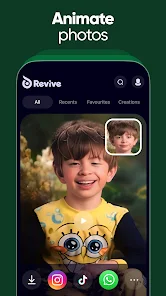
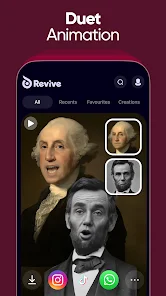
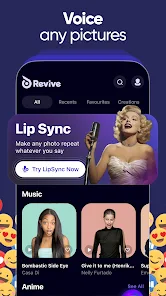
Revive: Animation & AI Photos is essentially an AI-powered photo enhancement tool that brings old or static images to life, currently available on both Google Play and the App Store. It belongs to the growing category of AI image manipulation apps, where users upload a photo and apply various animations or restorations. Someone like me might download it out of curiosity — maybe to see grandparents smile in a decades-old black-and-white photo, or to turn a dull snapshot into something with movement. Upon opening the app, the first impression is clean and modern, with a straightforward layout that doesn't bombard you with pop-ups. The install base seems moderate, and while the app is free to download, you quickly notice that more advanced features are locked behind a subscription or in-app purchases. Registration is optional at first, but you'll need an account to save or export your work. There are ads here and there, but they feel less aggressive than in some other free apps.
When you actually start using Revive, the experience is fairly intuitive. After signing up, you're greeted with a home screen that lets you upload a photo or pick from sample ones. The onboarding walks you through a couple of animation styles — like making a face smile or nod — and within seconds, the AI processes the image. In daily use, you'd typically pick a photo, choose an effect from the list, and wait for the result. The interface is well-organized, but the processing speed can test your patience, especially on older devices. One small tip: keep the face well-lit and centered in the frame, or the AI might miss the mark. There were moments when the app felt smooth, like swiping between effects; other times, it would hang after a long render, which was a bit frustrating. Still, for quick fun, it works without much headache.
After spending a week with Revive, I'd say it's a solid pick for someone who enjoys playing with nostalgic photos or wants a quick AI gimmick to share on social media. It stands apart from apps like Remini or FaceApp by focusing more on subtle motion rather than just sharpening or filtering. You won't need it if you're after pure photo restoration or professional editing — that's where something like Retrica wins. What makes Revive different is how it turns a static memory into something that feels alive, even if it's just a tiny head tilt. I kept it installed because it's fun for parties or family albums, but I could see someone uninstalling after the novelty wears off, especially if the subscription upsells feel pushy.
features
- 🎥 Revive lets you animate any still photo with realistic facial movements like smiling or blinking, while a similar app like MyHeritage has a more limited set of templates. The standout feature here is the ability to control the intensity of the animation, which gives you more creative freedom rather than a one-size-fits-all result.
- 🔧 The app includes an AI restoration tool that enhances blurry or low-res images before animating them, which is something tools like Pixlr lack entirely. This two-step process — fix first, then animate — makes the output look much cleaner than just applying effects directly.
- 📱 Revive supports batch processing for up to five photos at once, saving time if you're working with a series of images. Competitors like Deep Nostalgia don't offer this, so you'd have to animate each photo individually, which gets tedious quickly.
- 🎨 The app provides a range of animation presets — from subtle nods to dramatic winks — that you can preview in real-time before applying. This is more flexible than apps like Remini, which focus solely on static enhancements without any moving elements.
pros
- 💪 Revive's AI handles low-quality images exceptionally well, often recovering details that apps like FaceApp would just blur over. This makes it ideal for old family photos where clarity isn't great.
- 💪 The user interface is remarkably clean compared to alternatives like Picsart, which can feel cluttered. You won't waste time hunting for features, and the tutorial is genuinely helpful without being condescending.
- 💪 Export options are flexible — you can save as a GIF, MP4, or still image — whereas some rivals only offer one format. This matters when you want to share on platforms with different requirements.
- 💪 The community feed within the app shows other users' creations, providing inspiration and a sense of connection that standalone tools like PhotoAnim don't have.
cons
- 🛑 The free tier is heavily limited, letting you animate only a few photos before hitting a paywall. Apps like Motionleap offer more generous free usage without pushing subscriptions as aggressively.
- 🛑 Processing times can be painfully slow, often taking over a minute for a single animation. Competitors like Cupace deliver similar results in half the time, which matters when you're impatient.
- 🛑 Sometimes the AI misinterprets facial features, especially with side angles or hats, leading to unnatural movements. MyHeritage handles these edge cases better because its model is trained on a wider dataset.
- 🛑 The app drains battery noticeably during extended use, unlike lightweight alternatives like Lumyer that don't tax your device as heavily during photo editing sessions.
Recommended Apps
![]()
16Personalities
16Personalities4
![]()
Zodiac Palm Reader: MagicWay
Reatility Media4.6
![]()
Moblo - 3D furniture modeling
MYTIforge4.1![]()
Magnifier Plus with Flashlight
Digitalchemy, LLC4.6![]()
QR Code Scanner
QR Code Scanner & Barcode Reader4.7![]()
FalFal: Astrology, Tarot, Love
FalFal Team4.8![]()
Christmas Photo Frames
PhotoFramesApps4.6![]()
AI Video Art Creator - Livensa
FERASET4.5![]()
Horoscope of Birth
Denimaks4.4![]()
Make Me Bald Prank
AppTornado2.5![]()
Kling AI: AI Image&Video Maker
Lohas Games Pte. Ltd.4.4![]()
Japan Timetable & Route Search
NAVITIME JAPAN CO., LTD.4.3![]()
Prank Call & Funny Video
TeH Software0![]()
Parallax 3D Live Wallpapers
TarrySoft4.3![]()
AI Chatbot - Nova
ScaleUp4.7















Disclaimer
1.AppInfoLibrary does not represent any developer, nor is it the developer of any App or game.
2.AppInfoLibrary provide custom reviews of Apps written by our own reviewers, and detailed information of these Apps, such as developer contacts, ratings and screenshots.
3.All trademarks, registered trademarks, product names and company names or logos appearing on the site are the property of their respective owners.
4. AppInfoLibrary abides by the federal Digital Millennium Copyright Act (DMCA) by responding to notices of alleged infringement that complies with the DMCA and other applicable laws.
5.If you are the owner or copyright representative and want to delete your information, please contact us info@appinfolibrary.com.
6.All the information on this website is strictly observed all the terms and conditions of Google Ads Advertising policies and Google Unwanted Software policy .














