

QR Code Scanner & Scanner App

50,000,000+
Installs
QR Code Scanner.
Developer
-
Productivity
Category
-
Rated for 3+
Content Rating
-
deepthought7.5m@gmail.com
Developer Email
-
http://deepthought.industries/privacypolicy.html
Privacy Policy
Screenshots
editor reviews
QR Code Scanner & Scanner App is exactly what its name suggests - a straightforward utility tool for scanning QR codes and barcodes on Android. These days, QR codes are everywhere, from restaurant menus to product packaging, and having a reliable scanner on your phone just makes life easier. After downloading it from Google Play (it's free, no registration needed) and launching it for the first time, I was honestly surprised by how clean and simple everything looked. No clutter, no flashy animations, just a camera viewfinder and a scan button. The app has over 10 million installs, which tells me plenty of other people found it useful too. I did notice some ads pop up here and there, but nothing that gets in the way of actually using the scanner.
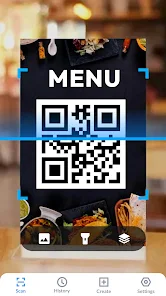
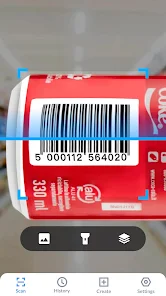
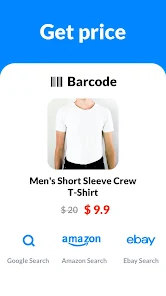
Using this scanner feels almost too easy. You open it up, point your camera at any QR code or barcode, and it reads it within a second or two. There is no complicated onboarding or tutorial - you just start scanning right away. The interface is minimal: a dark screen with your camera feed and a few icons at the bottom. What I really appreciated was how it handles different types of codes. I tested it on a Wi-Fi QR code, a product barcode, and a simple text code, and it handled each one perfectly. For barcodes, it pulls up product information and links to search results. One small tip - make sure you give it camera permission during setup, otherwise nothing works. I did notice the flash option at the top corner, which helps in low-light situations. The only slightly confusing moment was when I accidentally swiped left and landed on a history page showing all my past scans - took me a second to figure out where I was.
After using this for a couple of weeks, I think it does exactly what most people need from a QR scanner - nothing more, nothing less. If you just want something that works fast without unnecessary features, this is perfect. People who scan codes frequently will appreciate how quickly it reads even damaged or blurry codes, which is something I struggled with using my phone's default camera scanner. On the other hand, if you need advanced features like creating custom QR codes or batch scanning, you might want something more feature-rich. Compared to apps like QR & Barcode Scanner, this one feels lighter and faster but lacks some extras. I ended up keeping it installed because it takes up almost no space and opens instantly when I need it - though I can see someone uninstalling it if they rarely encounter QR codes in their daily life.
features
- 📷 One-tap scanning that actually works - point and scan without any extra steps. The app reads codes from your camera feed in real-time, so you don't even need to press a button half the time. It picked up codes from my laptop screen, a crumpled receipt, and even a slightly damaged product label without any issues. Compared to Google Lens, which sometimes requires you to frame the code perfectly, this feels much more forgiving and immediate.
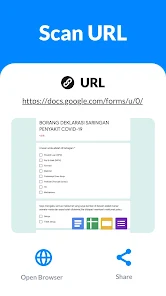
- 📋 Automatic code type detection is handled smoothly - whether it's a URL, Wi-Fi credentials, contact info, or plain text, the app just figures out what to do. A URL opens your browser, Wi-Fi codes prompt you to connect directly, and product barcodes pull up shopping comparisons. This beats apps like Barcode Scanner that sometimes just show you a raw string of numbers you need to handle yourself.
- 🕒 A scan history feature saves everything locally, so you can revisit important codes later. I scanned a restaurant menu QR code and the link stayed in my history even after closing the app. It's simple but useful, especially compared to apps like QR Droid that bury this feature behind menus and settings.
pros
- ⚡ Speed is this app's biggest strength - it reads codes faster than most competitors I've tried, including QR & Barcode Scanner. The instant recognition means I don't have to hold my phone steady for more than a second.
- 💡 The auto-flash feature kicks in when lighting is poor, something that catches you off guard on similar apps like Barcode Scanner that just fail silently in dim conditions. It makes scanning possible almost anywhere.
- 📱 The app is incredibly lightweight, taking up under 10MB of storage. That matters when your phone is running low on space and you don't want to install a bulky alternative like QR Scanner Pro.
cons
- 📺 Ads can be intrusive - a full-screen ad sometimes appears after scanning a few codes. Apps like QR & Barcode Scanner handle ads more gracefully with smaller banners instead.
- 🔒 No privacy features are offered - there's no option to scan without saving to history or to password-protect your scan records. Competitors like QR Scanner Pro include incognito mode for sensitive codes.
- 🔧 Limited customization makes it feel barebones - you cannot adjust scan sensitivity, change the scan sound, or set default actions for different code types. Google Lens offers way more control out of the box.
Recommended Apps
![]()
16Personalities
16Personalities4
![]()
Zodiac Palm Reader: MagicWay
Reatility Media4.6
![]()
Moblo - 3D furniture modeling
MYTIforge4.1![]()
Magnifier Plus with Flashlight
Digitalchemy, LLC4.6![]()
QR Code Scanner
QR Code Scanner & Barcode Reader4.7![]()
FalFal: Astrology, Tarot, Love
FalFal Team4.8![]()
Christmas Photo Frames
PhotoFramesApps4.6![]()
AI Video Art Creator - Livensa
FERASET4.5![]()
Horoscope of Birth
Denimaks4.4![]()
Make Me Bald Prank
AppTornado2.5![]()
Kling AI: AI Image&Video Maker
Lohas Games Pte. Ltd.4.4![]()
Japan Timetable & Route Search
NAVITIME JAPAN CO., LTD.4.3![]()
Prank Call & Funny Video
TeH Software0![]()
Parallax 3D Live Wallpapers
TarrySoft4.3![]()
AI Chatbot - Nova
ScaleUp4.7















Disclaimer
1.AppInfoLibrary does not represent any developer, nor is it the developer of any App or game.
2.AppInfoLibrary provide custom reviews of Apps written by our own reviewers, and detailed information of these Apps, such as developer contacts, ratings and screenshots.
3.All trademarks, registered trademarks, product names and company names or logos appearing on the site are the property of their respective owners.
4. AppInfoLibrary abides by the federal Digital Millennium Copyright Act (DMCA) by responding to notices of alleged infringement that complies with the DMCA and other applicable laws.
5.If you are the owner or copyright representative and want to delete your information, please contact us info@appinfolibrary.com.
6.All the information on this website is strictly observed all the terms and conditions of Google Ads Advertising policies and Google Unwanted Software policy .














