

Microsoft Outlook

500,000,000+
Installs
Microsoft Corporation
Developer
-
Productivity
Category
-
Rated for 3+
Content Rating
-
noreply@microsoft.com
Developer Email
-
http://taps.io/outlookprivacy
Privacy Policy
Screenshots
editor reviews
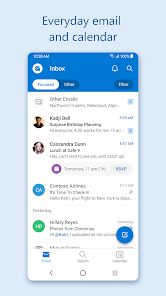
Microsoft Outlook is basically your classic email client that's been around forever, but it's really grown into a full-on productivity hub. You don't just check emails here; you manage your calendar, keep tabs on tasks, and store contacts all in one place. For most people, it's the default app on a new work computer, so you don't really choose it—it just comes with your Office subscription. I downloaded it from the Google Play store for my phone, and it's free to install, but you do need a Microsoft account or a work email to get started. The first impression after launching was surprisingly clean for an app that's known for being bulky. It asked me to sign in right away, which feels natural, and the setup was super quick. No annoying ads popped up, which was a relief, though deeper integrations might require a paid plan.
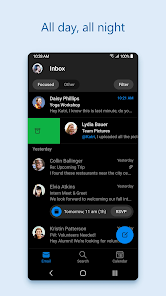
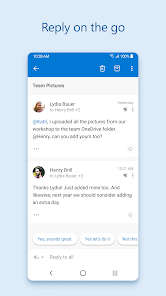
Once you start actually using it, the experience is pretty smooth. The interface is divided into a bottom tab bar—Mail, Calendar, and Files—so jumping between them feels quick. When you open an email, the swipe gestures are actually smart: a short swipe archives it, but you can customize it to delete or flag. Setting up a meeting in the Calendar is where it shines; you just tap a time slot, type the title, and Outlook suggests attendees from your recent emails. A small but handy tip: if you hold down the send button, you can schedule the email to send later. The only confusing moment I hit was the Focused Inbox feature—it tries to sort important emails from the rest, but sometimes it hides things you actually need, so I turned it off in settings.
After using it for a few weeks, I think it's a solid pick if you're already in the Microsoft ecosystem. The way it syncs your calendar across devices is nearly flawless, which is a big deal for anyone juggling work and personal schedules. It does feel a bit too tied to Microsoft services though; if you mainly use Gmail, the integration isn't as tight as Google's own apps. Compared to something like Spark or Edison Mail, Outlook feels more corporate and less playful. I can see someone keeping it installed if their company requires it, but for personal use, I might uninstall it because the constant notification about setting up an Outlook.com account gets a little annoying. It's great for organization, but it's not really a fun app to open.
features
- 📧 Outlook's "Focused Inbox" is a standout compared to Gmail's similar feature. It learns faster which senders matter to you, so your inbox stays less cluttered. Gmail takes a bit longer to get that pattern right, especially if you have multiple accounts.
- 📧 The built-in calendar integration is seamless here. You can book a meeting without leaving your inbox, and it pulls availability from other Outlook users automatically. Google Calendar does this too, but it needs a separate browser tab or app to work well.
- 📧 "Scheduled Send" is built right into the send button. You hold it down, pick a time, and the email goes out then. In Gmail, you have to click a dropdown menu, which is an extra step. It's a small time saver, but it matters when you reply late at night.
- 📧 Offline access to recent emails and calendars is quite reliable. You can read, reply, and queue messages when you have no signal. Compared to Edison Mail, which sometimes fails to sync drafts offline, Outlook handles this much more consistently.
pros
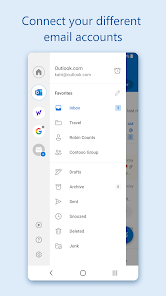
- 👍 The app handles multiple email accounts incredibly well. You can add Gmail, Yahoo, iCloud, and Exchange accounts all in one view. That's something Spark does too, but Outlook's unified inbox feels more stable and less buggy when switching between accounts.
- 👍 Search is surprisingly fast and accurate. You can search by sender, subject, or even keywords inside attachments. Google's own app is faster for Gmail specifically, but Outlook searches across all your linked accounts without slowing down.
- 👍 The "My Day" pane is a nice touch. It shows your daily calendar and tasks side by side with emails. Compared to Apple Mail, which has no calendar view at all, this makes planning your day a lot easier without juggling two apps.
cons
- 👎 The app is pretty heavy on storage and battery. It runs background sync constantly, so your phone drains faster. Gmail is lighter on resources, especially on older devices, and doesn't heat up the phone as much.
- 👎 Notifications can get overwhelming. It often sends alerts for every single email, even ones from newsletters you already marked as spam. Spark has much smarter notification grouping, so you only get pinged for important threads.
- 👎 Some features are locked behind a Microsoft 365 subscription. For example, advanced rules to auto-forward or block specific senders require a paid plan. Edison Mail offers more advanced filtering for free.
- 👎 The Android widget is basic and not very customizable. You can only show a list of recent messages, while Gmail's widget lets you choose specific labels or folders, which is more useful for quick scans.
Recommended Apps
![]()
16Personalities
16Personalities4
![]()
Zodiac Palm Reader: MagicWay
Reatility Media4.6
![]()
Moblo - 3D furniture modeling
MYTIforge4.1![]()
Magnifier Plus with Flashlight
Digitalchemy, LLC4.6![]()
QR Code Scanner
QR Code Scanner & Barcode Reader4.7![]()
FalFal: Astrology, Tarot, Love
FalFal Team4.8![]()
Christmas Photo Frames
PhotoFramesApps4.6![]()
AI Video Art Creator - Livensa
FERASET4.5![]()
Horoscope of Birth
Denimaks4.4![]()
Make Me Bald Prank
AppTornado2.5![]()
Kling AI: AI Image&Video Maker
Lohas Games Pte. Ltd.4.4![]()
Japan Timetable & Route Search
NAVITIME JAPAN CO., LTD.4.3![]()
Prank Call & Funny Video
TeH Software0![]()
Parallax 3D Live Wallpapers
TarrySoft4.3![]()
AI Chatbot - Nova
ScaleUp4.7















Disclaimer
1.AppInfoLibrary does not represent any developer, nor is it the developer of any App or game.
2.AppInfoLibrary provide custom reviews of Apps written by our own reviewers, and detailed information of these Apps, such as developer contacts, ratings and screenshots.
3.All trademarks, registered trademarks, product names and company names or logos appearing on the site are the property of their respective owners.
4. AppInfoLibrary abides by the federal Digital Millennium Copyright Act (DMCA) by responding to notices of alleged infringement that complies with the DMCA and other applicable laws.
5.If you are the owner or copyright representative and want to delete your information, please contact us info@appinfolibrary.com.
6.All the information on this website is strictly observed all the terms and conditions of Google Ads Advertising policies and Google Unwanted Software policy .














