

Aura Frames

500,000+
Installs
Aura Home, Inc.
Developer
-
Productivity
Category
-
Rated for 3+
Content Rating
-
help@auraframes.com
Developer Email
-
https://auraframes.com/privacy
Privacy Policy
Screenshots

editor reviews
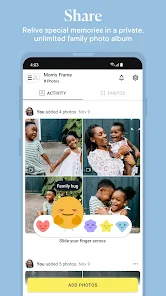
When I first heard about Aura Frames, I thought it was just another digital photo frame—something I'd seen before and honestly wasn't expecting much from. It's a smart photo frame app developed by Aura Home, Inc., designed to turn your tablet or their dedicated frame hardware into a constantly updating digital album. You mainly use it to send photos directly to the frame from your phone, so family members or close friends can see new pictures without anyone having to manually upload or transfer anything. The app is free to download on Google Play and the App Store, and while I didn't need to register right away, I did have to create an account to actually start using it. My first impression after launching the app was pretty clean—simple layout, not cluttered, and it immediately asked me to invite family members. That felt personal from the start.
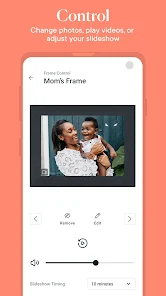
Once I got into the actual experience, the app is straightforward in a good way. The interface is minimal, with your frame's current slideshow showing up as soon as you log in. Onboarding was quick: you choose which photos to send, set up a few display preferences, and then invite others to contribute. In daily use, I found myself opening the app maybe once every couple of days, just to send a batch of recent photos from my camera roll. You can also like or comment on pictures if your connected frame supports it, which adds a small social layer. One thing I noticed is that the app syncs fast—photos show up on the frame within seconds. A smooth moment was realizing you can schedule when photos show or hide, which is great for avoiding surprise baby pictures during work calls. On the flip side, I did get confused at first about the difference between adding photos to the “frame” versus simply uploading them to the app. It's not hard once you figure it out, but it's not instantly obvious either.
After using Aura Frames for a few weeks, I think it's perfect for families or close friend groups who want to stay visually connected without the hassle of group chats or social media. If you're someone who likes sharing pictures but hates constant notifications, this app offers a quieter alternative. Compared to something like Google Photos' shared albums, Aura feels more intentional—you don't just upload and forget; you actively send photos to a specific device that sits in someone's home. That personal touch makes it different. On the other hand, if you don't own the actual Aura hardware, the app is basically a remote control with no real use on its own. I could see people keeping it installed if they have the frame, but uninstalling quickly if they don't. It's a nice niche product, not a universal tool.
features
- 📸 Live photo support – Unlike many digital frame apps, Aura Frames actually plays live photos taken on iPhone, so your frame shows moving moments instead of just static images. Frameo lacks this entirely, which makes Aura feel more alive when the screen lights up with a short video clip.
- 📸 Guest invitation system – You can send an invite link to anyone, and they can add photos directly to your frame without needing their own account. This is much smoother than Skylight Frame's method, which requires each person to install the app and register separately.
- 📸 Smart display settings – The app automatically adjusts brightness and orientation based on the room's lighting and the photo's aspect ratio. Most competitors like Nixplay make you manually tweak these settings, but Aura handles it quietly in the background.
pros
- ✨ Photo delivery speed – Photos appear on the frame almost instantly after being sent, which beats Frameo and Nixplay by a noticeable margin. I've seen delays of up to a minute on other apps, but Aura is genuinely fast.
- ✨ Completely ad-free – Unlike many free frame apps that sneak in ads, Aura Frames has no third-party advertising at all. Skylight Frame's app has occasional sponsored content, but Aura stays clean and focused.
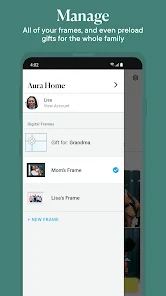
- ✨ Hardware-software integration – The app is built specifically for Aura's own frames, so everything from pairing to remote management feels polished. Nixplay's app works with multiple brands, but that often leads to small compatibility issues.
cons
- ⚠️ Hardware dependency – The app is nearly useless without Aura's own frame. Unlike Google Photos or Frameo, which work on any device, you're locked into buying their hardware to see any benefit.
- ⚠️ Limited editing tools – You can't crop or adjust brightness before sending a photo. Skylight Frame's app has basic editing built in, while Aura expects you to edit elsewhere before sharing.
- ⚠️ Shared albums lack organization – If multiple people send photos, there's no way to sort or group them by date or person. Nixplay offers tagging, but Aura just throws everything into one continuous feed.
- ⚠️ No guest feedback options – Unlike Frameo, which allows recipients to react or comment on photos directly on the frame, Aura only lets you like images from your phone. The frame itself stays silent.
Recommended Apps
![]()
16Personalities
16Personalities4
![]()
Zodiac Palm Reader: MagicWay
Reatility Media4.6
![]()
Moblo - 3D furniture modeling
MYTIforge4.1![]()
Magnifier Plus with Flashlight
Digitalchemy, LLC4.6![]()
QR Code Scanner
QR Code Scanner & Barcode Reader4.7![]()
FalFal: Astrology, Tarot, Love
FalFal Team4.8![]()
Christmas Photo Frames
PhotoFramesApps4.6![]()
AI Video Art Creator - Livensa
FERASET4.5![]()
Horoscope of Birth
Denimaks4.4![]()
Make Me Bald Prank
AppTornado2.5![]()
Kling AI: AI Image&Video Maker
Lohas Games Pte. Ltd.4.4![]()
Japan Timetable & Route Search
NAVITIME JAPAN CO., LTD.4.3![]()
Prank Call & Funny Video
TeH Software0![]()
Parallax 3D Live Wallpapers
TarrySoft4.3![]()
AI Chatbot - Nova
ScaleUp4.7















Disclaimer
1.AppInfoLibrary does not represent any developer, nor is it the developer of any App or game.
2.AppInfoLibrary provide custom reviews of Apps written by our own reviewers, and detailed information of these Apps, such as developer contacts, ratings and screenshots.
3.All trademarks, registered trademarks, product names and company names or logos appearing on the site are the property of their respective owners.
4. AppInfoLibrary abides by the federal Digital Millennium Copyright Act (DMCA) by responding to notices of alleged infringement that complies with the DMCA and other applicable laws.
5.If you are the owner or copyright representative and want to delete your information, please contact us info@appinfolibrary.com.
6.All the information on this website is strictly observed all the terms and conditions of Google Ads Advertising policies and Google Unwanted Software policy .














