

Netflix

1,000,000,000+
Installs
Netflix, Inc.
Developer
-
Entertainment
Category
-
Rated for 12+
Content Rating
-
playstore@netflix.com
Developer Email
-
http://www.netflix.com/privacy
Privacy Policy
Screenshots
editor reviews
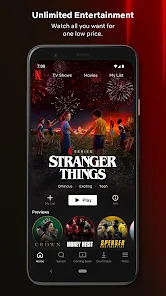
Netflix is a streaming service that I think most people have heard of by now. It's essentially a massive library of movies, TV shows, documentaries, and original content you can watch on demand. You download the app from the Google Play or App Store, install it, and then you're prompted to either start a free trial or log in if you already have an account. The first impression after launching it is pretty clean and polished—there's a dark background with bright thumbnails, and it immediately feels like you're stepping into a huge catalog of entertainment. It's free to download, but you do need a paid subscription to actually watch anything, and there are no in-app purchases for individual titles. The app has been installed over a billion times, so it's clearly a go-to for a lot of people.
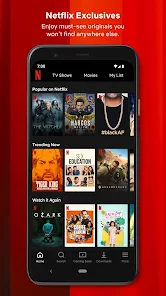
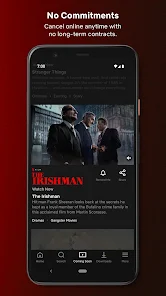
When you actually start using Netflix, the experience is generally smooth. After logging in, you're taken to the home screen, which is organized into rows like “Trending Now,” “Top Picks for You,” and “New Releases.” The interface is pretty intuitive—you just scroll horizontally through rows and tap on something that catches your eye. Tapping a title gives you a preview with a description, a trailer, and options to add it to your list or start watching. One thing I noticed is that the app remembers where you left off in a series, which is handy if you're binge-watching. Onboarding is minimal once you're set up, but if you're new, the app asks about your preferences to tailor recommendations. The search function works well, but sometimes finding older or niche titles can be a bit tedious since the algorithm pushes newer stuff. A small tip: using the download feature for offline viewing is great for commutes, but it only works on mobile or tablet, not on the web version.
After using Netflix for a while, I'd say it's a solid choice for anyone who enjoys watching a wide variety of content without ads. The original series like “Stranger Things” or “The Crown” are genuinely high-quality, and the recommendation engine does a decent job of keeping you hooked. However, if you're someone who prefers live TV or sports, this isn't the app for you. Compared to something like Hulu, Netflix has a broader international library but lacks the same day-after broadcast availability for current shows. What makes it stand out is the sheer volume of exclusive content and the ability to create multiple profiles for different family members. I've kept it installed for years, but I've sometimes considered uninstalling when the price goes up or when there's nothing new that grabs my interest. It's not perfect, but for pure on-demand streaming, it's hard to beat.
features
- 🎬 Personalized recommendations: Netflix uses a sophisticated algorithm to suggest shows based on what you've watched. Unlike Hulu, which often leans on trending or popular content, Netflix feels more tailored to your specific tastes, so you're less likely to scroll endlessly without finding something interesting.
- 🎬 Offline downloads: You can download movies and shows to watch without an internet connection, which is a lifesaver for flights or areas with spotty service. Competitors like Amazon Prime Video also offer this, but Netflix has a larger selection of downloadable titles, including most of its originals.
- 🎬 No ads: One of the biggest draws is that even on the basic plan, there are no commercial interruptions. Services like Peacock or Hulu's ad-supported tiers can be annoying with breaks, so Netflix keeps the experience seamless from start to finish.
pros
- 👍 Vast library of originals: Netflix invests heavily in original content, from dramas to documentaries, which you can't find anywhere else. HBO Max has great originals too, but Netflix's catalog is much larger and more diverse.
- 👍 User profiles: You can create up to five profiles per account, each with its own recommendations and watch history. This is more flexible than Disney+, which limits profiles and doesn't separate preferences as cleanly.
- 👍 Global accessibility: Netflix works in almost every country with localized content and subtitles. While Hulu is mostly US-only, Netflix's reach is truly international.
cons
- 👎 Content rotation: Titles leave the platform regularly, which can be frustrating if you're in the middle of a series. Amazon Prime Video tends to keep its library more stable, so you don't lose access as often.
- 👎 Price hikes: Netflix has increased subscription costs several times, making it pricier than competitors like Peacock or Paramount+. It feels like you're paying more for less sometimes.
- 👎 Limited live content: There's no live TV, sports, or news, unlike Hulu + Live TV or YouTube TV. If you want real-time programming, Netflix just doesn't fit the bill.
- 👎 Search functionality: Finding specific titles can be clunky, especially compared to Disney+, which has a more streamlined interface for browsing by franchise or genre.
Recommended Apps
![]()
16Personalities
16Personalities4
![]()
Zodiac Palm Reader: MagicWay
Reatility Media4.6
![]()
Moblo - 3D furniture modeling
MYTIforge4.1![]()
Magnifier Plus with Flashlight
Digitalchemy, LLC4.6![]()
QR Code Scanner
QR Code Scanner & Barcode Reader4.7![]()
FalFal: Astrology, Tarot, Love
FalFal Team4.8![]()
Christmas Photo Frames
PhotoFramesApps4.6![]()
AI Video Art Creator - Livensa
FERASET4.5![]()
Horoscope of Birth
Denimaks4.4![]()
Make Me Bald Prank
AppTornado2.5![]()
Kling AI: AI Image&Video Maker
Lohas Games Pte. Ltd.4.4![]()
Japan Timetable & Route Search
NAVITIME JAPAN CO., LTD.4.3![]()
Prank Call & Funny Video
TeH Software0![]()
Parallax 3D Live Wallpapers
TarrySoft4.3![]()
AI Chatbot - Nova
ScaleUp4.7















Disclaimer
1.AppInfoLibrary does not represent any developer, nor is it the developer of any App or game.
2.AppInfoLibrary provide custom reviews of Apps written by our own reviewers, and detailed information of these Apps, such as developer contacts, ratings and screenshots.
3.All trademarks, registered trademarks, product names and company names or logos appearing on the site are the property of their respective owners.
4. AppInfoLibrary abides by the federal Digital Millennium Copyright Act (DMCA) by responding to notices of alleged infringement that complies with the DMCA and other applicable laws.
5.If you are the owner or copyright representative and want to delete your information, please contact us info@appinfolibrary.com.
6.All the information on this website is strictly observed all the terms and conditions of Google Ads Advertising policies and Google Unwanted Software policy .














