

PlantSnap plant identification

10,000,000+
Installs
PlantSnap, Inc.
Developer
-
Education
Category
-
Rated for 3+
Content Rating
-
support@plantsnap.net
Developer Email
-
https://www.plantsnap.com/privacy-policy
Privacy Policy
Screenshots
editor reviews
I first downloaded PlantSnap because I kept walking past these wildflowers in my neighborhood and had no idea what they were called. It's one of those plant identification apps that uses your phone's camera to figure out what something is, and honestly, it felt like magic the first time I opened it. After installing it from the Google Play Store — it's free to download, though you'll bump into some in-app purchase prompts and ads if you want the full encyclopedia — you just point, snap, and wait a few seconds. The launch screen shows a nice little leaf animation, and then you're dropped straight into the camera view, which is pretty intuitive. There's no forced registration right away, which I appreciated, though you'll eventually need an account if you want to save your finds across devices. The install count is massive, something in the tens of millions, so clearly I wasn't the only one curious about the greenery around me.
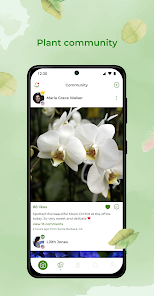
Once you start using it, the experience is mostly smooth but has a few quirks. You take a photo of a leaf, flower, or even a tree trunk, and the app processes it against its database. The interface is clean — a simple white background with a big green button for snapping. Onboarding just shows you a short tutorial about how to frame the shot, and then you're let loose. In everyday use, I'd walk around a park, snap a few things, and within maybe five seconds get a name and some basic info. Sometimes it would ask me to take another angle if the lighting was off or the leaf was too similar to another species, which felt helpful rather than frustrating. One practical tip I picked up: make sure the plant fills most of the frame, and avoid shadows. There's a little community feature where you can post photos for other users to ID if the app fails, which saved me a couple of times when it just couldn't decide between two lookalikes.
After a few weeks of regular use, I think PlantSnap is great if you're a casual nature lover or a parent trying to answer a kid's endless “what's that?” questions. But if you're a serious botanist, you might find the database a bit limited compared to something like iNaturalist, which has a more active community and richer ecological data. What keeps me from uninstalling it is how fast it is — I don't always want to wait for a human expert on iNaturalist, and PlantSnap gives me an answer instantly, even if it's not always 100% right. On the other hand, the ads pop up pretty often, and the free version only lets you save a limited number of plants before you hit a paywall. I've considered paying for the full version, but for now, it's good enough for quick IDs during weekend hikes. It's the kind of app that feels unnecessary until you suddenly need it, and then you're glad it's there.
features
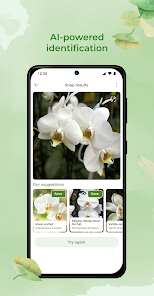
- 🖼️ Instant photo recognition is the core feature — just snap any leaf, flower, or bark, and PlantSnap returns a likely match within seconds. Unlike PictureThis, which sometimes feels slower and requires a clearer shot, PlantSnap handles slightly blurry images better, though it's not perfect.
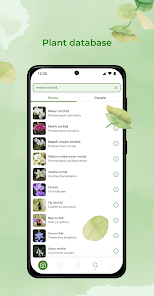
- 🌍 The database covers over 600,000 species globally, which is broader than iNaturalist‘s default search list. I've identified plants from trips to different climates without needing a separate guide, and it works offline too once you download a regional database.
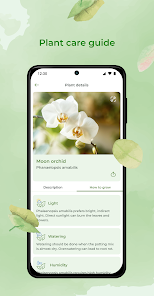
- 📚 A built-in plant encyclopedia gives you basic care tips, toxic warnings, and fun facts after each ID. It's not as detailed as a dedicated gardening app, but for quick curiosity, it beats digging through Wikipedia.
- 👥 The community feature lets you post unidentified plants for other users, similar to iNaturalist's expert ID system. It's less active, but responses come fast enough when the app's AI is stumped.
pros
- ⚡ Speed is PlantSnap's biggest strength — it identifies plants in 2-5 seconds, which is noticeably faster than iNaturalist's crowdsourced approach, where you might wait hours for a human ID. Perfect for impatient explorers.
- 📱 The offline mode is a lifesaver when hiking in areas without cell service. PictureThis requires an internet connection for every scan, so PlantSnap wins here if you spend time in remote spots.
- 🔍 The match confidence percentage shown after each ID gives you a sense of accuracy. It's not perfect, but seeing “95% match” helps me decide if I should double-check, something iNaturalist doesn't offer in the same way.
cons
- 📛 Accuracy can be hit or miss with common garden plants — I once scanned a dandelion and got “false sunflower,” which was annoying. iNaturalist's human checkers usually get these basics right, so PlantSnap feels less reliable for everyday finds.
- 💰 The free version is heavily ad-supported, and you only get a handful of free saves per day before it nags you to subscribe. PictureThis offers a more generous free tier with fewer interruptions.
- 🧠 The database leans toward North American and European species, so if you're in tropical regions, you'll encounter more “unknown” results. iNaturalist's global community fills those gaps much better.
- 🔐 Saving your identification history across multiple devices requires a paid account, which feels unnecessary — iNaturalist gives you full cloud sync for free.
Recommended Apps
![]()
16Personalities
16Personalities4
![]()
Zodiac Palm Reader: MagicWay
Reatility Media4.6
![]()
Moblo - 3D furniture modeling
MYTIforge4.1![]()
Magnifier Plus with Flashlight
Digitalchemy, LLC4.6![]()
QR Code Scanner
QR Code Scanner & Barcode Reader4.7![]()
FalFal: Astrology, Tarot, Love
FalFal Team4.8![]()
Christmas Photo Frames
PhotoFramesApps4.6![]()
AI Video Art Creator - Livensa
FERASET4.5![]()
Horoscope of Birth
Denimaks4.4![]()
Make Me Bald Prank
AppTornado2.5![]()
Kling AI: AI Image&Video Maker
Lohas Games Pte. Ltd.4.4![]()
Japan Timetable & Route Search
NAVITIME JAPAN CO., LTD.4.3![]()
Prank Call & Funny Video
TeH Software0![]()
Parallax 3D Live Wallpapers
TarrySoft4.3![]()
AI Chatbot - Nova
ScaleUp4.7















Disclaimer
1.AppInfoLibrary does not represent any developer, nor is it the developer of any App or game.
2.AppInfoLibrary provide custom reviews of Apps written by our own reviewers, and detailed information of these Apps, such as developer contacts, ratings and screenshots.
3.All trademarks, registered trademarks, product names and company names or logos appearing on the site are the property of their respective owners.
4. AppInfoLibrary abides by the federal Digital Millennium Copyright Act (DMCA) by responding to notices of alleged infringement that complies with the DMCA and other applicable laws.
5.If you are the owner or copyright representative and want to delete your information, please contact us info@appinfolibrary.com.
6.All the information on this website is strictly observed all the terms and conditions of Google Ads Advertising policies and Google Unwanted Software policy .














