

DoorDash - Food Delivery

50,000,000+
Installs
DoorDash
Developer
-
Food & Drink
Category
-
Rated for 3+
Content Rating
-
support@doordash.com
Developer Email
-
https://www.doordash.com/privacy/
Privacy Policy
Screenshots

editor reviews
DoorDash is a food delivery app that connects you with local restaurants and stores for on-demand delivery. It's probably one of the most popular apps in this space, right up there with Uber Eats and Grubhub. People mainly use it when they're craving something specific but don't feel like cooking or driving to pick it up. I downloaded it from the App Store because a friend sent me a promo code for free delivery. After launching it, the first impression was a bit overwhelming—there's a homepage packed with restaurant tiles, promotional banners, and a search bar at the top. It felt like a lot of visual noise at first, but the layout is familiar if you've used any other delivery app before. Registration requires an email or phone number, and you can log in with Google or Apple, which saved me some time. The app is free to download, though you'll quickly notice that Dasher tips and service fees add up fast.
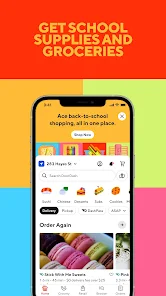
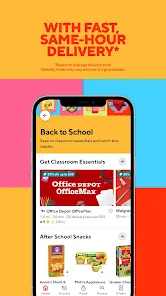
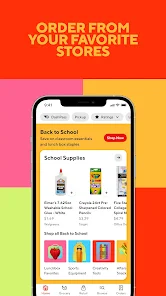
Actually using DoorDash for the first time was smoother than I expected. The onboarding asked for my delivery address and then immediately showed nearby restaurants, which was helpful. The interface is straightforward: you search for a cuisine or browse the categories like Pizza, Chinese, or Fast Food. Tapping a restaurant pulls up their menu with photos, prices, and estimated delivery times. One thing I appreciated was the “Pickup” option—sometimes I'd rather save on delivery fees and just grab it myself. The order flow is simple: add items to the cart, choose a Dasher tip (the default percentages feel high though), and place the order. Tracking the driver in real time was neat, but I noticed the estimated time often ran later than shown. A practical tip: filter by “DashPass” if you want to avoid paying delivery fees on every order, though that subscription costs money each month. The app asks for ratings after every delivery, which gets a bit repetitive after a while.
After a few weeks of testing, I'd say DoorDash is solid for convenience, but it's not for everyone. If you order takeout regularly and live in a city with lots of options, this app will save you a lot of hassle. But if you're on a budget, the fees pile up fast—service fees, delivery fees, and tips can easily double the menu price. What sets it apart from Uber Eats is that DoorDash often has more local mom-and-pop shops listed, not just chains. Still, I've had mixed experiences: some deliveries came hot and fast, while others arrived cold or missing items, and the refund process required chatting with support. Compared to Grubhub, DoorDash's Dasher tips seem more visible upfront, which feels fairer for drivers. I kept it installed because the DashPass trial made delivery free for a while, but I'll probably uninstall once that ends. It's a good app if you're flexible with wait times and willing to pay extra for the convenience.
features
- 🛵 You can track your Dasher on a live map after placing an order, which shows their location and estimated arrival time. Uber Eats has a similar feature, but DoorDash's map updates feel slightly more accurate in my experience.
- 🍕 DoorDash lists a wider variety of local restaurants compared to Grubhub, especially smaller shops that don't have their own delivery drivers. I've found some hidden gems I wouldn't have discovered otherwise.
- 🚗 The “Pickup” option lets you bypass delivery fees entirely by ordering ahead and grabbing the food yourself. This is nice when you're near a restaurant but still want the convenience of ordering through an app.
pros
- ⭐ DoorDash's restaurant selection often includes smaller, independent spots that aren't on Uber Eats or Grubhub, giving you more local variety.
- ⚡ The live tracking feature is more detailed than what Postmates used to offer, showing exactly where your driver is on the map.
- 💵 DashPass gives you free delivery on eligible orders, which is a similar perk to Uber One but can save money if you order frequently.
cons
- 💸 The fees are steep—service fees, delivery fees, and tips often make a $10 meal cost $18. Uber Eats has similar fees, but DoorDash's defaults feel more aggressive.
- 🐌 Delivery times can be unpredictable. I've had orders arrive 20 minutes late, while Uber Eats seems more consistent with timing in my area.
- 📱 The app sometimes freezes or crashes when switching between tabs, which is frustrating mid-order. Grubhub's app tends to be more stable on my phone.
Recommended Apps
![]()
16Personalities
16Personalities4
![]()
Zodiac Palm Reader: MagicWay
Reatility Media4.6
![]()
Moblo - 3D furniture modeling
MYTIforge4.1![]()
Magnifier Plus with Flashlight
Digitalchemy, LLC4.6![]()
QR Code Scanner
QR Code Scanner & Barcode Reader4.7![]()
FalFal: Astrology, Tarot, Love
FalFal Team4.8![]()
Christmas Photo Frames
PhotoFramesApps4.6![]()
AI Video Art Creator - Livensa
FERASET4.5![]()
Horoscope of Birth
Denimaks4.4![]()
Make Me Bald Prank
AppTornado2.5![]()
Kling AI: AI Image&Video Maker
Lohas Games Pte. Ltd.4.4![]()
Japan Timetable & Route Search
NAVITIME JAPAN CO., LTD.4.3![]()
Prank Call & Funny Video
TeH Software0![]()
Parallax 3D Live Wallpapers
TarrySoft4.3![]()
AI Chatbot - Nova
ScaleUp4.7















Disclaimer
1.AppInfoLibrary does not represent any developer, nor is it the developer of any App or game.
2.AppInfoLibrary provide custom reviews of Apps written by our own reviewers, and detailed information of these Apps, such as developer contacts, ratings and screenshots.
3.All trademarks, registered trademarks, product names and company names or logos appearing on the site are the property of their respective owners.
4. AppInfoLibrary abides by the federal Digital Millennium Copyright Act (DMCA) by responding to notices of alleged infringement that complies with the DMCA and other applicable laws.
5.If you are the owner or copyright representative and want to delete your information, please contact us info@appinfolibrary.com.
6.All the information on this website is strictly observed all the terms and conditions of Google Ads Advertising policies and Google Unwanted Software policy .














