

Bird — Ride Electric

10,000,000+
Installs
Bird Rides, Inc.
Developer
-
Travel & Local
Category
-
Rated for 3+
Content Rating
-
hello@bird.co
Developer Email
-
http://www.bird.co/privacy
Privacy Policy
Screenshots

editor reviews
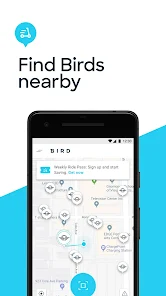
Bird — Ride Electric is a micromobility app that lets you find, unlock, and rent electric scooters and bikes for short trips around town. It's basically a ride-sharing service for two-wheelers, aimed at people who need a quick way to cover a mile or two without waiting for a bus or hailing a cab. Most users download it when they're in a city where Bird operates, often after seeing the scooters parked on sidewalks. The first thing you notice after launching the app is a map interface with available scooters scattered around, each with a battery indicator and a price estimate. There's no payment wall upfront—you can browse the map before signing up, which feels welcoming. Registration asks for a phone number, a payment method, and a quick driver's license scan to verify you can ride. It's free to download, but the rides themselves are pay-per-minute, with occasional promo codes for new users. In-app purchases are just for ride credit, and I haven't seen any ads interrupting the flow.
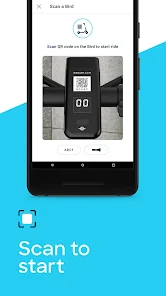
Once you create an account, the actual experience is straightforward. You tap a scooter on the map, hold your phone near the QR code on the handlebars to scan it, and the scooter unlocks with a beep. The interface is clean—big buttons for “Ride,” “Park,” and “End Trip,” with a speed indicator and a map showing your route. The onboarding walks you through safety tips, like wearing a helmet and not riding on the street in some areas, which is decent for first-timers. When I used it in downtown Austin, I noticed the scooters have a bit of a learning curve: the accelerator is a thumb trigger on the right handle, and the brake is on the left, so it takes a minute to get used to. A small trick is to double-check the battery level before unlocking—anything under 30% might leave you pushing a heavy scooter uphill. The ride itself is smooth on pavement but bumpy on cobblestone, and the app tracks your trip in real time, showing the cost accumulating by the second. Ending the ride requires you to snap a photo of the scooter parked upright, which prevents clutter but feels a bit tedious when you're in a hurry.
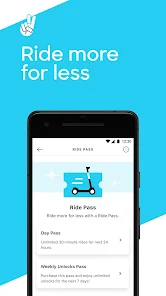
After a few weeks of using Bird here and there, I think it's a solid option for urban explorers who don't own a bike or car. It shines for those last-mile commutes—say from a train station to your office—but it's not fantastic if you expect to go long distances or ride in bad weather. Compared to Lime or Spin, Bird's scooters feel slightly heavier and more stable, which I prefer on uneven roads, but the unlock fee can be a bit annoying if you only need a two-minute ride. The app has a “reserve” feature that holds a scooter for 10 minutes, which saved me once when I saw a scooter across the street but had to cross a busy intersection. I'd keep it installed because it's handy in a pinch, but I could see someone uninstalling it if their city has a better public transit network or cheaper bike-sharing program. It's not a perfect system—pricing adds up fast—but for spontaneous trips, it beats walking.
features
- 🚲 Real-time scooter location map – Bird's map updates every few seconds and shows nearby scooters with battery levels and pricing, which is more granular than Lime's static station-based pins. You can zoom into street level and see exactly where each scooter is parked, so you don't walk in circles.
- 🔋 Battery health indicator – Each scooter's battery percentage is displayed before you ride, as well as a rough range estimate (like “6 miles left”). This is more honest than Uber's Jump bikes, which only show a vague green-yellow-red icon without specifics.
- 📱 QR code unlock – No need to pair via Bluetooth, just scan and go. This is faster than Spin's manual code-entry system, which requires typing a 4-digit number that's sometimes worn off the scooter's sticker.
- 🅿️ Parking photo confirmation – After you end your ride, you take a photo of the scooter parked properly, which helps prevent sidewalk chaos. This is more structured than Lime's trust-based system, where you just tap “end trip” and hope the next user finds it upright.
pros
- 🌟 Stable ride quality – Bird's scooters have wider tires and a lower center of gravity than Lime's, making them feel less wobbly on cracked pavement. I've taken them on slightly gravelly paths without feeling like I'd wipe out.
- 🌟 Consistent pricing model – No surge pricing spikes like Uber's e-bikes during peak hours; Bird charges a flat per-minute rate plus a small unlock fee, so you know exactly what you're paying ahead of time.
- 🌟 Good battery range – Most Bird scooters start at 80-100% charge, even during busy weekends, while I've grabbed Lime scooters at 50% that died after three blocks. This reliability is a big plus if you plan a longer trip.
- 🌟 User-friendly app design – The interface is simple and uncluttered, with big buttons and clear icons, unlike Spin's app that buries the “end ride” button behind a menu. Even a first-time user can figure it out in seconds.
cons
- ⚠️ High unlock fee – Bird charges a $1 unlock fee on top of the per-minute rate, which adds up quickly for very short trips. Lime only charges per minute with no unlock fee, making it cheaper for sub-5-minute rides.
- ⚠️ Limited service area – Outside major downtown corridors, Bird's coverage drops off sharply, and the app warns you when you're leaving the zone. Spin has broader suburban coverage in some cities, so you can actually ride to a friend's house without getting stranded.
- ⚠️ Slight learning curve for new riders – The thumb accelerator and brake placement take getting used to, especially if you're used to hand-grip controls on Lime scooters. I nearly crashed on my first ride because I braked with my left hand out of habit.
- ⚠️ Parking photo requirement – It forces you to hold your phone steady and snap a clear picture, which is annoying if you're in a rush or it's raining. Lime just asks you to confirm you parked okay without evidence, which is faster.
Recommended Apps
![]()
16Personalities
16Personalities4
![]()
Zodiac Palm Reader: MagicWay
Reatility Media4.6
![]()
Moblo - 3D furniture modeling
MYTIforge4.1![]()
Magnifier Plus with Flashlight
Digitalchemy, LLC4.6![]()
QR Code Scanner
QR Code Scanner & Barcode Reader4.7![]()
FalFal: Astrology, Tarot, Love
FalFal Team4.8![]()
Christmas Photo Frames
PhotoFramesApps4.6![]()
AI Video Art Creator - Livensa
FERASET4.5![]()
Horoscope of Birth
Denimaks4.4![]()
Make Me Bald Prank
AppTornado2.5![]()
Kling AI: AI Image&Video Maker
Lohas Games Pte. Ltd.4.4![]()
Japan Timetable & Route Search
NAVITIME JAPAN CO., LTD.4.3![]()
Prank Call & Funny Video
TeH Software0![]()
Parallax 3D Live Wallpapers
TarrySoft4.3![]()
AI Chatbot - Nova
ScaleUp4.7















Disclaimer
1.AppInfoLibrary does not represent any developer, nor is it the developer of any App or game.
2.AppInfoLibrary provide custom reviews of Apps written by our own reviewers, and detailed information of these Apps, such as developer contacts, ratings and screenshots.
3.All trademarks, registered trademarks, product names and company names or logos appearing on the site are the property of their respective owners.
4. AppInfoLibrary abides by the federal Digital Millennium Copyright Act (DMCA) by responding to notices of alleged infringement that complies with the DMCA and other applicable laws.
5.If you are the owner or copyright representative and want to delete your information, please contact us info@appinfolibrary.com.
6.All the information on this website is strictly observed all the terms and conditions of Google Ads Advertising policies and Google Unwanted Software policy .














