
Gmail

10,000,000,000+
Installs
Google LLC
Developer
-
Social
Category
-
Rated for 3+
Content Rating
-
apps-help@google.com
Developer Email
-
http://www.google.com/policies/privacy
Privacy Policy
Screenshots
editor reviews
You probably already know Gmail if you have a smartphone. It's the email client developed by Google, and it comes pre-installed on almost every Android phone sold globally. For many people, it's the first thing they set up after pulling a new device out of the box. You use it to send, receive, and organize emails, but it also does a lot more than that these days. Even though it's a free download on both Google Play and the App Store, you'd be hard-pressed to find a phone without it already there — install counts are in the billions. When you first open it, the interface feels clean and familiar, almost boring in a comforting way. You sign in with your Google account, and within seconds, your inbox shows up. There's no fanfare, no fancy tutorial — just your emails waiting for you.
After you start using it, the experience is mostly smooth. The onboarding process is nonexistent because Google assumes you already know what email is. The main screen shows your inbox with a search bar at the top and a floating compose button at the bottom. Tapping the compose button opens a new message window where you enter the recipient, subject, and body. Swiping left or right on an email archives or deletes it, which I find quicker than digging through menus. Categories like Primary, Social, and Promotions help sort incoming mail automatically, though sometimes a coupon from a store ends up in Primary when it should be in Promotions. One small tip: if long-press an email, you can select multiple messages to batch archive or delete. The search function is surprisingly powerful — you can find an email from years ago just by typing a few words from the message.
After sticking with Gmail for a while, I have mixed feelings. If you're already in the Google ecosystem — using Google Calendar, Drive, or Photos — it's incredibly convenient because everything links together. People who send lots of attachments will appreciate the 15GB of free storage shared across Google services. On the other hand, privacy-conscious folks might hate how Google scans your emails to serve ads, even though they say they stopped doing that for targeted ads. Compared to something like Apple's Mail app, Gmail feels more feature-rich but also more cluttered with all the tabs and settings. I keep it installed because switching feels like a hassle, but I have friends who ditched it for ProtonMail just to get away from Google's tracking. It's a solid workhorse, not a flashy novelty.
features
- 📧 Smart Reply and Smart Compose save you time by suggesting quick responses or finishing your sentences as you type. Outlook has a similar feature, but Gmail's feels more natural and learns your tone over time.
- 📧 Labels instead of folders let you tag a single email with multiple categories, making it easy to find later. Apple Mail still uses traditional folders, where an email can only live in one place at a time.
- 📧 Search operators like “from:” or “has:attachment” let you pinpoint old emails fast. Microsoft Outlook has search filters too, but Gmail's syntax is cleaner if you know a few shortcuts.
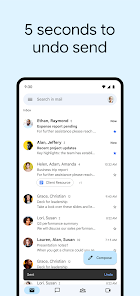
- 📧 Undo Send gives you a few seconds to recall a message after hitting send. This is a lifesaver when you realize you forgot an attachment or addressed the wrong person, and it works more reliably than Outlook's delayed delivery.
pros
- 👍 Free storage is generous — 15GB shared across Gmail, Drive, and Photos, which beats Apple's stingy 5GB and Yahoo Mail's similar offering.
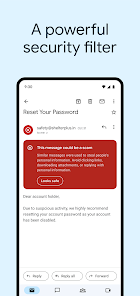
- 👍 Spam filtering is top-notch. I rarely see junk in my inbox compared to Outlook, which sometimes lets obvious spam through.
- 👍 Integration with Google Workspace means you can schedule events or open Docs directly from your email, something that feels messy with third-party clients like Spark.
- 👍 The mobile app is lightweight and loads quickly, even on older phones, unlike the bloated Yahoo Mail app that can lag.
cons
- 👎 Privacy concerns are real — Google scans email content for data mining, while ProtonMail encrypts everything end-to-end so even they can't read it.
- 👎 Search can be frustrating when you don't remember the exact words; sometimes it misses emails that Outlook finds easily due to different indexing logic.
- 👎 The interface feels cluttered with tabs, ads in the Promotions tab, and sidebars that you can't fully hide, whereas Apple Mail keeps things minimal.
- 👎 Offline mode is clunky on mobile compared to Outlook, which syncs recent emails better when you have no signal.
Recommended Apps
![]()
16Personalities
16Personalities4
![]()
Zodiac Palm Reader: MagicWay
Reatility Media4.6
![]()
Moblo - 3D furniture modeling
MYTIforge4.1![]()
Magnifier Plus with Flashlight
Digitalchemy, LLC4.6![]()
QR Code Scanner
QR Code Scanner & Barcode Reader4.7![]()
FalFal: Astrology, Tarot, Love
FalFal Team4.8![]()
Christmas Photo Frames
PhotoFramesApps4.6![]()
AI Video Art Creator - Livensa
FERASET4.5![]()
Horoscope of Birth
Denimaks4.4![]()
Make Me Bald Prank
AppTornado2.5![]()
Kling AI: AI Image&Video Maker
Lohas Games Pte. Ltd.4.4![]()
Japan Timetable & Route Search
NAVITIME JAPAN CO., LTD.4.3![]()
Prank Call & Funny Video
TeH Software0![]()
Parallax 3D Live Wallpapers
TarrySoft4.3![]()
AI Chatbot - Nova
ScaleUp4.7















Disclaimer
1.AppInfoLibrary does not represent any developer, nor is it the developer of any App or game.
2.AppInfoLibrary provide custom reviews of Apps written by our own reviewers, and detailed information of these Apps, such as developer contacts, ratings and screenshots.
3.All trademarks, registered trademarks, product names and company names or logos appearing on the site are the property of their respective owners.
4. AppInfoLibrary abides by the federal Digital Millennium Copyright Act (DMCA) by responding to notices of alleged infringement that complies with the DMCA and other applicable laws.
5.If you are the owner or copyright representative and want to delete your information, please contact us info@appinfolibrary.com.
6.All the information on this website is strictly observed all the terms and conditions of Google Ads Advertising policies and Google Unwanted Software policy .














