

Ticketmaster AU Event Tickets

500,000+
Installs
Ticketmaster L.L.C.
Developer
-
Entertainment
Category
-
Rated for 3+
Content Rating
-
app@ticketmaster.com.au
Developer Email
-
https://www.ticketmaster.com.au/privacy
Privacy Policy
Screenshots
editor reviews
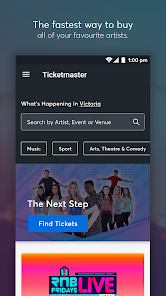
Ticketmaster AU Event Tickets is the official mobile entry point for anyone looking to snag a spot at concerts, sports matches, or theater performances across Australia and New Zealand. As a native ticketing app, it basically takes the full Ticketmaster website and shrinks it into a pocket-sized tool. Most people end up downloading it out of panic—when a hot sale is about to start, or when they realize their printed ticket is buried somewhere at home. First impression after launching? Slightly overwhelming. The home screen throws a ton of upcoming events at you, sorted by city and genre, but it does give you a clear search bar and a countdown timer for upcoming onsales. It's free to download from Google Play or the App Store, with loads of installs pushing into the tens of millions globally. No forced registration to browse, but you'll need an account to actually buy or transfer tickets. In-app purchases? That's pretty much the whole point—tickets themselves. Ads are thankfully absent, though you do get hit with service fees during checkout, which is more of a pricing thing than an ad.
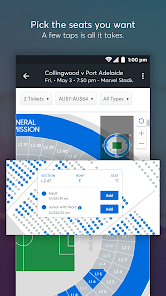
Once you start using it, the experience is a mixed bag. The interface follows a clean, modern design with big event cards, clear pricing, and a seating map that actually zooms in without lagging. Onboarding is minimal—you search for an event, pick your seat, and checkout. The smoothest part is ticket transfer; you can send a ticket to a friend by just typing their email, which saves the hassle of meeting at the gate. But the real moment of truth is during a high-demand sale. The app puts you in a waiting room, then a queue, and you watch a progress bar crawl. Sometimes you get in quickly; sometimes it kicks you back. One practical tip: enable notifications for your favorite artists, because presale codes pop up there first. The app also stores your payment details securely, so checkout is faster next time. Navigation between tabs like "My Events" and "Explore" feels buttery smooth, but loading the full event list can stutter if your signal's weak.
After a few months of using it for gigs and footy games, I think it's a necessary evil. For people who regularly buy big-event tickets—like Taylor Swift fans or AFL season-ticket holders—this app is almost essential because it's the official source, and third-party sites usually charge more. Casual users might find it annoying, especially if they only buy tickets once a year; the forced account creation and queue system feel like extra hurdles. Compared to something like Eventbrite, which is more for smaller local shows, Ticketmaster handles massive scale better but feels less personal. The real standout is the ticket resale feature built right into the app—you can resell legitimately without worrying about scams. That's why I keep it installed; it's the only way to get into major events without risking fake tickets.
features
- 🚀 The app's queue system is its most defining feature. During high-demand sales like Taylor Swift or Ed Sheeran, the waiting room gives you a fair shot instead of a free-for-all. That's a big step up from sites like Eventbrite, which just crashes when traffic spikes. Here, the queue moves predictably, and you can see your position updating in real time.
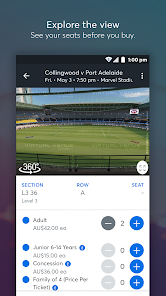
- 🚀 Interactive seating maps are a huge plus. You can zoom into a floor plan and tap individual sections to see seat views and prices. Competitors like Live Nation or AXS offer similar maps, but Ticketmaster's often includes real photos from specific rows, so you know exactly what you're buying.
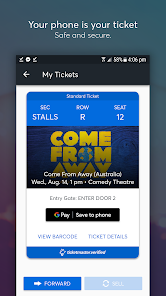
- 🚀 Ticket transfer and resale are built right in. You can send a ticket to a friend via email or text without printing anything, which beats StubHub's more cumbersome verification process. Reselling is also straightforward—set your price, and the app handles the transfer automatically when sold, no need to meet strangers.
pros
- ✅ Official source for major events—unlike Viagogo or Tixel, you're guaranteed the ticket is real and not a duplicate. That peace of mind is worth the fees.
- ✅ The app remembers your payment and delivery preferences, so repeat buying is fast. Eventbrite makes you re-enter details every time.
- ✅ Push notifications for presales and resales are timely; I've snagged last-minute tickets this way while other apps like SeatGeek were still loading.
cons
- ❌ Service fees are notoriously high and not transparent until checkout, making a $100 ticket cost $130. On Tixel, fees are usually lower and shown upfront.
- ❌ The queue doesn't save your spot if you get a network error—you're sent to the back. Eventbrite does a better job holding your position.
- ❌ No offline mode. If you're at a stadium with spotty reception, you can't load your ticket. Other apps like AXS let you add tickets to your phone wallet for offline use.
Recommended Apps
![]()
16Personalities
16Personalities4
![]()
Zodiac Palm Reader: MagicWay
Reatility Media4.6
![]()
Moblo - 3D furniture modeling
MYTIforge4.1![]()
Magnifier Plus with Flashlight
Digitalchemy, LLC4.6![]()
QR Code Scanner
QR Code Scanner & Barcode Reader4.7![]()
FalFal: Astrology, Tarot, Love
FalFal Team4.8![]()
Christmas Photo Frames
PhotoFramesApps4.6![]()
AI Video Art Creator - Livensa
FERASET4.5![]()
Horoscope of Birth
Denimaks4.4![]()
Make Me Bald Prank
AppTornado2.5![]()
Kling AI: AI Image&Video Maker
Lohas Games Pte. Ltd.4.4![]()
Japan Timetable & Route Search
NAVITIME JAPAN CO., LTD.4.3![]()
Prank Call & Funny Video
TeH Software0![]()
Parallax 3D Live Wallpapers
TarrySoft4.3![]()
AI Chatbot - Nova
ScaleUp4.7















Disclaimer
1.AppInfoLibrary does not represent any developer, nor is it the developer of any App or game.
2.AppInfoLibrary provide custom reviews of Apps written by our own reviewers, and detailed information of these Apps, such as developer contacts, ratings and screenshots.
3.All trademarks, registered trademarks, product names and company names or logos appearing on the site are the property of their respective owners.
4. AppInfoLibrary abides by the federal Digital Millennium Copyright Act (DMCA) by responding to notices of alleged infringement that complies with the DMCA and other applicable laws.
5.If you are the owner or copyright representative and want to delete your information, please contact us info@appinfolibrary.com.
6.All the information on this website is strictly observed all the terms and conditions of Google Ads Advertising policies and Google Unwanted Software policy .














