

Healthy Benefits+

1,000,000+
Installs
Solutran, Inc.
Developer
-
Health & Fitness
Category
-
Rated for 3+
Content Rating
-
support@healthybenefitsplus.com
Developer Email
-
https://healthybenefitsplus.com/base/Home/PrivacyPolicy
Privacy Policy
Screenshots
editor reviews
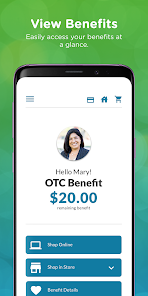
Healthy Benefits+ is essentially a digital wallet and benefits administration app, specifically designed for people enrolled in certain employer-sponsored or government-funded health plans, like those offering a Health Reimbursement Arrangement (HRA) or a Flexible Spending Account (FSA). You use it to manage those pre-tax benefit dollars without having to handle paper claims or keep track of a million receipts. For someone who just got a new benefits card in the mail, the first step is usually downloading it from the Google Play or App Store—it's a free install, but you'll need to log in using member ID info from your employer's benefits portal. That initial login can feel a bit corporate, but once you're in, seeing your available balance front and center gives you a clear sense of control over your health spending.
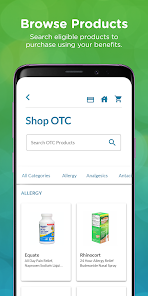
After you get past that login screen, the actual experience is pretty straightforward. The main dashboard shows your account balance, recent transactions, and a few quick-action buttons for common tasks like checking eligibility or paying a provider. Onboarding is minimal—there's no tutorial, which is fine because the layout is intuitive. Most users will move through the app by first linking a payment method, then browsing the "Pay a Provider" feature when they need to use their funds for a copay or a prescription. One smooth moment is snapping a photo of a receipt for reimbursement; it feels almost instant. On the flip side, the search function for eligible expenses can be a bit finicky if you type in a specific brand name. A practical tip: always double-check the "Eligibility Check" before you buy something over-the-counter to avoid a rejected claim later.
After using it for a few months, I can see why it sticks around for some people and gets deleted by others. It's a solid tool for anyone who gets a benefits card from a big employer or a state health plan and hates dealing with paper forms. But if your employer uses a different benefits administrator or if you only have simple health coverage, you might not even need the app. Compared to something like HealthEquity's app, Healthy Benefits+ feels more streamlined and less cluttered, but it lacks the investment features you'd see in a HSA-focused app. I'd keep it installed if my plan required active benefit usage, but if my account was only used for annual eye exams, I'd probably uninstall it after that one trip.
features
- 💰 One standout feature is the real-time eligibility checker that lets you scan a product's barcode at the store to see if it's covered before you buy—something apps like Fidelity's HSA or Optum Bank don't offer in such a direct way.
- 📸 The photo-based receipt submission for claims is incredibly fast compared to manually typing out amounts and dates in a form, which you'd have to do in many traditional benefits portals.
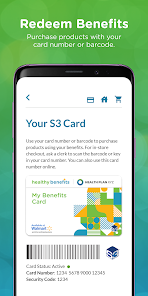
- 🛒 The "Pay a Provider" function works like a virtual debit card, so you can instantly pay medical bills directly from the app without waiting for reimbursement checks or manual transfers.
- 🔍 Searchable transaction history with filters lets you sort by date or merchant, making tax season or annual benefit reviews way less stressful than digging through old paper statements.
pros
- + It's entirely free, with no monthly fees or hidden charges, unlike some HSA management tools that nickel-and-dime you for basic account access.
- + The UI is genuinely simple—no unnecessary tabs or confusing jargon—which makes it easier for less tech-savvy users compared to the cluttered interface of WageWorks' app.
- + Customer support response times are surprisingly quick via in-app chat, a big step up from the long hold times you'd get calling Aetna or Cigna directly.
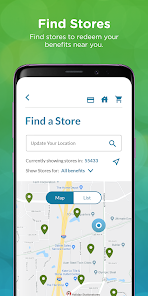
- + The integration with major pharmacy chains and dental providers is better than what I've seen in similar apps like HealthSaver, reducing surprise claim denials.
cons
- – It only works with specific employer plans, so if you switch jobs and lose eligibility, the app becomes useless and you have to delete it—unlike a general health tracker app like MyChart that works across systems.
- – No investment options at all, which is a major downside compared to HSA apps like Lively or Fidelity that let you grow unused funds in ETFs or mutual funds.
- – The login process can be frustrating if your employer changes their benefits portal URL, requiring you to re-login from scratch, unlike a more stable account system in SimpleBenefits+.
- – The app doesn't sync with popular fitness trackers or health records, so you can't use it as a central health hub the way you can with Apple Health or Google Fit integrations.
Recommended Apps
![]()
16Personalities
16Personalities4
![]()
Zodiac Palm Reader: MagicWay
Reatility Media4.6
![]()
Moblo - 3D furniture modeling
MYTIforge4.1![]()
Magnifier Plus with Flashlight
Digitalchemy, LLC4.6![]()
QR Code Scanner
QR Code Scanner & Barcode Reader4.7![]()
FalFal: Astrology, Tarot, Love
FalFal Team4.8![]()
Christmas Photo Frames
PhotoFramesApps4.6![]()
AI Video Art Creator - Livensa
FERASET4.5![]()
Horoscope of Birth
Denimaks4.4![]()
Make Me Bald Prank
AppTornado2.5![]()
Kling AI: AI Image&Video Maker
Lohas Games Pte. Ltd.4.4![]()
Japan Timetable & Route Search
NAVITIME JAPAN CO., LTD.4.3![]()
Prank Call & Funny Video
TeH Software0![]()
Parallax 3D Live Wallpapers
TarrySoft4.3![]()
AI Chatbot - Nova
ScaleUp4.7















Disclaimer
1.AppInfoLibrary does not represent any developer, nor is it the developer of any App or game.
2.AppInfoLibrary provide custom reviews of Apps written by our own reviewers, and detailed information of these Apps, such as developer contacts, ratings and screenshots.
3.All trademarks, registered trademarks, product names and company names or logos appearing on the site are the property of their respective owners.
4. AppInfoLibrary abides by the federal Digital Millennium Copyright Act (DMCA) by responding to notices of alleged infringement that complies with the DMCA and other applicable laws.
5.If you are the owner or copyright representative and want to delete your information, please contact us info@appinfolibrary.com.
6.All the information on this website is strictly observed all the terms and conditions of Google Ads Advertising policies and Google Unwanted Software policy .














