

CapCut - Video Editor

1B+
Installs
Bytedance Pte. Ltd.
Developer
-
Video Players & Editors
Category
-
Teen
Content Rating
-
capcut.support@bytedance.com
Developer Email
-
https://sf16-draftcdn-sg.ibytedtos.com/obj/ies-hotsoon-draft-sg/capcut/via_clause_privacy_policy_en.html
Privacy Policy
Screenshots
editor reviews
CapCut is a free video editing app developed by Bytedance, the same company behind TikTok. It's a mobile-first editing tool designed for anyone who wants to quickly trim clips, add effects, or stitch together short videos for social media. With over a billion downloads on the Google Play Store alone, it's clearly hit a nerve. Most people probably install it because they've seen slick transitions on TikTok or Instagram and want to recreate that look without paying for a subscription. The first time you open the app, the layout feels surprisingly clean and unintimidating for something this powerful. There's no forced sign-up right away, and you can jump straight into a project, which is a huge relief when you just want to test the waters.
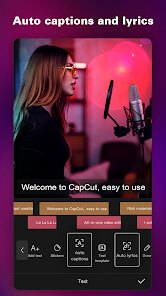
Using CapCut feels more like playing than working. You tap "New Project," pick some clips from your gallery, and the real fun starts. The timeline at the bottom looks simple, but it's packed with tools that are easy to find. Want to split a clip or adjust speed? Just a few taps. The real standout is the auto-captions feature, which is shockingly accurate and lets you pick from multiple subtitle styles. Transitions and effects are organized well, and you can preview them instantly. One minor annoyance is that the export time can drag if your video is long, but the free 4K export option more than makes up for it. I also appreciated that most tutorials are built right in, so you're not stuck guessing how to do basic edits.
After a few weeks of regular use, CapCut feels like the best option for someone who wants high-quality results without a learning curve. It's different from apps like InShot because it offers more sophisticated effects, but it doesn't push you to upgrade as aggressively as some others. I think casual creators, vloggers, and social media managers will love it. But if you need multi-cam editing or advanced color grading, you'll hit a wall fast. I keep it installed because it's perfect for quick, fun edits, and the fact that most features are genuinely free makes it hard to justify uninstalling. It's not perfect, but for most people, it gets the job done without the headache.
features
- 🎬 Auto-captions and text-to-speech: CapCut's auto-caption feature is incredibly accurate and supports multiple languages, which is far ahead of what you get in InShot. You can also generate voiceovers from text with natural-sounding voices, making it perfect for quick explainers or story videos without recording your own audio.
- 🎬 Advanced keyframe animation: Unlike many free editors, CapCut lets you set keyframes for position, scale, rotation, and opacity. This gives you precise control over motion effects and animations, something usually locked behind premium subscriptions in apps like Kinemaster or PowerDirector.
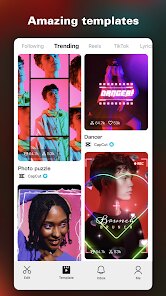
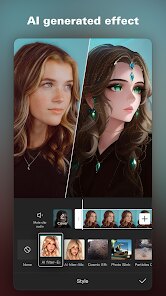
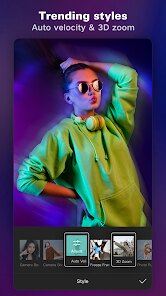
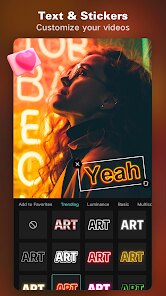
- 🎬 Vast effects library with trends: The app comes with hundreds of transitions, filters, and stickers, many of which are updated weekly based on trending social media styles. You can literally clone the latest TikTok edit trend in minutes, which is something Adobe Premiere Rush or iMovie just can't match for speed.
- 🎬 Built-in editing tutorials and templates: CapCut includes a "Templates" tab where you can paste your clips and instantly get a polished result. Combined with step-by-step tutorials inside the app, this makes it much more beginner-friendly than DaVinci Resolve or even LumaFusion, which require external learning resources.
pros
- ✅ Absolutely free core experience: Unlike InShot, which locks basic exports and effects behind a paywall, CapCut lets you export in 4K at 60fps without a watermark or subscription. That's a huge win for budget-conscious creators who don't want to pay monthly fees.
- ✅ Seamless TikTok integration: Since it's made by the same company as TikTok, you can directly share edits to your TikTok account with optimal settings. You also get access to trending sounds and effects that are already edited for specific video lengths, saving you time compared to using separate apps.
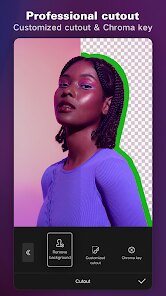
- ✅ Easy-to-use interface with pro-level features: CapCut manages to include features like chroma key, speed curves, and beat detection without overwhelming beginners. In contrast, PowerDirector often buries these tools in confusing menus, and Kinemaster requires a learning curve to access the same functionality.
cons
- ❌ Occasional export failures and crashes: On older devices, CapCut tends to crash during heavy edits or long exports. InShot is more stable in my experience, especially when handling 4K clips. Losing work due to a crash can be really frustrating when you're almost done.
- ❌ Limited advanced audio editing: The app's audio tools are basic compared to Kinemaster or PowerDirector. You can't do multi-track audio mixing, apply noise reduction, or adjust individual channel levels. If your project relies heavily on clean sound, you'll need another app.
- ❌ Aggressive feature removal: Bytedance has been known to remove popular features without warning, like the "Remove Background" tool that disappeared after a few updates. This unpredictability is annoying because you might rely on a feature and suddenly lose it, which doesn't happen as much with Adobe Premiere Rush.
Recommended Apps
![]()
16Personalities
16Personalities4
![]()
Zodiac Palm Reader: MagicWay
Reatility Media4.6
![]()
Moblo - 3D furniture modeling
MYTIforge4.1![]()
Magnifier Plus with Flashlight
Digitalchemy, LLC4.6![]()
QR Code Scanner
QR Code Scanner & Barcode Reader4.7![]()
FalFal: Astrology, Tarot, Love
FalFal Team4.8![]()
Christmas Photo Frames
PhotoFramesApps4.6![]()
AI Video Art Creator - Livensa
FERASET4.5![]()
Horoscope of Birth
Denimaks4.4![]()
Make Me Bald Prank
AppTornado2.5![]()
Kling AI: AI Image&Video Maker
Lohas Games Pte. Ltd.4.4![]()
Japan Timetable & Route Search
NAVITIME JAPAN CO., LTD.4.3![]()
Prank Call & Funny Video
TeH Software0![]()
Parallax 3D Live Wallpapers
TarrySoft4.3![]()
AI Chatbot - Nova
ScaleUp4.7















Disclaimer
1.AppInfoLibrary does not represent any developer, nor is it the developer of any App or game.
2.AppInfoLibrary provide custom reviews of Apps written by our own reviewers, and detailed information of these Apps, such as developer contacts, ratings and screenshots.
3.All trademarks, registered trademarks, product names and company names or logos appearing on the site are the property of their respective owners.
4. AppInfoLibrary abides by the federal Digital Millennium Copyright Act (DMCA) by responding to notices of alleged infringement that complies with the DMCA and other applicable laws.
5.If you are the owner or copyright representative and want to delete your information, please contact us info@appinfolibrary.com.
6.All the information on this website is strictly observed all the terms and conditions of Google Ads Advertising policies and Google Unwanted Software policy .














