

Blink Home Monitor

5,000,000+
Installs
Immedia Semiconductor
Developer
-
Productivity
Category
-
Rated for 3+
Content Rating
-
android@blinkforhome.com
Developer Email
-
https://apphelp.immedia-semi.com/en/privacy_policy.html
Privacy Policy
Screenshots
editor reviews
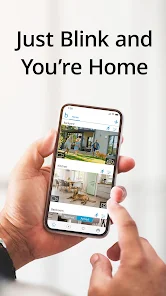
Blink Home Monitor is a security camera app that turns your phone into a tiny home surveillance system. It belongs to the smart home and security category, and you mainly use it to check live feeds from Blink cameras, get motion alerts, record clips, and arm or disarm your system from anywhere. I first heard about it because of its low cost and the lack of monthly fees for basic features, which made me curious. After downloading it from the Google Play store and launching the app, I was honestly surprised by how straightforward the setup was. The app has over a million installs and is free to download, though you do need a Blink camera to actually use it. No mandatory subscription is required to store basic clips, which is a huge plus for people like me who hate recurring fees. The first impression after signing up was a clean, slightly bare interface with a focus on simplicity. It didn't feel cluttered or overwhelming, which was refreshing.
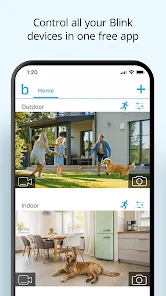
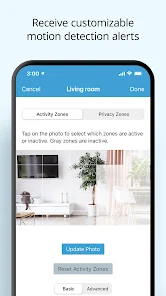
Once I actually started using it during a typical week, I found the experience pretty smooth overall. After pairing a couple of cameras through the app's onboarding wizard, which only took a few minutes, I was able to see live views with a tap. The main screen shows each camera's thumbnail, and tapping one opens a live stream that's usually crisp on Wi-Fi. A small hiccup happened when switching to cellular data; the stream lagged for a couple of seconds, but it recovered quickly. The motion detection feature is where the app shines. You can adjust sensitivity per camera, set specific zones to ignore the neighbor's cat, and choose between armed and disarmed modes manually or on a schedule. I also noticed that clip recordings save to the cloud for free, but only for the first hour of activity each cycle, which feels a bit stingy. One frustration I had was that finding the option to delete old clips isn't as obvious as it should be; it's buried under settings, not on the clip viewer itself.
After a couple of months of daily use, I'd say this app is a solid fit for people who want basic, affordable home monitoring without a lot of complexity. It's ideal for someone living in an apartment or a small house who just wants to check on a front door or a pet when they're away. But if you need advanced analytics like facial recognition or multi-camera sync across several properties, you'd probably be better off with something like Ring or Arlo. What sets Blink apart is its low battery consumption and the absence of a forced cloud subscription, which Ring eventually nudges you toward. I keep it installed because it's simple and the notifications are reliable, but I can see myself uninstalling it if I ever wanted more granular control or live two-way talk without delays. For the price point and the peace of mind, though, it earns its spot on my home screen.
features
- 📹 Local and Free Cloud Storage: Blink cameras can store clips locally on a USB drive via the Sync Module 2, which is a rarity. Most rivals like Ring require a paid plan for saving videos longer than a few hours. This gives you control without monthly bills.
- ⚡ Long Battery Life: Unlike Arlo Pro cameras that need charging every few months, Blink cameras can last up to two years on a pair of AA lithium batteries. This means less climbing up ladders and more hassle-free monitoring.
- 🔔 Customizable Motion Zones: You can draw specific areas within the camera's view to ignore or focus on. For example, I blacked out a swaying tree that kept triggering alerts. Ring offers this only on higher-end models, making Blink more accessible for basic homes.
pros
- 💰 No Subscription Dependency: Blink's free cloud storage for clips up to an hour a day is generous compared to Wyze's limited free tier and Ring's reliance on a paid plan for any history. It saves me real money every year.
- 🔋 Exceptional Energy Efficiency: The two-year battery life on alkaline cells beats Nest's wired-only requirement and Arlo's 3–6 month recharge cycles. I don't have to worry about running out of juice during a vacation.
- 🚪 Compact and Mount-Friendly Design: Blink cameras are small and discreet, which is easier to hide or mount than bulkier models from Eufy. They stick to walls with magnetic mounts, making repositioning effortless.
cons
- ⏳ Delayed Live Stream: The live feed often takes 5–8 seconds to load compared to Ring's nearly instant connection. This makes it less useful for checking real-time events like a delivery person.
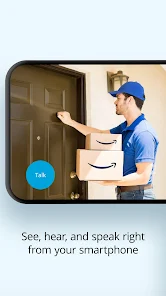
- 🔊 Poor Audio Quality for Two-Way Talk: The microphone picks up background noise loudly, and the speaker on Blink Mini sounds tinny. Arlo offers clearer audio, which matters for talking to visitors or scaring off intruders.
- 📶 Wi-Fi Reliance for All Features: Blink cameras don't record locally without cloud sync active, and they're useless if your internet goes down. Wyze cameras can still record to an SD card offline, which feels more reliable.
- ⏰ Limited Free Clip Duration: The free plan caps active recording to one hour per day per account, not per camera. If you set high sensitivity, you run out quickly, while Eufy gives unlimited local recording with no daily limit.
Recommended Apps
![]()
16Personalities
16Personalities4
![]()
Zodiac Palm Reader: MagicWay
Reatility Media4.6
![]()
Moblo - 3D furniture modeling
MYTIforge4.1![]()
Magnifier Plus with Flashlight
Digitalchemy, LLC4.6![]()
QR Code Scanner
QR Code Scanner & Barcode Reader4.7![]()
FalFal: Astrology, Tarot, Love
FalFal Team4.8![]()
Christmas Photo Frames
PhotoFramesApps4.6![]()
AI Video Art Creator - Livensa
FERASET4.5![]()
Horoscope of Birth
Denimaks4.4![]()
Make Me Bald Prank
AppTornado2.5![]()
Kling AI: AI Image&Video Maker
Lohas Games Pte. Ltd.4.4![]()
Japan Timetable & Route Search
NAVITIME JAPAN CO., LTD.4.3![]()
Prank Call & Funny Video
TeH Software0![]()
Parallax 3D Live Wallpapers
TarrySoft4.3![]()
AI Chatbot - Nova
ScaleUp4.7















Disclaimer
1.AppInfoLibrary does not represent any developer, nor is it the developer of any App or game.
2.AppInfoLibrary provide custom reviews of Apps written by our own reviewers, and detailed information of these Apps, such as developer contacts, ratings and screenshots.
3.All trademarks, registered trademarks, product names and company names or logos appearing on the site are the property of their respective owners.
4. AppInfoLibrary abides by the federal Digital Millennium Copyright Act (DMCA) by responding to notices of alleged infringement that complies with the DMCA and other applicable laws.
5.If you are the owner or copyright representative and want to delete your information, please contact us info@appinfolibrary.com.
6.All the information on this website is strictly observed all the terms and conditions of Google Ads Advertising policies and Google Unwanted Software policy .














