
McDonald's

50,000,000+
Installs
McDonalds USA, LLC
Developer
-
Food & Drink
Category
-
Rated for 3+
Content Rating
-
mobileappfeedback@us.mcd.com
Developer Email
-
https://www.mcdonalds.com/us/en-us/privacy-overview.html
Privacy Policy
Screenshots
editor reviews
If you've ever grabbed a Big Mac on a road trip or scarfed down McNuggets after a late shift, the McDonald's app feels less like a utility and more like a ticket to convenience. It's a fast-food ordering and loyalty app, built specifically for the Golden Arches, and it's meant to speed up your trip from parking lot to full stomach. With over 10 million downloads on Google Play and a strong presence on the App Store, the app is free to download, though you'll need to register an account to get the most out of it. The first time you open it, the splash screen is clean and familiar—red, yellow, and a big “Order Now” button staring back at you. It doesn't waste time trying to sell you on the brand; it assumes you're already on board. What struck me immediately was how local the experience feels: the app grabbed my location and showed my nearest McDonald's with its current hours and drive-thru wait time. That kind of specificity makes you feel like it actually knows where you are, which is nice when you're hangry and just need to know if you can skip the line.
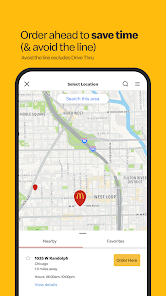
Once you start using it, the app runs like a well-oiled machine. The onboarding is minimal—enter your email, maybe link a payment method, and you're ready to order. The interface is divided into three main tabs: “Order,” “Rewards,” and “Deals.” To place an order, you pick your McDonald's location, browse the menu by category (burgers, breakfast, McCafé drinks, etc.), customize items by tapping modifiers like “no pickles” or “extra cheese,” and then pay with a card or Apple Pay. The app remembers your recent orders, so if you always get a Quarter Pounder with fries and a Coke, it's a one-tap reorder. What's slightly confusing is the drive-thru vs. in-store pickup toggle—it's easy to accidentally set it for curbside when you're already at the counter. But once you get the hang of it, the flow is smooth. I liked that the app shows you a countdown timer for when your food will be ready, and it buzzes you when it's fresh. Mobile order checkout is faster than waiting in line, especially during lunch rush, and you can skip the counter entirely by using the designated pickup spot. Small tip: always check the “Deals” tab before ordering. There's often a “Free McFlurry with any purchase” or a “$2 off” coupon that stacks with your rewards.
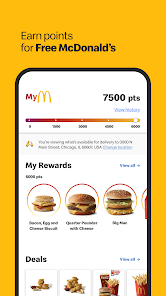
After using it for a few weeks, I'd say the app is a no-brainer if you eat at McDonald's more than once a month. The loyalty rewards are actually decent—every dollar earns you 100 points, and 1,500 points gets you a free Egg McMuffin or a small McCafé. That's faster payout than some other fast-food loyalty programs I've tried. The real standout is the “MyMcDonald's Rewards” system, which feels more generous than what you get from apps like Taco Bell's or Wendy's. If you're a breakfast person, the app lets you mobile order in the morning without talking to a human, which alone justifies keeping it installed. On the downside, the app pushes you toward loading a “McCard” for faster checkout, but I never felt forced. I've kept it because the deals legitimately save money, and the convenience of skipping the line beats standing around. But if you only eat at McDonald's a few times a year, it's probably not worth the storage space. Compared to the Wendy's app, which has a similar layout but more aggressive upsells, the McDonald's app feels focused on getting you in and out quickly. It's not perfect—some locations don't update their inventory in real time—but it's a solid tool for regular customers.
features
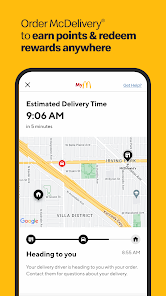
- 🎯 Mobile Order & Contactless Pickup – This is where the app shines. You place the order from your car or couch, choose drive-thru, curbside, or in-store pickup, and the app notifies you when it's ready. Unlike the Burger King app, which can be buggy with location detection, McDonald's locks onto your nearest store accurately and gives you an ETA. The timer counting down your order's preparation is a small touch, but it reduces that “is it ready yet?” anxiety.
- 🎯 MyMcDonald's Rewards – Every purchase earns points, and you redeem them for items like Hash Browns, McFlurries, or even Big Macs. The ramp-up isn't stingy compared to Starbucks Rewards (which requires 100 stars for a coffee). You get 1,500 points pretty quickly—maybe three or four visits—and the free items are actually ones you'd order anyway, not just the cheapest on the menu.
- 🎯 Customization & Saved Orders – You can modify almost every item: remove cheese, add extra sauce, ask for no ice in your soda. The app remembers your preferences between sessions, so if you always order a McChicken with no mayo, it keeps that setting. This beats the KFC app, which resets customizations every time you order. For anyone with specific dietary needs or picky kids, this saves a lot of tapping.
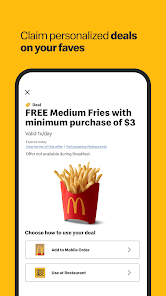
- 🎯 Deals Tab with Stackable Offers – The “Deals” section refreshes weekly with coupons like “BOGO McFlurries” or “Free Fries with any $1 purchase.” What sets it apart from the Chick-fil-A app is that you can often stack a deal with a reward—like using a free sandwich reward plus a coupon for a free drink. Chick-fil-A doesn't allow stacking, so McDonald's wins here for maximizing savings.
pros
- 👍 Faster checkout speed – Compared to the Wendy's app, McDonald's processes mobile orders quicker because the store staff is trained to prioritize them. You don't have to wait for a handheld tablet check-in. The designated pickup area in most locations means you walk right past the counter crowd.
- 👍 More consistent deal availability – Unlike the Taco Bell app, where deals seem to vanish based on location or time of day, McDonald's app offers deals that are usually available chain-wide and during all operating hours. No hidden “only valid after 2 PM” surprises.
- 👍Cleaner interface for reordering – The Burger King app buries the “reorder” button inside menus. McDonald's puts your previous order right on the “Order” tab's top row, so repeating last week's breakfast is a single tap. No reentering items.
cons
- 👎 Inventory accuracy issues – Sometimes the app will let you order a McFlurry, but when you arrive, they'll tell you the machine is down. The Wendy's app does a better job of reflecting real-time stock because staff manually update availability. McDonald's really needs to sync its POS system better.
- 👎Too many notifications – The app pushes promotional notifications almost daily, and the “Exclusive Deal” alerts rarely feel exclusive. You can turn them off in settings, but it's a hassle initially. The Chick-fil-A app is more respectful with notification frequency.
- 👎 No offline ordering capability – If you lose signal in the parking lot (common in malls or basements), the app won't even load your saved orders. The Starbucks app allows you to cache your order for offline access. McDonald's should add an offline mode for those spotty connection moments.
- 👎 Customer service integration is weak – If your order is wrong, the app directs you to call the store directly. There's no in-app chat or refund request button like in the Domino's app. You're basically on your own with the cashier, which defeats the contactless promise.
Recommended Apps
![]()
16Personalities
16Personalities4
![]()
Zodiac Palm Reader: MagicWay
Reatility Media4.6
![]()
Moblo - 3D furniture modeling
MYTIforge4.1![]()
Magnifier Plus with Flashlight
Digitalchemy, LLC4.6![]()
QR Code Scanner
QR Code Scanner & Barcode Reader4.7![]()
FalFal: Astrology, Tarot, Love
FalFal Team4.8![]()
Christmas Photo Frames
PhotoFramesApps4.6![]()
AI Video Art Creator - Livensa
FERASET4.5![]()
Horoscope of Birth
Denimaks4.4![]()
Make Me Bald Prank
AppTornado2.5![]()
Kling AI: AI Image&Video Maker
Lohas Games Pte. Ltd.4.4![]()
Japan Timetable & Route Search
NAVITIME JAPAN CO., LTD.4.3![]()
Prank Call & Funny Video
TeH Software0![]()
Parallax 3D Live Wallpapers
TarrySoft4.3![]()
AI Chatbot - Nova
ScaleUp4.7















Disclaimer
1.AppInfoLibrary does not represent any developer, nor is it the developer of any App or game.
2.AppInfoLibrary provide custom reviews of Apps written by our own reviewers, and detailed information of these Apps, such as developer contacts, ratings and screenshots.
3.All trademarks, registered trademarks, product names and company names or logos appearing on the site are the property of their respective owners.
4. AppInfoLibrary abides by the federal Digital Millennium Copyright Act (DMCA) by responding to notices of alleged infringement that complies with the DMCA and other applicable laws.
5.If you are the owner or copyright representative and want to delete your information, please contact us info@appinfolibrary.com.
6.All the information on this website is strictly observed all the terms and conditions of Google Ads Advertising policies and Google Unwanted Software policy .














