
Amazon Prime Video

500,000,000+
Installs
Amazon Mobile LLC
Developer
-
Entertainment
Category
-
Rated for 12+
Content Rating
-
aiv-android-feedback-na@amazon.com
Developer Email
-
http://www.amazon.com/gp/help/customer/display.html?nodeId=468496
Privacy Policy
Screenshots

editor reviews
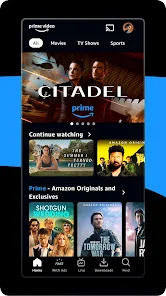
The Amazon Prime Video app is a streaming service, plain and simple, but it comes bundled with an Amazon Prime membership. You download it from the App Store or Google Play, and the install count is in the hundreds of millions, given it's free to download. Most people who already have a Prime subscription for the free shipping just see it as a bonus perk. When you first launch it, the experience is a bit like walking into a massive video store that's also a little cluttered. The interface throws a lot at you — rows and rows of content, some original shows, some movies you have to rent or buy separately, and a mix of live sports and channels you can add on. It's not as clean or intuitive as Netflix right out of the gate, and that first impression can feel a bit overwhelming. Registration is automatic if you have an Amazon account, so there's no real friction there, but the presence of ads for other Amazon services and the occasional promotional banner can make the home screen feel a little commercial.
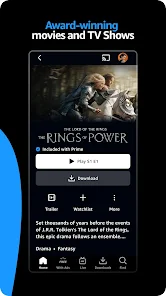
Once you get past the initial setup, the actual viewing experience is solid. Navigating around the app feels a bit heavy compared to others; the menus aren't as snappy, and sometimes a show's page takes a second to load fully. The search function works well though, and the X-Ray feature, which tells you what actor is on screen or what song is playing, is genuinely useful during a show. A common user flow would be: you open the app, scroll through the 'Recommended For You' row, maybe tap on a title, watch a trailer or read the synopsis, then hit play. The video player itself is great — picture quality is sharp with HDR support, and you can download shows for offline viewing, which is a lifesaver on flights. One small tip is to use the 'Watchlist' feature heavily, because the default categories can be a maze. The audio and subtitle options are also plentiful, but the interface for switching them mid-play isn't the smoothest around. After using it for a weekend, you'll probably find yourself relying more on search than browsing.
After a few weeks of regular use, I have mixed feelings about keeping it. The app's greatest strength is the sheer volume of content you get for the Prime subscription price, especially the Amazon Originals like "The Boys" or "Reacher," which are top-tier. But compared to Netflix, the catalog feels less curated and has more filler. Compared to Disney+, the interface is definitely less polished and kid-friendly. Who would enjoy this app? People who already have a Prime membership and want to make the most of it, or fans of live sports like Thursday Night Football. Who might not need it? Someone looking for a purely straightforward streaming experience with a crisp, minimal UI. The X-Ray feature is something no other app does as well, and the offline download capability is a must-have for travelers. But if I'm honest, the cluttered layout and the push to rent or buy content that I thought was included in my subscription make me consider uninstalling it. It's a great value add, but not the best standalone streaming app.
features
- 😮 X-Ray Feature: This is the standout difference from Netflix or Hulu. While watching a show, you can tap the screen to see the actor's name, the song playing, or trivia about the scene, all without leaving the video player. It's a small addition that feels incredibly natural after you use it a few times.
- 📱 Family Sharing with Profiles: You can have up to six user profiles on one account, and each person gets their own watch history and recommendations. This is similar to Netflix, but Amazon lets you add an adult profile for a child without needing a separate Kids account, which is a nice touch for families.
- 📥 Generous Offline Downloads: You can download a huge number of titles to your device for offline viewing. Unlike Netflix which restricts how many devices can have downloads active, Amazon Prime Video is much more lenient, making it far superior for frequent travelers or people with unreliable internet.
- 📺 Live TV Integration: Amazon includes live channels like Amazon Freevee and Prime Video Channels, so you can flip between on-demand content and live news or sports. This is something Netflix and Disney+ don't offer, making the app feel more like a cable alternative than just a streaming library.
pros
- 🎬 Value for Money: If you already pay for Amazon Prime for shipping, the streaming service is essentially free. Netflix charges a monthly fee for its library, but Amazon bundles its video content with other perks, making it the cheaper option overall for regular Amazon users.
- 📚 Extensive Library: The selection of movies, especially older classics and indie films, is often much larger than what you find on Disney+ or Apple TV+. Netflix has a bigger catalog of original series, but Amazon's breadth of third-party films is a clear win.
- 🏅 X-Ray is Unmatched: The in-video information tool is unique to Amazon Prime Video. Other apps like Hulu don't offer anything similar during playback. It's a simple strength that adds value to every movie or show you watch.
cons
- 📱 Clunky Interface: The layout is noticeably less smooth and more confusing than Netflix or Disney+. Menus are slower to load, categories can be repetitive, and the home screen is cluttered with promotional tiles and rental suggestions that distract from what's actually included with your subscription.
- 🔍 Search Frustrations: While the search itself works okay, finding a specific movie or show can be annoying because the results mix in titles you need to rent or buy with the ones you already have access to. Netflix keeps this much simpler by only showing available content.
- 📶 Inconsistent Streaming Quality: On the same internet connection, Netflix usually streams at a consistent 4K HDR, but Amazon Prime Video sometimes drops the resolution for no clear reason. It's not a deal-breaker, but it's a noticeable gap in reliability.
- 📺 Limited Original Content: Compared to Netflix or HBO Max, Amazon's original shows and movies feel fewer and far between. They have some big hits, but the overall volume of exclusive content is lower than what competitors offer for the same price.
Recommended Apps
![]()
16Personalities
16Personalities4
![]()
Zodiac Palm Reader: MagicWay
Reatility Media4.6
![]()
Moblo - 3D furniture modeling
MYTIforge4.1![]()
Magnifier Plus with Flashlight
Digitalchemy, LLC4.6![]()
QR Code Scanner
QR Code Scanner & Barcode Reader4.7![]()
FalFal: Astrology, Tarot, Love
FalFal Team4.8![]()
Christmas Photo Frames
PhotoFramesApps4.6![]()
AI Video Art Creator - Livensa
FERASET4.5![]()
Horoscope of Birth
Denimaks4.4![]()
Make Me Bald Prank
AppTornado2.5![]()
Kling AI: AI Image&Video Maker
Lohas Games Pte. Ltd.4.4![]()
Japan Timetable & Route Search
NAVITIME JAPAN CO., LTD.4.3![]()
Prank Call & Funny Video
TeH Software0![]()
Parallax 3D Live Wallpapers
TarrySoft4.3![]()
AI Chatbot - Nova
ScaleUp4.7















Disclaimer
1.AppInfoLibrary does not represent any developer, nor is it the developer of any App or game.
2.AppInfoLibrary provide custom reviews of Apps written by our own reviewers, and detailed information of these Apps, such as developer contacts, ratings and screenshots.
3.All trademarks, registered trademarks, product names and company names or logos appearing on the site are the property of their respective owners.
4. AppInfoLibrary abides by the federal Digital Millennium Copyright Act (DMCA) by responding to notices of alleged infringement that complies with the DMCA and other applicable laws.
5.If you are the owner or copyright representative and want to delete your information, please contact us info@appinfolibrary.com.
6.All the information on this website is strictly observed all the terms and conditions of Google Ads Advertising policies and Google Unwanted Software policy .














