

Google Chrome: Fast & Secure

10,000,000,000+
Installs
Google LLC
Developer
-
Social
Category
-
Rated for 3+
Content Rating
-
apps-help@google.com
Developer Email
-
http://www.google.com/chrome/intl/en/privacy.html
Privacy Policy
Screenshots
editor reviews
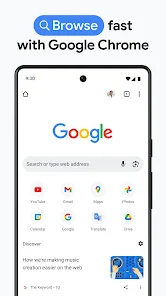
I've been using Google Chrome as my go-to browser for years, both on my phone and desktop. It's a free web browser developed by Google, available for download from both the Google Play Store and the Apple App Store. With over 10 billion installs on Android alone, it's easily one of the most popular tools for browsing the internet. You don't need to register an account to start using it, though signing into your Google account syncs bookmarks and passwords across devices. The first time you open it, the interface feels clean and fast—you're greeted by a simple search bar, your most visited sites, and a few news articles. It's minimalist, which makes it feel less cluttered compared to some other browsers I've tried.
When I actually use Chrome day-to-day, the experience is mostly smooth. Tabs load quickly, and switching between them feels snappy, even when I have a dozen open. The address bar doubles as a search box, which saves me a step. Onboarding is straightforward since the default settings just work. I do tend to close tabs from the tab switcher view, but I sometimes accidentally hit the close-all button on mobile. On desktop, the bookmarks bar is handy, but on mobile, I rely more on the recent tabs list. One small tip: if you long-press the tab switcher button on Android, you can quickly reopen the last closed tab, which has saved me more than once.
After using it for a while, I've realized Chrome is best for people who want a no-fuss, reliable browsing experience that syncs effortlessly across devices. If you're deeply into privacy, you might prefer something like Firefox or Brave, since Chrome's data collection can feel a bit heavy. What sets Chrome apart is its sheer speed and compatibility with almost every website out there. I keep it installed because it's just dependable, but I can see someone uninstalling it if they're worried about battery drain or RAM usage on older devices. It's a solid choice, but not perfect for everyone.
features
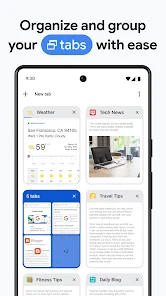
- : Chrome's tab grouping feature is miles ahead of Safari. While Safari lets you group tabs, Chrome's implementation on desktop and mobile feels more intuitive, with color-coding and collapsible groups that make managing dozens of tabs less of a headache.
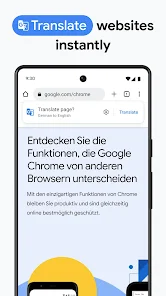
- : The built-in Google Translate integration is seamless. Unlike Firefox, which requires an add-on, Chrome automatically offers to translate pages in a foreign language with one tap, making it incredibly useful for browsing international sites.
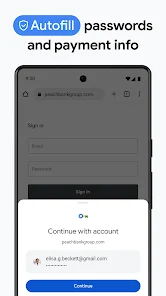
- : Chrome's password manager, while not as polished as dedicated apps like LastPass, is deeply integrated into the browser's autofill system. It suggests and saves passwords without extra steps, which is faster than Safari's iCloud Keychain when switching between devices.
pros
- : Chrome's cross-platform sync is unmatched. I can start reading an article on my phone and pick it up on my laptop instantly, with open tabs and history all synced. Safari only works within Apple's ecosystem, so Chrome wins here for mixed-device users.
- : The constant updates keep security tight. Chrome gets patches for vulnerabilities faster than most browsers, and its Safe Browsing feature warns me about phishing sites before I even click, which feels more proactive than Edge's similar tool.
- : The vast library of extensions in the Chrome Web Store is a huge advantage. On desktop, I can add ad blockers, grammar checkers, or note-taking tools, whereas mobile browsers like Samsung Internet have a much smaller selection of add-ons.
cons
- : Chrome is a notorious RAM hog. On my 8GB laptop, having 10+ tabs open can slow things down noticeably, whereas Firefox uses significantly less memory for the same workload, making it a better choice for older hardware.
- : The tracking feels invasive. Even in incognito mode, sites can fingerprint my device, and Google collects a lot of browsing data by default. Brave blocks trackers by default, so privacy-conscious users might prefer that over Chrome's more permissive stance.
- : The mobile browser lacks a bottom address bar. Safari on iOS and most Android browsers let you move the bar to the bottom for easier thumb access, but Chrome forces it to the top, which can be awkward on larger phones. Some workarounds exist, but it's not a built-in option.
Recommended Apps
![]()
16Personalities
16Personalities4
![]()
Zodiac Palm Reader: MagicWay
Reatility Media4.6
![]()
Moblo - 3D furniture modeling
MYTIforge4.1![]()
Magnifier Plus with Flashlight
Digitalchemy, LLC4.6![]()
QR Code Scanner
QR Code Scanner & Barcode Reader4.7![]()
FalFal: Astrology, Tarot, Love
FalFal Team4.8![]()
Christmas Photo Frames
PhotoFramesApps4.6![]()
AI Video Art Creator - Livensa
FERASET4.5![]()
Horoscope of Birth
Denimaks4.4![]()
Make Me Bald Prank
AppTornado2.5![]()
Kling AI: AI Image&Video Maker
Lohas Games Pte. Ltd.4.4![]()
Japan Timetable & Route Search
NAVITIME JAPAN CO., LTD.4.3![]()
Prank Call & Funny Video
TeH Software0![]()
Parallax 3D Live Wallpapers
TarrySoft4.3![]()
AI Chatbot - Nova
ScaleUp4.7















Disclaimer
1.AppInfoLibrary does not represent any developer, nor is it the developer of any App or game.
2.AppInfoLibrary provide custom reviews of Apps written by our own reviewers, and detailed information of these Apps, such as developer contacts, ratings and screenshots.
3.All trademarks, registered trademarks, product names and company names or logos appearing on the site are the property of their respective owners.
4. AppInfoLibrary abides by the federal Digital Millennium Copyright Act (DMCA) by responding to notices of alleged infringement that complies with the DMCA and other applicable laws.
5.If you are the owner or copyright representative and want to delete your information, please contact us info@appinfolibrary.com.
6.All the information on this website is strictly observed all the terms and conditions of Google Ads Advertising policies and Google Unwanted Software policy .














