

Opera Mini: Fast Web Browser

500,000,000+
Installs
Opera
Developer
-
Social
Category
-
Rated for 3+
Content Rating
-
support-mini-android@opera.com
Developer Email
-
http://www.opera.com/privacy
Privacy Policy
Screenshots
editor reviews
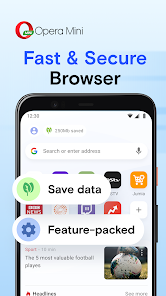
I picked up Opera Mini ages ago mainly because my old phone had limited storage and a data cap. It's a lightweight web browser made by Opera that focuses on saving bandwidth and loading pages quickly even on slower connections. You download it for free from Google Play or the App Store, and it has a huge install count—over a billion downloads on Android alone. When you first launch it, there's no forced sign-up, which I appreciate. You just see a search bar, some news feed cards below, and a simple bottom toolbar. The whole vibe feels stripped-down but not cheap, like a tool built for speed rather than flash. There are optional in-app purchases for things like ad removal, and you'll see some ads in the feed unless you tweak the settings, but it never blocks your actual browsing. If you've ever watched a page crawl on 3G or paid out the nose for roaming data, that initial “wow, this actually loads” moment is real.
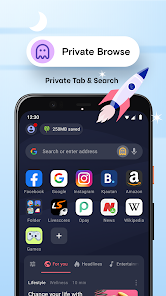
Once you start actually using it, the experience flows pretty naturally. The interface is clean: a bottom bar holds tabs, bookmarks, and the menu. Tapping a link feels snappy because of how Opera compresses data through its servers before sending it to your phone. For daily use, say checking news or reading blog posts, the “Extreme” compression mode shrinks images noticeably, so articles load even if your signal is weak. I have a habit of using the night mode when I'm in bed—it's one tap away in the settings tray. Onboarding is practically nonexistent; you just start browsing. There are some small hitches: occasionally a page that relies heavily on JavaScript, like a web app, won't render perfectly until you switch to “High” compression. But for casual reading or searches, it's mostly smooth. I also like that you can download videos from certain sites, though the download manager feels a bit basic compared to standalone apps.
After using it for a while, I think it's a solid pick for anyone who's on a prepaid data plan, lives in an area with spotty coverage, or just hates waiting for pages to load. Students traveling abroad or people with older budget phones would get the most out of it. On the flip side, if you're someone who needs full desktop-level rendering or uses a lot of complex web tools (like Google Docs editing directly in the browser), you might find Opera Mini's compression too aggressive—it can break formatting on some forms and dashboards. Compared to Chrome or Firefox, it's definitely faster on loading but less capable in rendering heavy modern sites. I've kept it installed as a backup even when I switched to a faster phone; it saves battery too, surprisingly. But I'd uninstall it if my main browser handled slow networks well enough because Opera Mini lacks sync with desktop browsers and some extensions. It's a specialist tool, not a jack-of-all-trades.
features
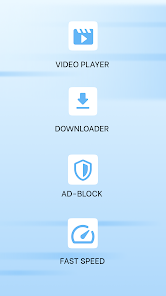
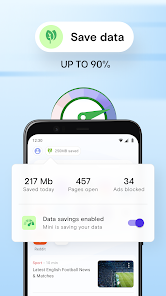
- 📦 Data compression is the standout trick here. Opera Mini routes all traffic through its cloud servers and squishes images, text, and scripts before sending them to your device. Chrome or Safari don't do this, so on a 2G or metered connection, Opera Mini can load a Reuters news article in seconds while the others just spin. The “Extreme” mode shrinks files up to 90%—great for casual reading but less great for image-heavy sites.
- 🧭 The built-in ad blocker works right out of the gate without any setup, which is rare for a mobile browser. Firefox on Android lets you install uBlock Origin as an add-on, but that takes a few extra taps. Opera Mini's version is more limited—it won't block YouTube ads—but for banner and pop-up ads on news websites, it's very effective and keeps pages lean.
- 📥 Video downloading is a direct, no-tool-required feature. On many streaming sites, a small download button appears when you hover over a video. In contrast, Chrome doesn't allow video downloads natively at all, and Safari requires third-party shortcuts. You can save clips for offline viewing, which is perfect for commutes with no signal.
pros
- 🎯 The data saver is better than any other browser's similar feature. Chrome has a “Lite mode” but it's not as aggressive, and it only reduces image quality—Opera Mini compresses whole page structures. Samsung Internet also has a data saver, but it's noticeably slower on the same connection.
- ⚡ Speed is its biggest asset. On a sub-1 Mbps connection, Opera Mini consistently loads pages before Firefox or Edge even finish their DNS lookup. That raw advantage in slow-network scenarios is a lifesaver if you're stuck on a bus with weak signal.
- 💸 Completely free with no forced accounts. You don't need to sign in to use any core browsing features, unlike DuckDuckGo's browser which pushes syncing as a perk that requires registration. Opera Mini just works out of the box.
cons
- 🌐 Some modern sites render incorrectly because Opera Mini strips JavaScript-heavy elements during compression. Services like Trello or Notion often break, and Google Forms might not submit properly. Chrome or Firefox handle these perfectly because they don't pre-process the site.
- 🔒 Security can be a concern for privacy-conscious users. All your data passes through Opera's servers, meaning Opera could theoretically log your browsing. DuckDuckGo's browser processes everything locally and blocks trackers more aggressively, so if privacy matters, that's a cleaner choice.
- 🔄 No desktop sync beyond basic bookmarks through the Opera Link feature. If you use Chrome or Firefox, you get full history, tab, and password sync across devices. Opera Mini feels isolated—you can't continue a session from your laptop on your phone.
Recommended Apps
![]()
16Personalities
16Personalities4
![]()
Zodiac Palm Reader: MagicWay
Reatility Media4.6
![]()
Moblo - 3D furniture modeling
MYTIforge4.1![]()
Magnifier Plus with Flashlight
Digitalchemy, LLC4.6![]()
QR Code Scanner
QR Code Scanner & Barcode Reader4.7![]()
FalFal: Astrology, Tarot, Love
FalFal Team4.8![]()
Christmas Photo Frames
PhotoFramesApps4.6![]()
AI Video Art Creator - Livensa
FERASET4.5![]()
Horoscope of Birth
Denimaks4.4![]()
Make Me Bald Prank
AppTornado2.5![]()
Kling AI: AI Image&Video Maker
Lohas Games Pte. Ltd.4.4![]()
Japan Timetable & Route Search
NAVITIME JAPAN CO., LTD.4.3![]()
Prank Call & Funny Video
TeH Software0![]()
Parallax 3D Live Wallpapers
TarrySoft4.3![]()
AI Chatbot - Nova
ScaleUp4.7















Disclaimer
1.AppInfoLibrary does not represent any developer, nor is it the developer of any App or game.
2.AppInfoLibrary provide custom reviews of Apps written by our own reviewers, and detailed information of these Apps, such as developer contacts, ratings and screenshots.
3.All trademarks, registered trademarks, product names and company names or logos appearing on the site are the property of their respective owners.
4. AppInfoLibrary abides by the federal Digital Millennium Copyright Act (DMCA) by responding to notices of alleged infringement that complies with the DMCA and other applicable laws.
5.If you are the owner or copyright representative and want to delete your information, please contact us info@appinfolibrary.com.
6.All the information on this website is strictly observed all the terms and conditions of Google Ads Advertising policies and Google Unwanted Software policy .














