

Yahoo Mail – Organized Email

100,000,000+
Installs
Yahoo
Developer
-
Social
Category
-
Rated for 3+
Content Rating
-
mail.android.feedback@yahooinc.com
Developer Email
-
https://policies.yahoo.com/xw/en/yahoo/privacy/directory/international/index.htm
Privacy Policy
Screenshots
editor reviews
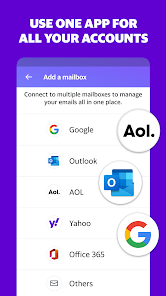
Yahoo Mail is basically an email client, but it tries to be more than that--it's a full-on inbox manager that also throws in calendar and cloud storage features. Honestly, most people download it because they've got an old Yahoo email address they still use for newsletters, shopping confirmations, or that one account from the early 2000s. When I first launched the app from Google Play, the install was quick and it's free, though you do bump into ads pretty fast. The initial screen feels clean enough: a blue header, your inbox right there, and a big compose button. You sign in with your Yahoo ID, or you can add other email accounts like Gmail or Outlook, which is handy. First impression? It's a bit busy with the ads sitting at the bottom, but the core inbox is easy to read.
After using it for a week, I got the hang of the layout. The swipe gestures are smooth--swipe left to archive, right to delete--which feels natural for daily use. The onboarding just asked me to pick a theme color and set up notifications, nothing annoying. When I open a thread, the app shows all replies stacked neatly, and there's a quick "reply all" button that saved me a few taps. The search bar works well enough for finding that random flight confirmation from three months ago. One thing that tripped me up: adding an attachment from the cloud storage isn't as obvious as it could be; you have to tap a tiny icon. Still, for checking emails on the go, it's reliable. I also like the "Travel" folder that automatically sorts booking emails, though it only works if you let it scan your inbox.
After a while, my feeling is mixed. If you're someone who gets tons of spam or promotional emails, the automatic sorting into tabs like "Social" and "Promotions" is genuinely useful--it keeps your main inbox clean. But if you're used to Gmail's snappier search or ProtonMail's strict privacy focus, Yahoo Mail feels a bit cluttered and ad-heavy. I kept it installed because it handles my old Yahoo address well, and the 1TB of cloud storage (for free users) is a nice bonus for backing up photos. That said, I might uninstall it if I ever fully switch to another service, since the ads and the occasional promo banners in the inbox get annoying. It's a good secondary email app, not a daily driver for most power users.
features
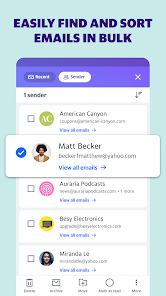
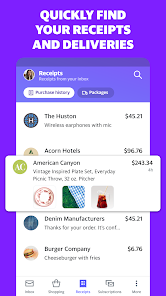
- 📧 Smart inbox sorting: Yahoo Mail automatically groups your emails into tabs like "Travel," "Shopping," and "Finance," which is better than Gmail's basic Promotions and Social sorting. Gmail does this too, but Yahoo's categories feel more specific--my booking confirmations and receipts actually landed where they should without me setting up filters.
- 📧 1TB free cloud storage: Compared to Gmail's 15GB shared across Drive and Photos, Yahoo gives you 1TB just for emails and attachments. For someone who hoards old email attachments or wants to back up phone photos directly from the app, this is a huge win over most competitors.
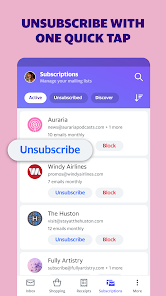
- 📧 One-tap unsubscribe: At the top of every promotional email, there's a clear "Unsubscribe" button that really works in one tap. In Gmail, you often have to scroll to the bottom of the email or open a separate web page--Yahoo simplifies this so much that I cleaned out half my inbox in minutes.
pros
- 🌟 Huge free storage: While Gmail caps free users at 15GB, Yahoo Mail gives 1TB, which is way more generous. Outlook.com offers 15GB too. For people who want to keep years of emails without paying, this is unmatched.
- 🌟 Integrated calendar and notes: The app includes a built-in calendar that syncs across devices, similar to Google Calendar, but it's right inside the mail interface. Apple Mail doesn't offer this natively on Android, so it's a nice all-in-one tool.
- 🌟 Customizable themes: You can change the app's look with several color themes and dark mode, unlike Gmail which only offers a basic default dark theme. It feels more personal.
cons
- ⚠️ Frequent ads: Free users see ads in the inbox list and at the bottom of the screen, which can be distracting. Gmail for Android shows ads too, but they're usually less intrusive and only in the Promotions tab.
- ⚠️ Slower search: Searching for an old email takes noticeably longer than in Gmail, which is almost instant. Yahoo's search often needs a few seconds and sometimes misses results I know exist.
- ⚠️ Clunky attachment handling: When attaching files, the app's media picker is slow, and accessing the 1TB cloud storage isn't straightforward. Apple Mail on iOS handles attachments more smoothly, and even Outlook's interface is better organized for this.
Recommended Apps
![]()
16Personalities
16Personalities4
![]()
Zodiac Palm Reader: MagicWay
Reatility Media4.6
![]()
Moblo - 3D furniture modeling
MYTIforge4.1![]()
Magnifier Plus with Flashlight
Digitalchemy, LLC4.6![]()
QR Code Scanner
QR Code Scanner & Barcode Reader4.7![]()
FalFal: Astrology, Tarot, Love
FalFal Team4.8![]()
Christmas Photo Frames
PhotoFramesApps4.6![]()
AI Video Art Creator - Livensa
FERASET4.5![]()
Horoscope of Birth
Denimaks4.4![]()
Make Me Bald Prank
AppTornado2.5![]()
Kling AI: AI Image&Video Maker
Lohas Games Pte. Ltd.4.4![]()
Japan Timetable & Route Search
NAVITIME JAPAN CO., LTD.4.3![]()
Prank Call & Funny Video
TeH Software0![]()
Parallax 3D Live Wallpapers
TarrySoft4.3![]()
AI Chatbot - Nova
ScaleUp4.7















Disclaimer
1.AppInfoLibrary does not represent any developer, nor is it the developer of any App or game.
2.AppInfoLibrary provide custom reviews of Apps written by our own reviewers, and detailed information of these Apps, such as developer contacts, ratings and screenshots.
3.All trademarks, registered trademarks, product names and company names or logos appearing on the site are the property of their respective owners.
4. AppInfoLibrary abides by the federal Digital Millennium Copyright Act (DMCA) by responding to notices of alleged infringement that complies with the DMCA and other applicable laws.
5.If you are the owner or copyright representative and want to delete your information, please contact us info@appinfolibrary.com.
6.All the information on this website is strictly observed all the terms and conditions of Google Ads Advertising policies and Google Unwanted Software policy .














