

Google Meet (original)

500,000,000+
Installs
Google LLC
Developer
-
Business
Category
-
Rated for 3+
Content Rating
-
apps-help@google.com
Developer Email
-
http://www.google.com/policies/privacy
Privacy Policy
Screenshots



editor reviews
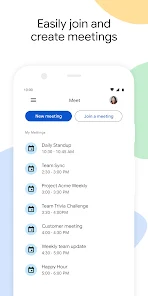
So Google Meet, right? It's basically Google's take on video conferencing, sitting right alongside stuff like Zoom and FaceTime in the crowded communication app space. People mainly use it for work meetings, catching up with family, or even remote classroom sessions. You might download and install it off the Play Store or App Store because it's already baked into a lot of Google services, and honestly, who wants to juggle another login? The first impression when you launch the app is this clean, almost minimalist interface. There's no clutter, just a big "New Meeting" button and a way to join a call with a code. It feels professional but also a bit bare, almost like it's trusting you to know what you're doing. It's free to download and use for one-on-one calls, though group calls have a time limit, which is a bit of a bummer if you're not on a paid workspace account. You don't even need to sign up for a separate account if you have a standard Gmail, which makes jumping into a call painless.
The hands-on experience is where things get interesting. The onboarding is basically nonexistent because the interface is so stripped down, which can be both good and bad. You'll likely start by tapping "New Meeting" to start an instant call or schedule one for later. During a call, the main actions are all at the bottom: mute, turn off your camera, share your screen, and hang up. It's pretty straightforward. One smooth moment I always appreciate is how it intelligently adjusts video quality based on your connection; it doesn't just drop the call when your Wi-Fi gets spotty. A confusing bit, though, is finding the chat or participant list sometimes feels a bit hidden in the corner. A practical tip I picked up is using the background blur or virtual backgrounds on the fly to hide a messy room without needing any fancy setup. Navigating through the app daily feels efficient, but you might find yourself poking around for settings that other apps put right in your face.
After using Google Meet for a while, I have a pretty clear picture of who it's for. Anyone deeply invested in the Google ecosystem, like someone who lives in Gmail and Google Calendar, will find it incredibly natural. The integration is its superpower; you can join a call straight from a Calendar event without thinking. But if you're a casual user who just wants a quick video chat with friends, its bare-bones feel might not be as welcoming as something like FaceTime or even Zoom's more playful features. What makes it different is this quiet efficiency, like it assumes you're on a call to talk and not to play with filters. I could see someone keeping it installed because it's reliable for work, but they might uninstall it if their team switches to a platform with better breakout rooms or more robust free tier for groups. It's a solid workhorse, not a flashy show pony.
features
- 📹 The screen sharing is slick. You can share your whole screen, a specific window, or even just a Chrome tab, all without dropping the call's audio. Zoom does this too, but Google Meet's integration with Chrome makes it feel a bit smoother if you're already in the browser.
- 🧩 Live captions, powered by Google's speech recognition, are a game changer. They appear in real-time and are surprisingly accurate, even with a bit of background noise. This feature alone makes it stand out against FaceTime, which completely lacks built-in captions, though Zoom offers something similar.
- 🔗 Joining a meeting via a simple link is dead simple. No annoying downloads or plugins needed if you're on a computer, and on mobile, it just opens the app. This is way less clunky than the old days of Skype, where you'd need a whole account setup just to answer a call.
pros
- 👍 Deep integration with Google Workspace is its biggest strength. If you use Gmail, Calendar, and Drive, meetings just pop up and recordings save automatically. This is something Zoom, with its separate account and storage system, can't match for a Google user.
- 👍 It handles low-bandwidth situations really well. The app is smart about dropping video quality before audio, so you rarely miss what someone says. FaceTime can stutter hard on a weak connection, but Meet keeps chugging along.
- 👍 No account needed from attendees. You can send a link to someone who doesn't even have a Google account, and they can join from their browser. This is a lot more open than FaceTime, which is locked to Apple devices and IDs.
cons
- 👎 The free tier has a 60-minute limit on group calls. Zoom's free plan gives you 40 minutes per meeting but with more participants, and FaceTime has no time limit at all. This makes Google Meet feel restrictive for longer catch-ups with friends.
- 👎 The interface can feel too minimal. Finding settings like background effects or changing your layout requires a bit of hunting. Zoom puts these controls front and center, making it more intuitive for first-time users.
- 👎 There's no built-in virtual whiteboard or advanced annotation tools. For collaborative brainstorming, Zoom has a better built-in whiteboard feature, while Google Meet relies on third-party apps or sharing a Google Jamboard, which is an extra step.
- 👎 Doing a grid view on mobile is still a bit messy. FaceTime on iPhone does this perfectly with auto-sizing tiles, but Meet's mobile grid view can feel cramped and doesn't always show everyone equally.
Recommended Apps
![]()
16Personalities
16Personalities4
![]()
Zodiac Palm Reader: MagicWay
Reatility Media4.6
![]()
Moblo - 3D furniture modeling
MYTIforge4.1![]()
Magnifier Plus with Flashlight
Digitalchemy, LLC4.6![]()
QR Code Scanner
QR Code Scanner & Barcode Reader4.7![]()
FalFal: Astrology, Tarot, Love
FalFal Team4.8![]()
Christmas Photo Frames
PhotoFramesApps4.6![]()
AI Video Art Creator - Livensa
FERASET4.5![]()
Horoscope of Birth
Denimaks4.4![]()
Make Me Bald Prank
AppTornado2.5![]()
Kling AI: AI Image&Video Maker
Lohas Games Pte. Ltd.4.4![]()
Japan Timetable & Route Search
NAVITIME JAPAN CO., LTD.4.3![]()
Prank Call & Funny Video
TeH Software0![]()
Parallax 3D Live Wallpapers
TarrySoft4.3![]()
AI Chatbot - Nova
ScaleUp4.7















Disclaimer
1.AppInfoLibrary does not represent any developer, nor is it the developer of any App or game.
2.AppInfoLibrary provide custom reviews of Apps written by our own reviewers, and detailed information of these Apps, such as developer contacts, ratings and screenshots.
3.All trademarks, registered trademarks, product names and company names or logos appearing on the site are the property of their respective owners.
4. AppInfoLibrary abides by the federal Digital Millennium Copyright Act (DMCA) by responding to notices of alleged infringement that complies with the DMCA and other applicable laws.
5.If you are the owner or copyright representative and want to delete your information, please contact us info@appinfolibrary.com.
6.All the information on this website is strictly observed all the terms and conditions of Google Ads Advertising policies and Google Unwanted Software policy .














