

Google Chat

10,000,000+
Installs
Google LLC
Developer
-
Business
Category
-
Rated for 3+
Content Rating
-
apps-help@google.com
Developer Email
-
http://www.google.com/policies/privacy
Privacy Policy
Screenshots
editor reviews
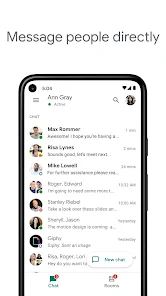
Google Chat is basically Google's take on a team messaging app, sitting somewhere between a casual messenger and a formal workplace tool. It's part of the Google Workspace family, so if you already use Gmail, you kind of get it whether you want it or not. Most people download it from Google Play or the App Store because their company or school forces the switch from Hangouts or Slack, not because they're hunting for a new chat app. The first impression after launching is clean but a little boring — it's all white space, blue accents, and a sidebar that screams “this is for spreadsheets, not memes.” It's free to download, but the real usefulness kicks in when you have a Workspace account, and there are no annoying ads popping up.
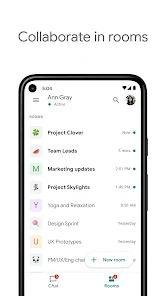
Opening Chat for the first time can feel surprisingly quiet if your team already set up rooms. The rooms automatically sync across Gmail, which is handy if you live in your inbox. Navigating from a direct message to a shared room is smooth, though the search function can feel slow when you're hunting for an old file or a message from last week. A common daily routine is starting a room chat, pinging a coworker, sharing a Google Doc link, and maybe starting a video call with the built-in Meet button. On mobile, the bottom tab layout makes sense, but typing long replies on my iPhone screen sometimes feels cramped. One trick I picked up: you can use slash commands like /mute to silence a noisy room without leaving it. Not life-changing, but it saves some sanity.
After living with Google Chat for a few months, I get why some people swear by it and others refuse to touch it. If your team already breathes Google Workspace — Gmail, Drive, Calendar — Chat feels like the missing puzzle piece. You can jump into a chat, share a file, edit it in Docs, and schedule a meeting without ever switching apps. That's neat for productivity nerds or remote teams that just need to get stuff done. But if you're used to the emoji reactions in Slack or the extensive app integrations in Microsoft Teams, Chat feels barebones. I ended up keeping it installed because my team uses it daily, but I also have Discord running for things that actually need a pulse. It's not a bad app, it's just very focused on work and not much else.
features
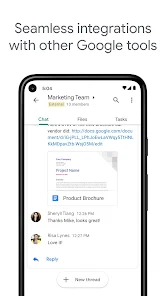
- 🤖 Real-time collaboration with Google Docs, Sheets, and Slides happens directly inside a room. You can preview, edit, and suggest changes without leaving the conversation. Slack needs separate file uploads or link previews, which adds an extra click. Chat makes it feel like you're working in one place instead of hopping between apps.
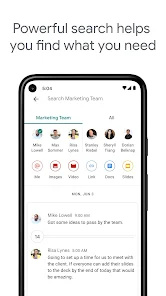
- 🔒 The search and organization honestly surprised me. You can search across rooms and DMs, filter by file type or date, and even use the @ symbol to find people or rooms quickly. Slack's search is decent, but Chat ties directly into your Gmail, so past conversations don't vanish into the void. It's handy when you need to find that one decision from three weeks ago.
- 📦 Direct integration with Google Meet is built into every conversation. You can start or join a video call with one tap, and it adds the meeting link automatically into the chat. Slack does this through a third-party integration or a calendar event, which feels like more setup. Chat keeps it simple and fast, especially on mobile.
pros
- 👍 The biggest strength is how seamless it works inside Gmail. You can switch from reading an email to a chat to a document without opening a new tab or app. Slack feels like a separate world, and Microsoft Teams is a whole universe. Chat respects your existing workflow instead of forcing you to learn a new one.
- 👍 Free for personal use with a Google account, and the storage is shared with your Drive. That's a lot better than Slack's free tier that limits message history to 90 days. For casual users or small teams on a budget, Chat gives you a lot without costing anything extra.
- 👍 The bot ecosystem might be smaller than Slack's, but the built-in bots like @Google Assistant for quick tasks or @Meet for scheduling are actually useful. You don't need to install dozens of plugins to get basic functionality. It's more focused and less distracting.
cons
- 👎 The app integration store is tiny compared to Slack's marketplace. If your team relies on Trello, Asana, or GitHub notifications inside chat, you'll find fewer options and less polish. Slack has a massive library, and Chat feels like it's stuck a few years behind in third-party support.
- 👎 Message formatting is surprisingly limited. You can bold, italic, or strikethrough text, but there's no code block formatting, no inline images in messages, and the markdown support is basic. Slack lets you create rich messages with snippets, code blocks, and even custom emoji reactions. Chat feels like plain text from 2010.
- 👎 The mobile app can be inconsistent with notifications. Sometimes I get a notification on my iPhone fifteen minutes late, or it doesn't show at all until I open the app. Slack is much more reliable about pushing real-time alerts. It's frustrating when you miss a message from your boss and only see it an hour later.
Recommended Apps
![]()
16Personalities
16Personalities4
![]()
Zodiac Palm Reader: MagicWay
Reatility Media4.6
![]()
Moblo - 3D furniture modeling
MYTIforge4.1![]()
Magnifier Plus with Flashlight
Digitalchemy, LLC4.6![]()
QR Code Scanner
QR Code Scanner & Barcode Reader4.7![]()
FalFal: Astrology, Tarot, Love
FalFal Team4.8![]()
Christmas Photo Frames
PhotoFramesApps4.6![]()
AI Video Art Creator - Livensa
FERASET4.5![]()
Horoscope of Birth
Denimaks4.4![]()
Make Me Bald Prank
AppTornado2.5![]()
Kling AI: AI Image&Video Maker
Lohas Games Pte. Ltd.4.4![]()
Japan Timetable & Route Search
NAVITIME JAPAN CO., LTD.4.3![]()
Prank Call & Funny Video
TeH Software0![]()
Parallax 3D Live Wallpapers
TarrySoft4.3![]()
AI Chatbot - Nova
ScaleUp4.7















Disclaimer
1.AppInfoLibrary does not represent any developer, nor is it the developer of any App or game.
2.AppInfoLibrary provide custom reviews of Apps written by our own reviewers, and detailed information of these Apps, such as developer contacts, ratings and screenshots.
3.All trademarks, registered trademarks, product names and company names or logos appearing on the site are the property of their respective owners.
4. AppInfoLibrary abides by the federal Digital Millennium Copyright Act (DMCA) by responding to notices of alleged infringement that complies with the DMCA and other applicable laws.
5.If you are the owner or copyright representative and want to delete your information, please contact us info@appinfolibrary.com.
6.All the information on this website is strictly observed all the terms and conditions of Google Ads Advertising policies and Google Unwanted Software policy .














