

SHAREit: Transfer, Share Files

1,000,000,000+
Installs
Smart Media4U Technology Pte.Ltd.
Developer
-
Productivity
Category
-
Rated for 3+
Content Rating
-
feedback_android@ushareit.com
Developer Email
-
https://web.wshareit.com/cdn/shareit/w/privacy/pr_en.html
Privacy Policy
Screenshots


editor reviews
I first came across SHAREit when a friend needed to send me a bunch of vacation videos that were way too large for email. It's a file transfer and sharing app that's been around for years, mainly known for moving photos, music, videos, and even apps between devices without using mobile data. You can grab it for free from both Google Play and the App Store, and it's been downloaded over a billion times, which tells you how popular it is for quick, local sharing. After installing and launching it, the first impression is a bit busy — the home screen throws a lot at you, with a file manager, a built-in video player, and some promoted content. It feels less like a simple transfer tool and more like a media hub right from the start. You do need to register or sign in to use some features, which might feel like extra work for just sending a few files, but the whole setup process is fairly quick.
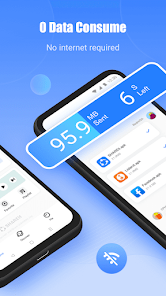
When you actually start using SHAREify for transfers, the core experience is pretty smooth. The app scans for nearby devices using Wi-Fi Direct or a hotspot connection, so there's no need for cables or Bluetooth pairing. You just select the files you want to send, tap the receiver's avatar, and the transfer kicks off at impressive speeds — I've moved a 1GB video in under a minute. The interface during a transfer is clear, showing progress and speed, so you're never left guessing. Onboarding is straightforward: the app prompts you to grant permissions for storage and location right away, which can feel a bit invasive but is necessary for the peer-to-peer connection. One thing that threw me off at first was the clutter — there are tabs for cleaning junk files, playing videos, and even discovering trending content, which makes it hard to focus on just sharing. A practical tip: use the “Send” button on the main screen to jump straight into a transfer without getting distracted by the extra tools.
After using SHAREit for a while, I think it's a solid choice if you regularly swap large files between Android and iOS devices, or if you're in a spot with weak or no internet. The transfer speed is genuinely its standout quality, and it's hard to beat for free. But I can see why some people might uninstall it — the app feels bloated with ads, promotional pop-ups, and features that don't really relate to file sharing, like a media player and a cleaning tool. If you just want a no-fuss way to send an occasional photo, simpler apps like Xender or Send Anywhere might feel cleaner. SHAREit is best for heavy users who move big media files often and don't mind the extra noise. I ended up keeping it installed for those times when I need to send a large batch of files quickly, but I rarely open it for anything else.
features
- ⭐ SHAREit uses a direct peer-to-peer Wi-Fi connection to transfer files at speeds up to 20MB/s, which is significantly faster than Bluetooth. Sharing a 2GB movie takes just a couple of minutes, while Bluetooth could take over 30 minutes for the same file.
- ⭐ The app supports cross-platform sharing between Android, iOS, Windows, and even older devices like feature phones via a web version. This is a big plus compared to AirDrop, which only works within Apple's ecosystem, or Samsung's Quick Share, which is limited to Samsung devices.
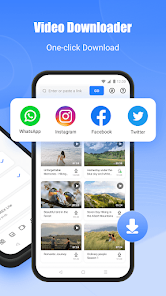
- ⭐ Beyond simple file transfers, SHAREit includes a built-in video player that supports subtitles and gesture controls, plus a file cleaner that removes junk files. Xender offers some similar extras, but SHAREit's video player is more polished for streaming downloaded content directly.
pros
- 🌟 SHAREit's transfer speed is its biggest win — it's faster than most competitors like Xender or Zapya, especially when moving very large files. I've had consistent speeds of over 20MB/s in real-world use, while Xender sometimes drops to half that.
- 🌟 The app allows batch sending of hundreds of files at once, which is rare even among similar apps. Send Anywhere limits batch sizes, and Bluetooth often fails on large batches, so this makes SHAREit better for heavy users.
- 🌟 SHAREit includes a feature to backup contacts, SMS, and call logs, which is something apps like Files by Google don't offer. It's a handy extra if you're switching phones and want a one-stop backup tool.
cons
- ⚠️ SHAREit is quite heavy on ads and promotional content, including full-screen pop-ups and sponsored app suggestions. Xender is much cleaner in comparison, with ads that are less intrusive and hidden in menus.
- ⚠️ The app often pushes a lot of irrelevant features like auto-play video feeds and trending content, making the interface feel cluttered. Send Anywhere keeps things minimal with just a transfer-focused design, which is better for users who don't want extra noise.
- ⚠️ Privacy is a concern — SHAREit has been criticized in the past for collecting user data and permissions more than necessary. Files by Google by Google has better privacy controls and is more transparent about what data it uses, making it a safer pick for privacy-conscious users.
Recommended Apps
![]()
16Personalities
16Personalities4
![]()
Zodiac Palm Reader: MagicWay
Reatility Media4.6
![]()
Moblo - 3D furniture modeling
MYTIforge4.1![]()
Magnifier Plus with Flashlight
Digitalchemy, LLC4.6![]()
QR Code Scanner
QR Code Scanner & Barcode Reader4.7![]()
FalFal: Astrology, Tarot, Love
FalFal Team4.8![]()
Christmas Photo Frames
PhotoFramesApps4.6![]()
AI Video Art Creator - Livensa
FERASET4.5![]()
Horoscope of Birth
Denimaks4.4![]()
Make Me Bald Prank
AppTornado2.5![]()
Kling AI: AI Image&Video Maker
Lohas Games Pte. Ltd.4.4![]()
Japan Timetable & Route Search
NAVITIME JAPAN CO., LTD.4.3![]()
Prank Call & Funny Video
TeH Software0![]()
Parallax 3D Live Wallpapers
TarrySoft4.3![]()
AI Chatbot - Nova
ScaleUp4.7















Disclaimer
1.AppInfoLibrary does not represent any developer, nor is it the developer of any App or game.
2.AppInfoLibrary provide custom reviews of Apps written by our own reviewers, and detailed information of these Apps, such as developer contacts, ratings and screenshots.
3.All trademarks, registered trademarks, product names and company names or logos appearing on the site are the property of their respective owners.
4. AppInfoLibrary abides by the federal Digital Millennium Copyright Act (DMCA) by responding to notices of alleged infringement that complies with the DMCA and other applicable laws.
5.If you are the owner or copyright representative and want to delete your information, please contact us info@appinfolibrary.com.
6.All the information on this website is strictly observed all the terms and conditions of Google Ads Advertising policies and Google Unwanted Software policy .














