

Snapchat

1B+
Installs
Snap Inc
Developer
-
Social
Category
-
Teen
Content Rating
-
snapchat@snap.com
Developer Email
-
http://www.snapchat.com/privacy
Privacy Policy
Screenshots


editor reviews
Snapchat is a multimedia messaging app that's really carved out its own space in social media. Instead of posts living forever, everything here disappears after you view it — photos, videos, and even text chats vanish by default, which changes how people talk to each other. You'd download it from Google Play or the App Store, and it's free to install with over a billion downloads. After signing up with your name and birthday, you're asked to verify your phone number, and then Snapchat asks for access to your camera and contacts right away. The first time you open it, the camera screen greets you immediately, which feels pretty straightforward, though the interface around it can be a lot at first glance with all the icons and buttons.
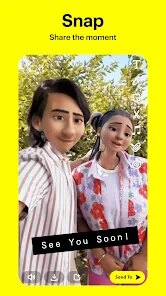
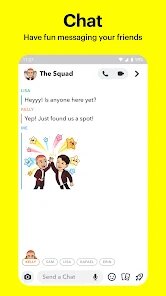
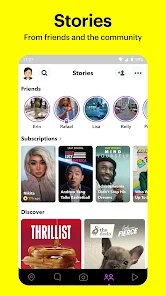
Once you're actually using it, your day-to-day flow is mostly sending what they call "Snaps" — basically pictures or short videos you can doodle on or add text to before sending to friends. You tap the big circle to take a photo, hold it for a video, and then pick who gets it. The chat section stores conversations, but they clear out when you close them unless you save something. Swiping left takes you to the Stories section where you can see what friends posted, and swiping right opens the Discover tab with news and content from publishers, which can get a bit cluttered. A thing I noticed early on is that Snapchat has a pretty steep learning curve — the navigation isn't obvious, and you'll probably need a few days to remember which swipe does what. One tip is to hold down on a friend's Bitmoji in the chat list to start a quick conversation without digging through menus.
After using it for a while, I can see why people get hooked. It's great for casual, everyday communication where you don't want the pressure of permanent texts or likes. Teens and younger adults love it because it feels less serious than Instagram or Facebook — you can send a dumb selfie or a random video of your lunch without thinking twice. That said, if you prefer structured feeds or in-depth profile pages, you might find Snapchat chaotic and overwhelming. Compared to something like WhatsApp or iMessage, the disappearing aspect makes conversations feel lighter and more spontaneous, but also less meaningful over time. I've kept it installed mainly because a few close friends only use Snapchat, but I can see why some people uninstall it after a week — the interface is honestly pretty messy, and the constant notifications from Discover can get annoying. It's not for everyone, but for quick, fun chats, nothing else quite works the same way.
features
- 😎 Snapchat's core feature of disappearing messages creates a low-pressure environment for sharing everyday moments, which is a big shift from Instagram's permanent feed. You don't have to worry about curating a perfect profile.
- 😎 The camera-first design launches straight into shooting mode, unlike WhatsApp or Messenger where you first open a chat and then tap to attach. It makes sending a quick photo feel instant and natural.
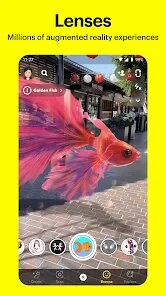
- 😎 AR filters and lenses are way more advanced here than what you'll find on Instagram Stories. Snapchat updates them frequently with stuff like world lenses and interactive games, so you can do more than just add dog ears to your face.
- 😎 Snap Map lets you share your location in real-time with close friends, showing where you are on a full map. Facebook or WhatsApp don't have this feature built in the same casual, friend-focused way.
pros
- 🔥 Privacy by design: The auto-delete default means fewer permanent records of your chats. Other apps like iMessage archive everything unless you manually delete threads, which can feel cluttered long-term.
- 🔥 Casual vibe: Streaks and silly filters make conversation feel playful rather than performative. On TikTok or Instagram, there's more pressure to post high-quality content, but Snapchat encourages raw, unfiltered sharing.
- 🔥 Quick photo-sharing: The interface prioritizes sending photos over typing text, which is the opposite of apps like Telegram. It's perfect for showing someone what you're doing right now without writing a paragraph.
cons
- 💔 Confusing interface: Swiping left and right into different sections takes time to learn, whereas Instagram has a much cleaner bottom navigation bar. Many new users get lost looking for friends or saved snaps.
- 💔 Cluttered Discover tab: Sponsored stories and publisher content flood this section, making it feel like you're fighting through ads. TikTok's For You page feels more curated with actual content you engage with.
- 💔 Limited desktop support: Snapchat is phone-only for direct messaging, while WhatsApp Web lets you seamlessly chat from a laptop. This makes it inconvenient if you want to check messages during work without picking up your phone.
- 💔 Memory issues: The app drains battery quickly and can lag on older phones, especially when using heavy lenses. Facebook Messenger is generally lighter on resources in my experience.
Recommended Apps
![]()
16Personalities
16Personalities4
![]()
Zodiac Palm Reader: MagicWay
Reatility Media4.6
![]()
Moblo - 3D furniture modeling
MYTIforge4.1![]()
Magnifier Plus with Flashlight
Digitalchemy, LLC4.6![]()
QR Code Scanner
QR Code Scanner & Barcode Reader4.7![]()
FalFal: Astrology, Tarot, Love
FalFal Team4.8![]()
Christmas Photo Frames
PhotoFramesApps4.6![]()
AI Video Art Creator - Livensa
FERASET4.5![]()
Horoscope of Birth
Denimaks4.4![]()
Make Me Bald Prank
AppTornado2.5![]()
Kling AI: AI Image&Video Maker
Lohas Games Pte. Ltd.4.4![]()
Japan Timetable & Route Search
NAVITIME JAPAN CO., LTD.4.3![]()
Prank Call & Funny Video
TeH Software0![]()
Parallax 3D Live Wallpapers
TarrySoft4.3![]()
AI Chatbot - Nova
ScaleUp4.7















Disclaimer
1.AppInfoLibrary does not represent any developer, nor is it the developer of any App or game.
2.AppInfoLibrary provide custom reviews of Apps written by our own reviewers, and detailed information of these Apps, such as developer contacts, ratings and screenshots.
3.All trademarks, registered trademarks, product names and company names or logos appearing on the site are the property of their respective owners.
4. AppInfoLibrary abides by the federal Digital Millennium Copyright Act (DMCA) by responding to notices of alleged infringement that complies with the DMCA and other applicable laws.
5.If you are the owner or copyright representative and want to delete your information, please contact us info@appinfolibrary.com.
6.All the information on this website is strictly observed all the terms and conditions of Google Ads Advertising policies and Google Unwanted Software policy .














