

Spotify: Music and Podcasts

1,000,000,000+
Installs
Spotify AB
Developer
-
Entertainment
Category
-
Rated for 12+
Content Rating
-
support@spotify.com
Developer Email
-
https://www.spotify.com/legal/privacy-policy/
Privacy Policy
Screenshots
editor reviews
I've been using Spotify on and off for years, so when I finally decided to give it a dedicated spot on my phone again, I knew what I was getting into. It's a music and podcast streaming app, one of the biggest players in the game, and honestly, it feels like the default choice for a lot of people. You download it from Google Play or the App Store for free, and the install count is astronomical—over a billion downloads. After launching, the first impression is pretty polished. It asks you to pick your favorite artists and genres right away, which is smart because it helps the app start building your recommendations before you even play a track. You can sign up with Google, Facebook, or an email, and while the free tier works, you'll be hit with occasional ads and limited skips. The main draw for most users is either the massive catalog of music or the huge library of podcasts, all in one place.
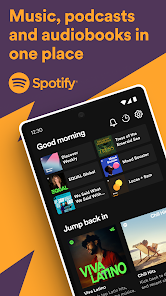
Getting hands-on with it, the interface is generally clean but can feel a bit cluttered in the beginning. The home screen shows you a mix of recent listens, recommended playlists, and new releases. The navigation bar at the bottom is simple: Home, Search, Your Library, and a Premium icon if you haven't upgraded. Searching for a song or artist is fast, and the results are well-organized. A common flow goes something like tapping a song, adding it to a queue or a playlist, and then letting the algorithm take over. The "Daily Mix" playlists are a practical touch—they update automatically based on your listening habits, so you rarely have to manually build a playlist. One small tip: long-pressing any song gives you quick access to save it, add to queue, or share it. The experience is smooth, but the free version can get annoying when an ad interrupts a good run or a study session. The mobile apps work fine offline if you pay for downloads, but it's a solid daily driver for most people.
After using it for a while, I can see why it's so popular, but I also see its limits. It's perfect for someone who loves discovering new music or follows a ton of artists, because the social and sharing features make it easy to see what friends are listening to. On the flip side, if you care deeply about audio quality, apps like Tidal or Qobuz offer lossless streaming, which Spotify still lacks. The free tier is functional but pushy, and the constant upselling to Premium can feel relentless. I ended up keeping it installed because of the playlist curation and the podcast integration, but if I were a hardcore audiophile or someone who only listens to a few albums on repeat, I could easily switch to something simpler. It's a great all-rounder, but not the best for every niche.
features
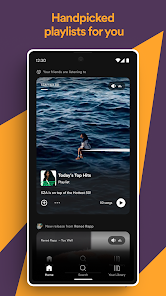
- 🎵 Curated Playlists: Spotify's "Discover Weekly" and "Daily Mix" are generated from your listening history and feel surprisingly accurate. It's like having a friend who actually knows your taste. Apple Music's "For You" mixes try something similar but don't feel as personal or varied.
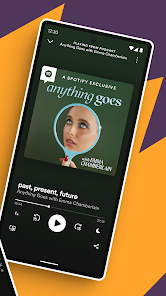
- 🎵 Podcast Integration: Instead of juggling between a separate podcast app and a music app, Spotify puts both in one interface. The search results blend episodes and albums, which is convenient. Pocket Casts, for example, is better for podcast management alone, but you'd lose the music side.
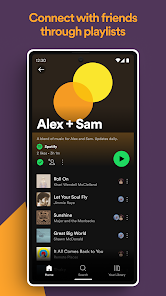
- 🎵 Social Listening: You can see what friends are playing, share playlists publicly, and even collaborate on them in real time. Deezer and Amazon Music lack this social layer, making Spotify feel more like a community than just a jukebox.
- 🎵 Cross-Device Control: Spotify Connect lets you switch playback between your phone, laptop, speaker, or even a PlayStation without losing your place. Tidal's similar feature works too, but Spotify's ecosystem has more compatible devices overall.
pros
- 👍 Massive Catalog: Spotify has more songs and podcasts than almost any competitor. Apple Music might match it on music, but Spotify's podcast library is much richer, including exclusive shows from popular creators.
- 👍 Free Tier Is Generous: Unlike Tidal or Amazon Music, which lock almost everything behind a paywall, Spotify's free version gives you full access to the catalog with only ads and limited skips. Great for casual listeners on a budget.
- 👍 Algorithm Recommendations: The "Discover Weekly" playlist is the standout feature. Apple Music's algorithmic picks are decent, but they don't feel as tailored to my specific moods or listening patterns as Spotify's do.
- 👍 Community Features: Shared playlists and listening parties make it easy to connect with friends. Deezer has a "Mood" feature, but it doesn't build the same sense of shared music culture.
cons
- 👎 Audio Quality Falls Short: Spotify's highest quality setting is 320 kbps Ogg Vorbis, while Tidal offers CD-quality lossless and even hi-res audio. For anyone with good headphones, the difference is noticeable in complex tracks.
- 👎 Free Tier Ads Are Annoying: The ads on the free version are frequent and often loud compared to the music, and you can't skip tracks freely. Pandora's free tier also has ads, but you can skip more songs without paying.
- 👎 No Lossless Option: Apple Music now includes lossless audio at no extra cost, but Spotify still forces you to pay for a service that offers worse audio quality. It feels like they're testing your patience on purpose.
- 👎 Clunky Local File Management: If you want to play songs you own that aren't on Spotify, you have to download them to your computer and sync them through a local network. Amazon Music handles personal uploads more smoothly in the cloud.
Recommended Apps
![]()
16Personalities
16Personalities4
![]()
Zodiac Palm Reader: MagicWay
Reatility Media4.6
![]()
Moblo - 3D furniture modeling
MYTIforge4.1![]()
Magnifier Plus with Flashlight
Digitalchemy, LLC4.6![]()
QR Code Scanner
QR Code Scanner & Barcode Reader4.7![]()
FalFal: Astrology, Tarot, Love
FalFal Team4.8![]()
Christmas Photo Frames
PhotoFramesApps4.6![]()
AI Video Art Creator - Livensa
FERASET4.5![]()
Horoscope of Birth
Denimaks4.4![]()
Make Me Bald Prank
AppTornado2.5![]()
Kling AI: AI Image&Video Maker
Lohas Games Pte. Ltd.4.4![]()
Japan Timetable & Route Search
NAVITIME JAPAN CO., LTD.4.3![]()
Prank Call & Funny Video
TeH Software0![]()
Parallax 3D Live Wallpapers
TarrySoft4.3![]()
AI Chatbot - Nova
ScaleUp4.7















Disclaimer
1.AppInfoLibrary does not represent any developer, nor is it the developer of any App or game.
2.AppInfoLibrary provide custom reviews of Apps written by our own reviewers, and detailed information of these Apps, such as developer contacts, ratings and screenshots.
3.All trademarks, registered trademarks, product names and company names or logos appearing on the site are the property of their respective owners.
4. AppInfoLibrary abides by the federal Digital Millennium Copyright Act (DMCA) by responding to notices of alleged infringement that complies with the DMCA and other applicable laws.
5.If you are the owner or copyright representative and want to delete your information, please contact us info@appinfolibrary.com.
6.All the information on this website is strictly observed all the terms and conditions of Google Ads Advertising policies and Google Unwanted Software policy .














