

iHeart: Music, Radio, Podcasts

50,000,000+
Installs
iHeartMedia, Inc.
Developer
-
Entertainment
Category
-
Rated for 12+
Content Rating
-
android@iheartradio.com
Developer Email
-
https://www.iheart.com/privacy
Privacy Policy
Screenshots
editor reviews
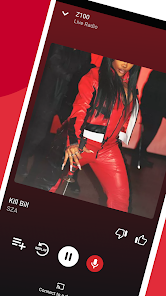
I first picked up iHeart: Music, Radio, Podcasts because I was tired of hopping between different apps just to get my daily fix of talk shows and music. It's essentially a digital radio and podcast hub, letting you stream live AM/FM stations from across the country, plus a massive library of on-demand podcasts and artist-curated playlists. Available as a free download on both Google Play and the App Store, it's been installed over 100 million times, so it's clearly not some niche thing. Once you launch it, the first thing that hits you is how busy the home screen is — it throws trending shows, local stations, and personalized picks right at your face. You don't have to sign up immediately to start listening, which is a relief, but skipping ads requires creating a free account. I'd say the first impression is a bit overwhelming, but also promising if you're into variety.
After a week of using it, the actual experience felt more like exploring a sprawling archive than using a typical radio app. The interface has a dark theme by default, which I like, but navigating from the “Live Radio” tab to the “Podcasts” section isn't always super intuitive — sometimes I'd accidentally tap a playlist when I meant to browse stations. The onboarding process guides you through picking favorite genres and shows, so your feed starts looking sensible quickly. A typical morning for me involves tapping the “For You” tab, which serves a mix of episodes based on my listening history, and then using the search bar to catch up on a specific news podcast. One neat trick I discovered: you can save entire radio stations and podcasts to your library, so they're easy to access later. However, the app does feel a bit sluggish when switching between audio streams, especially if your connection is spotty. I also noticed that skipping tracks on live radio is limited, which makes sense for broadcast, but still feels restrictive compared to on-demand playlists.
After sticking with it for a while, I can see why some people keep it installed and why others delete it. If you love traditional radio — like hearing a morning show from your hometown or a sports broadcast from the other coast — this app is honestly better than most dedicated radio apps because of its sheer coverage. On the flip side, if you're purely a podcast junkie who values clean organization, something like Pocket Casts or Overcast feels more polished and snappier. iHeart's biggest strength is its variety, but that can also make it feel bloated. I personally keep it around for live sports coverage and the occasional jukebox session, but I don't use it every day. It's a solid all-in-one, but I wouldn't call it the best at any single thing.
features
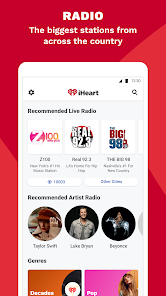
- 🎙 Live Radio on Steroids — Unlike Spotify, which focuses on algorithm-driven playlists, iHeart pulls in actual terrestrial radio stations from every major market. You can listen to a New York hip-hop station one minute and a Nashville country show the next, which feels alive and unpredictable.
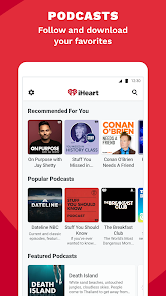
- 📻 Podcast Library That Merges with Radio — The app blends podcasts and live streams in your feed, so you don't have to switch contexts. For example, you can start a podcast episode, then seamlessly switch to a live broadcast of the same host's show — something Apple Podcasts doesn't offer.
- 🔊 Personalized Artist Radio — This is the standout feature: you can type in any artist name and iHeart builds a custom radio station around their style. It's smoother than Pandora's equivalent, with fewer repetitive tracks, and it learns your dislikes fast when you skip songs.
pros
- 💡 Massive Content Library — iHeart outperforms TuneIn Radio because it combines thousands of live stations with a podcast catalog that rivals Spotify's. You rarely hit a dead end searching for a show or genre.
- 📡 Local Focus Without Sacrificing Reach — While Apple Music is global and impersonal, iHeart lets you tune into your exact city's traffic updates or a community talk show. It keeps that local radio vibe alive.
- 🎧 Free Tier Is Generous — Unlike SiriusXM, which locks most live content behind a paywall, iHeart lets you listen to hundreds of stations for free with only occasional ads. You don't feel nickel-and-dimed.
cons
- ⚠️ Cluttered User Interface — The app tries to cram too much on one screen, making it easy to accidentally tap a podcast instead of a radio station. Smaller apps like Podcast Republic feel cleaner and more focused.
- 🐌 Performance Hiccups — Switching between live streams and podcasts can cause buffering delays or app freezes, especially on older phones. Spotify handles transitions much more smoothly.
- 🔇 Limited Offline Support — You can't download live radio for offline listening, which is a letdown if you commute through tunnels or areas with weak signal. Overcast lets you save tons of podcasts without that restriction.
Recommended Apps
![]()
16Personalities
16Personalities4
![]()
Zodiac Palm Reader: MagicWay
Reatility Media4.6
![]()
Moblo - 3D furniture modeling
MYTIforge4.1![]()
Magnifier Plus with Flashlight
Digitalchemy, LLC4.6![]()
QR Code Scanner
QR Code Scanner & Barcode Reader4.7![]()
FalFal: Astrology, Tarot, Love
FalFal Team4.8![]()
Christmas Photo Frames
PhotoFramesApps4.6![]()
AI Video Art Creator - Livensa
FERASET4.5![]()
Horoscope of Birth
Denimaks4.4![]()
Make Me Bald Prank
AppTornado2.5![]()
Kling AI: AI Image&Video Maker
Lohas Games Pte. Ltd.4.4![]()
Japan Timetable & Route Search
NAVITIME JAPAN CO., LTD.4.3![]()
Prank Call & Funny Video
TeH Software0![]()
Parallax 3D Live Wallpapers
TarrySoft4.3![]()
AI Chatbot - Nova
ScaleUp4.7















Disclaimer
1.AppInfoLibrary does not represent any developer, nor is it the developer of any App or game.
2.AppInfoLibrary provide custom reviews of Apps written by our own reviewers, and detailed information of these Apps, such as developer contacts, ratings and screenshots.
3.All trademarks, registered trademarks, product names and company names or logos appearing on the site are the property of their respective owners.
4. AppInfoLibrary abides by the federal Digital Millennium Copyright Act (DMCA) by responding to notices of alleged infringement that complies with the DMCA and other applicable laws.
5.If you are the owner or copyright representative and want to delete your information, please contact us info@appinfolibrary.com.
6.All the information on this website is strictly observed all the terms and conditions of Google Ads Advertising policies and Google Unwanted Software policy .














