

SiriusXM: Music, Sports & News

10,000,000+
Installs
Sirius XM Radio Inc
Developer
-
Entertainment
Category
-
Rated for 12+
Content Rating
-
listenercare@siriusxm.com
Developer Email
-
http://www.siriusxm.com/pdf/siriusxm_privacypolicy_eng.pdf
Privacy Policy
Screenshots


editor reviews
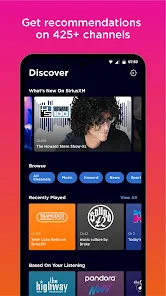
So you've probably heard of SiriusXM — it's that satellite radio service that's been around forever in cars. But the mobile app is a whole different beast. It's basically a streaming hub for music, live sports, news, talk shows, and even comedy. You don't need a satellite subscription to use it either; there's a free tier with limited channels, plus paid plans for full access. After downloading it from Google Play or the App Store (it's free to install, with in-app purchases and ads on the free version), the first thing that hits you is the sheer amount of content. The home screen throws channel tiles, curated playlists, and sports schedules at you all at once. It feels a bit overwhelming honestly, like walking into a giant radio station with a hundred rooms. But if you already know what you want — say, Howard Stern or NFL games — it's pretty straightforward.
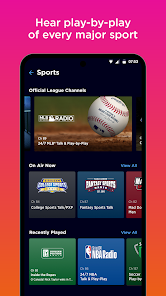
Once you start using it, the experience is mixed. The interface is clean but crowded. When you open it, there's a “Live” tab that shows what's playing right now, and a “Browse” tab where you can explore by genre like music, sports, news, or talk. Tapping a channel starts streaming instantly, which is nice. For sports fans, this is where the app shines. You can follow specific teams, set alerts for games, and listen to live play-by-play without any delay. The search function works fine, though sometimes finding a specific show or host takes a few tries. A small tip: if you're on the free tier, expect ads every few songs, and some channels are locked. The paid version removes ads and unlocks everything, but the app doesn't push you too hard to upgrade during use. The only real friction I hit was occasionally buffering on cellular data, but on Wi-Fi it's smooth.
After using it for a couple weeks, I'd say this app is best for people who already love live radio and sports commentary. If you're the type who enjoys flipping through stations while driving or just wants background noise during work, SiriusXM feels right at home. But if you're a serious music streaming person, you'll probably stick with Spotify or Apple Music since they have on-demand libraries and better playlists. What sets SiriusXM apart is the live, human-curated content — you get actual DJs, real-time talk shows, and sports coverage that feels immediate. I kept it installed mainly for NFL Sundays and the occasional comedy channel. The free version is solid for casual listening, but if you want full access, the subscription cost might make you pause. It's not for everyone, but for fans of talk radio and live sports, nothing else quite matches it.
features
- 🎧 Live sports without the subscription haggling — Unlike TuneIn Radio or iHeartRadio, SiriusXM gives you live play-by-play for NFL, MLB, NBA, and NHL without needing a separate sports add-on. Just tap your team and you're in. No blackouts for out-of-market games either, which is a huge win.
- 🎧 Massive on-demand library — While other radio apps are mostly live streams, SiriusXM stores thousands of shows and interviews. You can search for old Howard Stern episodes, concert recordings, or past sports analysis. This is something Spotify can't match since it doesn't do talk radio archives.
- 🎧 Car integration that actually works — The app syncs seamlessly with car systems via Bluetooth, and the streaming quality is solid even on highway long drives. Compared to Pandora, which sometimes drops connection, SiriusXM keeps a steady feed. Plus, the app remembers where you left off in a show when you turn the car back on.
pros
- ✅ No algorithm fatigue — Unlike Spotify or Apple Music that push playlists based on your history, SiriusXM has real human DJs and program directors. So you won't get stuck in a music loop. It feels more like flipping through real radio, which is refreshing if you're tired of algorithms.
- ✅ Better for live events — For sports and breaking news, TuneIn Radio has delays and sometimes cuts out. SiriusXM streams with minimal lag, and the commentary is often the same feed you'd get on satellite. You hear every touchdown or news bulletin as it happens.
- ✅ Works offline too — You can download certain shows and music channels to listen without data. That's something iHeartRadio doesn't offer for free. Great for flights or areas with bad cellular coverage.
cons
- ❌ Too expensive for casual users — The paid plan costs around $10-15 a month, which is steep compared to Spotify Premium or Apple Music at similar prices. If you only listen to music, it's hard to justify. Pandora's free tier offers more music variety without the price tag.
- ❌ Free tier is very limited — You get maybe 10-20 channels, heavy ads, and no on-demand access. TuneIn Radio's free version gives you way more live stations and sports coverage without a subscription. SiriusXM feels stingy unless you pay.
- ❌ Search and discovery could be better — Finding a specific show or episode is clunky. The app doesn't let you search by host name easily, and the “recommended for you” section often feels random. Spotify solves this with its smart playlists and podcast integration.
Recommended Apps
![]()
16Personalities
16Personalities4
![]()
Zodiac Palm Reader: MagicWay
Reatility Media4.6
![]()
Moblo - 3D furniture modeling
MYTIforge4.1![]()
Magnifier Plus with Flashlight
Digitalchemy, LLC4.6![]()
QR Code Scanner
QR Code Scanner & Barcode Reader4.7![]()
FalFal: Astrology, Tarot, Love
FalFal Team4.8![]()
Christmas Photo Frames
PhotoFramesApps4.6![]()
AI Video Art Creator - Livensa
FERASET4.5![]()
Horoscope of Birth
Denimaks4.4![]()
Make Me Bald Prank
AppTornado2.5![]()
Kling AI: AI Image&Video Maker
Lohas Games Pte. Ltd.4.4![]()
Japan Timetable & Route Search
NAVITIME JAPAN CO., LTD.4.3![]()
Prank Call & Funny Video
TeH Software0![]()
Parallax 3D Live Wallpapers
TarrySoft4.3![]()
AI Chatbot - Nova
ScaleUp4.7















Disclaimer
1.AppInfoLibrary does not represent any developer, nor is it the developer of any App or game.
2.AppInfoLibrary provide custom reviews of Apps written by our own reviewers, and detailed information of these Apps, such as developer contacts, ratings and screenshots.
3.All trademarks, registered trademarks, product names and company names or logos appearing on the site are the property of their respective owners.
4. AppInfoLibrary abides by the federal Digital Millennium Copyright Act (DMCA) by responding to notices of alleged infringement that complies with the DMCA and other applicable laws.
5.If you are the owner or copyright representative and want to delete your information, please contact us info@appinfolibrary.com.
6.All the information on this website is strictly observed all the terms and conditions of Google Ads Advertising policies and Google Unwanted Software policy .














