

Pandora - Music & Podcasts

100,000,000+
Installs
Pandora
Developer
-
Entertainment
Category
-
Rated for 12+
Content Rating
-
pandora-support@pandora.com
Developer Email
-
http://www.pandora.com/privacy
Privacy Policy
Screenshots
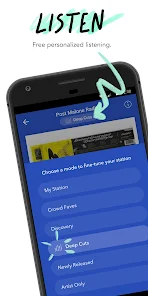
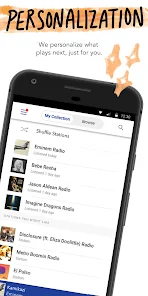
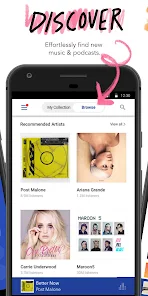
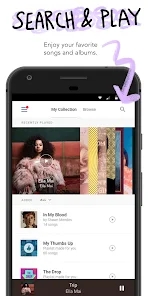
editor reviews
Pandora is a music and podcast streaming app that's been around for a long time, designed mainly for casual listening rather than active browsing. You fire it up when you want some background tunes or a specific vibe, without spending minutes picking out tracks. I first downloaded it from the Google Play Store maybe years ago, and honestly, it had hundreds of millions of installs at that point. No payment needed to start, just a quick sign-up with an email or Google account. My first impression after launching it was a bit of a throwback — the interface looked like a clean, pink-and-white radio station, not a library full of albums. You pick a song or artist you like, and it starts building a “station” around that sound, which immediately felt familiar and low-pressure, no search bar required at this stage.
Using Pandora day-to-day is mostly hands-off once you've set your stations. The main screen greets you with recently played stations and a few recommendations, but the cool part is the “thumb” system. You hear a song you enjoy, you hit the thumbs-up icon, and the station slowly adjusts to include similar styles. Thumbs-down skips fast too. I noticed you only get six skips an hour on the free version, which is a bummer if you're picky, but the ad breaks are short — usually 15 to 30 seconds. Creating a new station from scratch takes two seconds: you type in an artist like “Hozier,” and it immediately loads a playlist of that artist plus similar ones like The Lumineers. The podcast section is tucked in a separate tab, but it's surprisingly tidy — just tap and play, no episode management needed. What bugged me was the shuffle mode when listening to a station I'd heavily tuned; sometimes it repeated songs too often. But for moments when I'm cooking or gardening, it's exactly the kind of app that just runs in the background without needing my eyes glued to a screen.
After a few months, I'd say Pandora is best for people who just want music playing and hate decision fatigue. You don't need to curate anything actively, which is rare now compared to giants like Spotify or Apple Music where you build playlists and follow releases. Who wouldn't enjoy it? Probably folks who adore picking each song themselves and have specific daily rotation habits. What sets Pandora apart is its Music Genome Project — the algorithm digs into acoustic qualities like tempo or instrumentation, so a station starting with “Billie Eilish” might drift into “Lana Del Rey” unexpectedly but it clicks musically. On the flip side, I ended up uninstalling it after a few months because I wanted to save exact songs, and the free version's skip limit got old during work hours. It's not a replacement for on-demand apps, but as a digital radio that requires zero decision-making, it's hard to beat. I can see casual listeners keeping it forever, while power users might move on quickly.
features
- 🎵 Pandora's Music Genome Project analyzes songs by hundreds of musical attributes — like rhythm, instrumentation, and vocal style — instead of just genre tags. In contrast, Spotify relies heavily on collaborative filtering and user playlists. So while Spotify suggests based on what others with similar taste picked, Pandora suggests based on actual sound structure. That makes Pandora stations feel eerily accurate when you want something new but familiar.
- 🎵 The “thumbs” system is way simpler than Spotify's “Like” or “Add to Playlist” workflow. You just give a thumbs up or down per song, and the station adapts immediately. There's no need to create or manage a library. Spotify, by comparison, requires active curation to shape discovery. Pandora is almost zero maintenance in comparison.
- 🎵 Pandora offers deep personalization per station, whereas something like Apple Music relies on curated playlists from editors. With Pandora, you can fine-tune a station's vibe by adding more “seed” artists or using the “Variety” slider to play more or less diverse tracks. Apple Music doesn't give you that granular dial for a single station's flavor.
pros
- ✅ Pandora's free tier is genuinely usable without paying a cent. Compared to Spotify's free version, which heavily restricts mobile playback and shuffling, Pandora lets you pick stations and listen for hours with only short ads. It's a better experience for someone not ready to subscribe.
- ✅ The discovery algorithm feels more serendipitous than competitors. Where YouTube Music often gets stuck in a loop of the exact same artists, Pandora's genome approach often pulls in songs you've never heard but that fit the mood perfectly. It feels less predictable.
- ✅ No playlist anxiety. With services like Tidal or Deezer, you almost need to continuously manage collections. Pandora just plays, and you can tune it slightly. That's a major ease-of-use win for passive listeners.
cons
- ❌ Skips are severely limited on the free version — only six per hour. Spotify's free mobile also has some limits, but on desktop, Spotify lets you skip freely. This makes Pandora frustrating if a station plays a song you dislike multiple times in a row.
- ❌ Pandora's catalog isn't as deep for older or extremely niche music. I've found recent indie releases or obscure remixes missing, while Apple Music and Tidal almost always have them. Its strength is mainstream and legacy acts, not edge cases.
- ❌ You can't truly pick exact songs to play on demand unless you pay for Pandora Premium. Even Spotify's free version lets you play specific tracks (with ads). Pandora feels stuck in a radio-only model, which feels limiting to anyone wanting control over what comes next.
Recommended Apps
![]()
16Personalities
16Personalities4
![]()
Zodiac Palm Reader: MagicWay
Reatility Media4.6
![]()
Moblo - 3D furniture modeling
MYTIforge4.1![]()
Magnifier Plus with Flashlight
Digitalchemy, LLC4.6![]()
QR Code Scanner
QR Code Scanner & Barcode Reader4.7![]()
FalFal: Astrology, Tarot, Love
FalFal Team4.8![]()
Christmas Photo Frames
PhotoFramesApps4.6![]()
AI Video Art Creator - Livensa
FERASET4.5![]()
Horoscope of Birth
Denimaks4.4![]()
Make Me Bald Prank
AppTornado2.5![]()
Kling AI: AI Image&Video Maker
Lohas Games Pte. Ltd.4.4![]()
Japan Timetable & Route Search
NAVITIME JAPAN CO., LTD.4.3![]()
Prank Call & Funny Video
TeH Software0![]()
Parallax 3D Live Wallpapers
TarrySoft4.3![]()
AI Chatbot - Nova
ScaleUp4.7















Disclaimer
1.AppInfoLibrary does not represent any developer, nor is it the developer of any App or game.
2.AppInfoLibrary provide custom reviews of Apps written by our own reviewers, and detailed information of these Apps, such as developer contacts, ratings and screenshots.
3.All trademarks, registered trademarks, product names and company names or logos appearing on the site are the property of their respective owners.
4. AppInfoLibrary abides by the federal Digital Millennium Copyright Act (DMCA) by responding to notices of alleged infringement that complies with the DMCA and other applicable laws.
5.If you are the owner or copyright representative and want to delete your information, please contact us info@appinfolibrary.com.
6.All the information on this website is strictly observed all the terms and conditions of Google Ads Advertising policies and Google Unwanted Software policy .














