

Wise: International Transfers

10M+
Installs
Wise Payments Ltd.
Developer
-
Finance
Category
-
Everyone
Content Rating
-
support@wise.com
Developer Email
-
https://wise.com/privacy-policy
Privacy Policy
Screenshots


editor reviews
I first downloaded Wise because a friend needed to send me money from Australia, and the usual bank route was going to hit us with some nasty fees. Wise is basically a money transfer app that sits between your regular bank and someone else's, letting you send cash across borders using real exchange rates. When you open it for the first time, the interface is clean and minimal, which felt reassuring—no flashy promises, just a straightforward box asking how much you want to send. The app has been installed over 10 million times on Android, and you can grab it for free from both Google Play and the App Store. You do need to sign up with an email or Google account, and while the core sending feature is free to start, there are transfer fees based on the amount and currency. Ads aren't an issue since this isn't that kind of app; instead, you get a clear breakdown of costs before confirming anything.
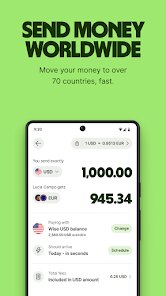
After logging in, the whole experience revolves around that main “Send” button. You tap it, pick the currency you're sending from and the one the recipient will get, then enter the amount. The app immediately shows you the mid-market exchange rate (the one you see on Google) and the total fee, which is a breath of fresh air compared to banks hiding margins. I set up my first transfer to a friend's UK account, and the steps were: add recipient details (just account number and sort code), choose payment method (bank transfer or debit card), and confirm. The interface is buttery smooth, and there's a handy calculator that flips between currencies so you can see exactly what's landing. One small tip: if you link a bank account instead of using a card, the fee drops significantly. The only slightly annoying bit is that for new users, the first transfer might take a day or two while they verify your identity, but after that, most transfers happen in seconds to a few hours.
After sending maybe a dozen transfers in the last six months, I honestly think this app is for anyone who regularly deals with money across borders—freelancers working with overseas clients, expats sending money home, or even people buying property abroad. It's not for someone who only transfers cash once a year, because the fee structure, while fair, still adds up if you're moving small amounts. Compared to something like PayPal, Wise kills it on transparency and rates; PayPal's conversion margin feels like highway robbery once you see Wise's numbers. But where Wise lags is speed for certain corridors—sending to some Asian countries can take two days, whereas a service like Revolut can be instant if both sides have accounts. Still, the reason I keep it installed is that the money actually arrives in the recipient's account without deductions, which you can't say for most banks. The app feels like a utility you trust, not one you get excited about.
features
- 🌐 Real-time mid-market exchange rate – Wise shows you the exact rate you see on Google, not a marked-up version. When I tested sending $500 to a UK account, a bank like HSBC hid almost $15 in the conversion spread. Wise just shows the fee upfront, so you can decide if it's worth it.
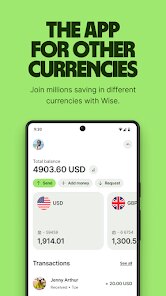
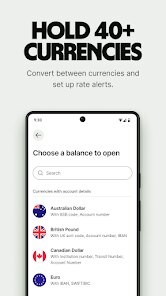
- 📊 Multi-currency account and borderless spending – You can hold over 40 currencies in one place, like a digital wallet. Unlike PayPal, which locks you into one currency and charges a conversion fee for any other, Wise lets you switch between USD, EUR, GBP, and more without extra costs, as long as you're just holding them.
- 🔒 Bank-level security with regulatory oversight – Wise is regulated by the FCA in the UK and other authorities globally, plus the first 2GB of storage is encrypted. When I used TransferWise (now just Wise), I felt safer than with a service like Remitly, which has had some compliance issues in the past. Your money isn't held in a pool; it's actually in dedicated accounts.
pros
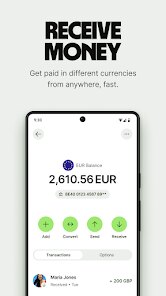
- 🏦 Bank-level account for receiving funds – Wise gives you local bank details (like a US account number or UK sort code) for major currencies, so you can get paid like a local. Facebook Marketplace sellers using PayPal waste money on fees; Wise lets a buyer send directly to your account without conversion losses.
- 📱 Clean, intuitive mobile interface – The app has one job and does it well. Western Union's app feels cluttered with promos and slow loading times; Wise's design is straightforward, with a single “Send” button and a clear fee breakdown that appears instantly.
- ⚡ Fast settlement for popular currency pairs – Transfers between USD, EUR, or GBP usually arrive within hours, sometimes minutes. Compare that to MoneyGram, which can take up to five business days for cross-border transfers without extra fees.
cons
- 📉 Slow processing for less common currency routes – Sending money to Kenya or Thailand in my experience took nearly two days, while a competitor like WorldRemit advertises “instant” delivery for similar corridors. Wise needs to improve its backend network for emerging markets.
- 💳 Card fees eat into savings – If you use a credit or debit card to fund a transfer instead of a bank account, Wise slaps on a 0.3–1% fee, plus a small fixed charge. Revolut offers free card funding for transfers under certain limits, which makes it cheaper for small amounts.
- 📚 No cash pickup option – Wise can only deposit money into a local bank account. If you need to send money to someone without a bank account (like in rural areas), Western Union's cash pickup service is the only way to go, and Wise has no equivalent feature.
Recommended Apps
![]()
16Personalities
16Personalities4
![]()
Zodiac Palm Reader: MagicWay
Reatility Media4.6
![]()
Moblo - 3D furniture modeling
MYTIforge4.1![]()
Magnifier Plus with Flashlight
Digitalchemy, LLC4.6![]()
QR Code Scanner
QR Code Scanner & Barcode Reader4.7![]()
FalFal: Astrology, Tarot, Love
FalFal Team4.8![]()
Christmas Photo Frames
PhotoFramesApps4.6![]()
AI Video Art Creator - Livensa
FERASET4.5![]()
Horoscope of Birth
Denimaks4.4![]()
Make Me Bald Prank
AppTornado2.5![]()
Kling AI: AI Image&Video Maker
Lohas Games Pte. Ltd.4.4![]()
Japan Timetable & Route Search
NAVITIME JAPAN CO., LTD.4.3![]()
Prank Call & Funny Video
TeH Software0![]()
Parallax 3D Live Wallpapers
TarrySoft4.3![]()
AI Chatbot - Nova
ScaleUp4.7















Disclaimer
1.AppInfoLibrary does not represent any developer, nor is it the developer of any App or game.
2.AppInfoLibrary provide custom reviews of Apps written by our own reviewers, and detailed information of these Apps, such as developer contacts, ratings and screenshots.
3.All trademarks, registered trademarks, product names and company names or logos appearing on the site are the property of their respective owners.
4. AppInfoLibrary abides by the federal Digital Millennium Copyright Act (DMCA) by responding to notices of alleged infringement that complies with the DMCA and other applicable laws.
5.If you are the owner or copyright representative and want to delete your information, please contact us info@appinfolibrary.com.
6.All the information on this website is strictly observed all the terms and conditions of Google Ads Advertising policies and Google Unwanted Software policy .














