

Google Home

500,000,000+
Installs
Google LLC
Developer
-
Lifestyle
Category
-
Rated for 3+
Content Rating
-
apps-help@google.com
Developer Email
-
https://policies.google.com/privacy
Privacy Policy
Screenshots
editor reviews
Google Home is a smart home control app from Google LLC that acts as the central hub for managing all your compatible smart devices. You can use it to adjust your thermostat, turn off lights, lock doors, or check security cameras, all from your phone. It's essentially the remote control for your connected home. On both Google Play and the App Store, the app is free to download and has been installed over a billion times, which gives you an idea of how many people rely on it. The first time you launch it, the setup process guides you through linking your Google account and discovering nearby devices. It's a clean, modern interface, but if you have a bunch of different brand gadgets, the initial "add device" step can feel a bit tedious. Still, once everything is synced, the home screen feels like a neat command center.
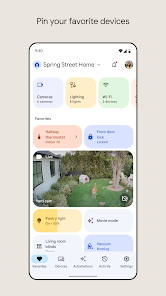
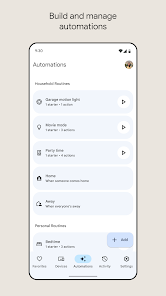
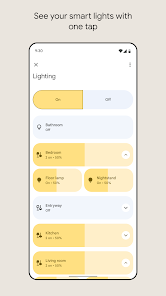
After the initial setup, daily use is pretty straightforward. You open the app and see all your devices grouped by room, like "Living Room" or "Kitchen." Tapping a device lets you control it directly, like dimming a smart bulb or starting a robot vacuum. The real charm, though, is the automation tab. You can create routines like "Good Morning," which turns on the lights, starts the coffee maker, and reads the news with one voice command or a tap. The navigation is mostly smooth, but I've noticed occasional lag when controlling devices from third-party brands. A small tip: pin your most-used devices to the favorites tab for quicker access. It's a small tweak, but it saves a lot of scrolling during your morning rush.
After using Google Home for a while, I'd say it's essential for anyone deeply invested in Google's ecosystem or with a mix of smart devices that need a single dashboard. It shines when you have Nest products, like the Nest Thermostat or Nest Cam, because they integrate seamlessly. But if you're just using one or two smart plugs, you could manage with each brand's individual app. What sets it apart from something like Apple HomeKit is its broader device compatibility and the strong Google Assistant integration. I've kept it installed because the routines feature makes my mornings way easier. That said, I've considered uninstalling it when a third-party device kept disconnecting, forcing me to re-sync everything. It's a powerful tool, but it relies heavily on a stable Wi-Fi network and consistent device firmware updates.
features
- 🧩 Cross-Platform Device Control: Google Home supports a huge range of devices from brands like Philips Hue, TP-Link, and Samsung, letting you manage them all from one app. In contrast, Apple HomeKit is far more restrictive, only working with HomeKit-certified accessories, which limits your hardware choices significantly.
- 🧩 Intuitive Voice Integration: The app is built around Google Assistant, so you can set up and test voice commands directly within the app. For example, you can say "Hey Google, turn off the bedroom fan" after linking a smart fan. Amazon Alexa's app requires a separate skills setup for each device, which feels more fragmented and less seamless.
- 🧩 Smart Scheduling via Routines: The "Routines" feature lets you chain multiple actions under one command, like "Goodnight" locking doors, dimming lights, and setting the alarm. This is more flexible than Samsung SmartThings, which uses a more rigid "scene" system that doesn't allow as many conditional triggers.
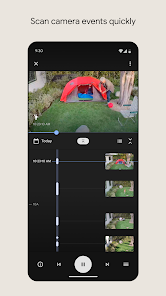
- 🧩 Nest Ecosystem Deep Ties: If you own Nest products (like Nest Cam or Nest Thermostat), the app provides unparalleled control and data insights, such as energy history graphs. Google Home adds unique features like Nest Aware subscription integration, which is absent in generic apps like SmartThings that offer only basic sensor data.
pros
- 💡 Clean and Modern Interface: The app's design is visually appealing with a card-based layout that feels modern and uncluttered. Compared to the Aeotec Smart Home Hub, which has a dated and overly technical interface, Google Home makes smart home control feel approachable for everyday users.
- 💡 Broad Ecosystem Support: It works with thousands of devices across different brands, offering much more flexibility than Apple HomeKit, which locks you into a limited selection of pricey, certified accessories. This means you aren't forced to buy specific gadgets.
- 💡 Seamless Google Services Integration: Everything syncs smoothly with your Google Calendar, Maps, and Gmail. For example, you can set a routine that shows your commute time on a Nest Hub display. This level of integration is a major leg up over Amazon Alexa, which doesn't tie into a personal productivity suite as naturally.
cons
- ⏳ Setup Can Be Tedious with Mixed Brands: Adding devices from brands other than Google often requires multiple steps, like enabling "Works with Google" and entering brand-specific account details. In contrast, Apple HomeKit often allows a simple QR code scan for instant pairing, making the process much faster.
- ⏳ Dependency on Stable Wi-Fi: The app and its connected devices are heavily reliant on a strong internet connection. If your Wi-Fi goes down, you lose control entirely. Local network options, like those in HomeAssistant, give you offline control that Google Home simply cannot match.
- ⏳ Occasional Device Disconnection: I've experienced third-party smart plugs randomly showing as "offline" in the app when they are actually still on. This requires manually re-syncing the device or restarting the app. Amazon Alexa's app seems to handle this more reliably, often maintaining a consistent connection.
Recommended Apps
![]()
16Personalities
16Personalities4
![]()
Zodiac Palm Reader: MagicWay
Reatility Media4.6
![]()
Moblo - 3D furniture modeling
MYTIforge4.1![]()
Magnifier Plus with Flashlight
Digitalchemy, LLC4.6![]()
QR Code Scanner
QR Code Scanner & Barcode Reader4.7![]()
FalFal: Astrology, Tarot, Love
FalFal Team4.8![]()
Christmas Photo Frames
PhotoFramesApps4.6![]()
AI Video Art Creator - Livensa
FERASET4.5![]()
Horoscope of Birth
Denimaks4.4![]()
Make Me Bald Prank
AppTornado2.5![]()
Kling AI: AI Image&Video Maker
Lohas Games Pte. Ltd.4.4![]()
Japan Timetable & Route Search
NAVITIME JAPAN CO., LTD.4.3![]()
Prank Call & Funny Video
TeH Software0![]()
Parallax 3D Live Wallpapers
TarrySoft4.3![]()
AI Chatbot - Nova
ScaleUp4.7















Disclaimer
1.AppInfoLibrary does not represent any developer, nor is it the developer of any App or game.
2.AppInfoLibrary provide custom reviews of Apps written by our own reviewers, and detailed information of these Apps, such as developer contacts, ratings and screenshots.
3.All trademarks, registered trademarks, product names and company names or logos appearing on the site are the property of their respective owners.
4. AppInfoLibrary abides by the federal Digital Millennium Copyright Act (DMCA) by responding to notices of alleged infringement that complies with the DMCA and other applicable laws.
5.If you are the owner or copyright representative and want to delete your information, please contact us info@appinfolibrary.com.
6.All the information on this website is strictly observed all the terms and conditions of Google Ads Advertising policies and Google Unwanted Software policy .














