

Video Editor & Maker - InShot

500,000,000+
Installs
InShot Video Editor
Developer
-
Video Players & Editors
Category
-
Rated for 3+
Content Rating
-
inshot.android@inshot.com
Developer Email
-
http://inshotapp.com/website/InShotAndroid/privacypolicy.html
Privacy Policy
Screenshots
editor reviews
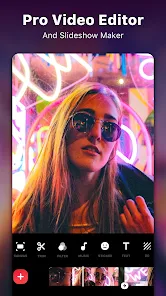
You know when you just want to trim a clip or add a filter without wrestling with some pro-level timeline? That's where InShot comes in. It's a mobile video editing app, available on both Google Play and the App Store, and it's been downloaded over 500 million times. It's free to download and install, though you'll run into ads and a watermark unless you pay for the premium version. The first time you open InShot, it feels pretty straightforward. You're greeted with a clean layout that immediately offers to import a video or photo, or you can swipe over to templates for a quick edit. For a casual user, that's a huge relief. You don't get bombarded with confusing settings or a complicated timeline right away; it just feels like an app that wants to help you get a video out the door.
Actually using InShot day-to-day is pretty smooth. After you import your clip, you land on the main editing screen. The bottom toolbar has all the essentials: trim, split, speed, filters, effects, stickers, and text. Trimming is just a matter of dragging the handles, and changing the speed is a single tap. What I found really useful is the "Cut" and "Split" tools. For example, when I wanted to remove a few awkward seconds in the middle of a clip, I just hit the split button at the right spots, selected the middle piece, and deleted it. No precision timeline needed. The interface is responsive, and even on older phones, the app handles 1080p footage without stuttering. A small tip: you can pinch to zoom in on the timeline for more precise cuts. That's not something they shout about, but once you find it, it makes a big difference.
After using InShot for a few weeks, here's what I think. It's perfect for someone who needs to make quick social media clips, edit a birthday video, or just add some music to a short reel. It's not for anyone who needs multi-track audio, keyframe animations, or advanced color grading. Compared to something like CapCut, InShot feels more contained and less flashy. CapCut has a ton of trendy effects and templates, but InShot feels more like a tool you can actually control. The ads in the free version can be annoying, especially when they pop up right as you're about to export. And the watermark stays unless you pay. But for basic trimming, speed changes, and adding text or music, it does the job better than most. I've kept it installed because it loads fast and doesn't try to do too much. But I can see someone uninstalling if they start wanting more creative control or get tired of the ads.
features
- 🎨 Easy Merge & Trim: InShot makes combining clips or cutting out unwanted parts dead simple. You just drag the ends or tap the split button. CapCut has a similar feature but sometimes lags when you have many clips stacked. InShot's timeline stays responsive, which is nice when you're in a hurry.
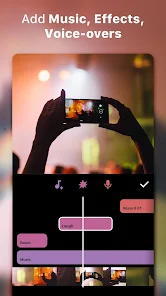
- 🎵 Built-in Music Library: You get a decent selection of royalty-free tracks and sound effects right in the app. You can also import your own music. CapCut offers more trendy songs, but InShot's library feels less cluttered and easier to browse. The standout part is that the music automatically adjusts to the length of your video, so you don't have to manually loop or trim tracks.
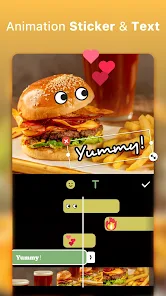
- 🖼️ Straightforward Text & Sticker System: Adding text or stickers is as easy as tapping the right icon. You can resize, rotate, and place them anywhere on the screen. InShot gives you enough fonts and colors without overwhelming you with choices. CapCut has way more text presets, but I find InShot's simpler approach leaves less room for error, especially for a beginner.
pros
- ✅ Cleaner Interface than CapCut: CapCut is great, but its toolbar can feel like a maze with all the hidden menus. InShot keeps everything on the main screen and groups tools logically. You rarely have to dig through submenus to find what you need.
- ✅ Fast Export without Crashing: I've had CapCut crash on me mid-export a couple of times, especially with 4K footage. InShot has been rock solid. It processes exports quickly and doesn't heat up my phone as much. That reliability matters when you're about to post something.
- ✅ Better Aspect Ratio Management: InShot automatically detects your video's original ratio and lets you change it to 1:1, 16:9, 9:16, or custom sizes with a single tap. It also adds blur backgrounds instead of just black bars, which looks more polished than what other apps offer.
cons
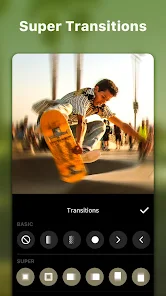
- ❌ More Limited Effects Library: Compared to CapCut which has dozens of trending effects and transitions, InShot's selection feels basic. If you want glitch effects, neon overlays, or fancy zoom transitions, you're better off with VN Video Editor or CapCut. InShot is more for clean, simple edits.
- ❌ Annoying Watermark in Free Version: The InShot watermark is pretty big and stays in a corner of your video for the entire clip. CapCut doesn't put a watermark on exports unless you use certain premium features. For a free user, that's a big difference.
- ❌ No Multi-Track Audio Support: You can only have one music track and one sound effect at a time on the timeline. If you want to layer voiceover over music over sound effects, you'll need to use something like Kinemaster. InShot just doesn't handle that without a workaround.
Recommended Apps
![]()
16Personalities
16Personalities4
![]()
Zodiac Palm Reader: MagicWay
Reatility Media4.6
![]()
Moblo - 3D furniture modeling
MYTIforge4.1![]()
Magnifier Plus with Flashlight
Digitalchemy, LLC4.6![]()
QR Code Scanner
QR Code Scanner & Barcode Reader4.7![]()
FalFal: Astrology, Tarot, Love
FalFal Team4.8![]()
Christmas Photo Frames
PhotoFramesApps4.6![]()
AI Video Art Creator - Livensa
FERASET4.5![]()
Horoscope of Birth
Denimaks4.4![]()
Make Me Bald Prank
AppTornado2.5![]()
Kling AI: AI Image&Video Maker
Lohas Games Pte. Ltd.4.4![]()
Japan Timetable & Route Search
NAVITIME JAPAN CO., LTD.4.3![]()
Prank Call & Funny Video
TeH Software0![]()
Parallax 3D Live Wallpapers
TarrySoft4.3![]()
AI Chatbot - Nova
ScaleUp4.7















Disclaimer
1.AppInfoLibrary does not represent any developer, nor is it the developer of any App or game.
2.AppInfoLibrary provide custom reviews of Apps written by our own reviewers, and detailed information of these Apps, such as developer contacts, ratings and screenshots.
3.All trademarks, registered trademarks, product names and company names or logos appearing on the site are the property of their respective owners.
4. AppInfoLibrary abides by the federal Digital Millennium Copyright Act (DMCA) by responding to notices of alleged infringement that complies with the DMCA and other applicable laws.
5.If you are the owner or copyright representative and want to delete your information, please contact us info@appinfolibrary.com.
6.All the information on this website is strictly observed all the terms and conditions of Google Ads Advertising policies and Google Unwanted Software policy .














