

PayPal - Send, Shop, Manage

100,000,000+
Installs
PayPal Mobile
Developer
-
Finance
Category
-
Rated for 3+
Content Rating
-
+18882211161
Developer Email
-
https://www.paypal.com/webapps/mpp/ua/privacy-full
Privacy Policy
Screenshots
editor reviews
PayPal is essentially a digital wallet and payment platform that lets you send money, make purchases, and manage finances all from your phone. It's one of those apps that many people download because they already have a PayPal account from online shopping or receiving payments from friends. When you first open the app, the interface feels clean and professional, with your balance prominently displayed at the top. The login process can be quick if you use fingerprint or face recognition, but the initial setup might feel a bit cluttered if you haven't linked a bank account or card yet. It's free to download on both Google Play and App Store, though you'll see prompts for linking cards and enabling notifications right away, which is standard for finance apps.
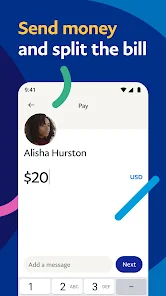
Once you're in, the app is pretty straightforward for basic tasks. Sending money to someone is as simple as tapping the "Send" button, typing an email or phone number, and entering an amount. I found the interface smooth for checking recent transactions, but the home screen can get crowded with promotional banners and suggestions for using PayPal Credit or crypto features. Onboarding is fine if you already have an account, but new users might get stuck linking a bank account because the verification process takes a couple of days with small deposits. A practical tip I picked up is to use the search bar instead of scrolling through menus to find specific transactions – it saves time. The app also has a "Request" feature that's handy for splitting bills with friends, though it's less intuitive than Venmo for social payments.
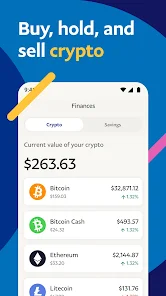
After using it for a while, I think PayPal works best for people who frequently shop online or need to send money across different platforms, like eBay or freelance websites. It's not the app you'd use for daily coffee runs or splitting dinner with friends – that's where something like Venmo or Cash App feels more natural. The standout difference is that PayPal is more tied to formal transactions and has strong buyer protection, which is great for online purchases. However, the app can feel a bit bloated with all the extra features like crypto trading and savings accounts. I'd keep it installed for those occasional online purchases, but I wouldn't rely on it for peer-to-peer payments day-to-day. It's solid, just not the most fun or fast for casual use.
features
- 🤖 PayPal offers a robust "Buyer Protection" feature that covers eligible purchases if items don't arrive or match the description. Compared to Venmo, which has minimal buyer protection, this makes PayPal the safer bet for online shopping on sites like eBay or Etsy.
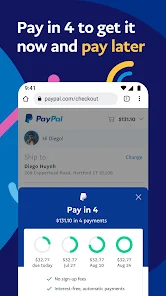
- 🤖 The "PayPal Checkout" option is integrated across thousands of online stores, letting you pay without entering card details each time. Square's payment system is more merchant-focused, so for everyday shoppers, PayPal's wide acceptance is a clear advantage.
- 🤖 You can send money internationally with PayPal, converting currencies within the app. While Wise offers lower exchange rates, PayPal's speed and convenience for one-off international payments to friends or freelancers beat competitors like Cash App, which lacks international support.
- 🤖 The app bundles a "Savings" account with a variable interest rate directly inside PayPal. Unlike Apple Cash, which doesn't offer interest at all, this gives users a simple way to grow spare cash without leaving the app, though the rate isn't as competitive as dedicated savings apps like Ally.
pros
- ⭐ One major strength is the wide merchant acceptance – PayPal is accepted on millions of websites globally, far more than Venmo or Cash App. This means you don't need to dig out your card for online purchases, and the one-click checkout is genuinely convenient.
- ⭐ The transaction speed for sending money to friends can be instant if both parties have PayPal balances. Venmo and Cash App also offer instant transfers, but PayPal's system feels more reliable for larger amounts without worrying about limits.
- ⭐ There's a solid dispute resolution system built into the app. If you buy something from a seller and it's broken or not delivered, PayPal steps in to mediate. Compare that to Zelle, which has no buyer protection at all – this alone makes PayPal worth keeping for online shopping.
cons
- ⚠️ The app interface feels cluttered with too many features crammed into the home screen. You'll see ads for PayPal Credit, crypto, and savings offers right next to your balance. Venmo's home screen is much cleaner, focusing only on payments and a simple feed of friends' activities.
- ⚠️ Withdrawing money to your bank account can take 1-3 business days for free transfers, which is slower than Cash App's standard free transfer that often arrives the next business day. If you need quick access to funds, this delay is frustrating.
- ⚠️ PayPal tends to hold funds from new accounts or suspicious transactions for up to 21 days, which is much stricter than Venmo or Cash App. While this is for security, it can catch regular users off guard when they can't access their money right away.
- ⚠️ The app lacks a simple way to split bills with friends in real-time, like Venmo's "Request" feature with descriptions and emojis. PayPal does have a request function, but it's buried in menus and less social, making it awkward for group payments.
Recommended Apps
![]()
16Personalities
16Personalities4
![]()
Zodiac Palm Reader: MagicWay
Reatility Media4.6
![]()
Moblo - 3D furniture modeling
MYTIforge4.1![]()
Magnifier Plus with Flashlight
Digitalchemy, LLC4.6![]()
QR Code Scanner
QR Code Scanner & Barcode Reader4.7![]()
FalFal: Astrology, Tarot, Love
FalFal Team4.8![]()
Christmas Photo Frames
PhotoFramesApps4.6![]()
AI Video Art Creator - Livensa
FERASET4.5![]()
Horoscope of Birth
Denimaks4.4![]()
Make Me Bald Prank
AppTornado2.5![]()
Kling AI: AI Image&Video Maker
Lohas Games Pte. Ltd.4.4![]()
Japan Timetable & Route Search
NAVITIME JAPAN CO., LTD.4.3![]()
Prank Call & Funny Video
TeH Software0![]()
Parallax 3D Live Wallpapers
TarrySoft4.3![]()
AI Chatbot - Nova
ScaleUp4.7















Disclaimer
1.AppInfoLibrary does not represent any developer, nor is it the developer of any App or game.
2.AppInfoLibrary provide custom reviews of Apps written by our own reviewers, and detailed information of these Apps, such as developer contacts, ratings and screenshots.
3.All trademarks, registered trademarks, product names and company names or logos appearing on the site are the property of their respective owners.
4. AppInfoLibrary abides by the federal Digital Millennium Copyright Act (DMCA) by responding to notices of alleged infringement that complies with the DMCA and other applicable laws.
5.If you are the owner or copyright representative and want to delete your information, please contact us info@appinfolibrary.com.
6.All the information on this website is strictly observed all the terms and conditions of Google Ads Advertising policies and Google Unwanted Software policy .














