

Cash App

100M+
Installs
Block, Inc.
Developer
-
Finance
Category
-
Everyone
Content Rating
-
support@squareup.com
Developer Email
-
https://cash.app/legal/us/en-us/privacy
Privacy Policy
Screenshots


editor reviews
Cash App is a peer-to-peer payment app, but honestly, it feels more like a full-on mobile banking sidekick than just a way to Venmo your friends. It's developed by Block, Inc. (Square's parent company), and you can download it for free from both Google Play and the App Store. It's been installed over 100 million times, so it's not exactly a hidden gem. When you first launch it, there's a clean, minimal vibe—everything is black, white, and that signature bright green. It asks you to create an account with just your email or phone number, no huge commitment. Right away, you notice the balance tab, a place to add your debit card, and that iconic $Cashtag username. It feels approachable, like the app doesn't expect you to be a finance guru.
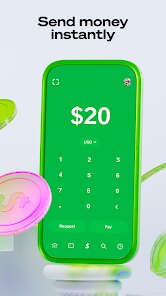
After you get past the initial setup, the hands-on experience is pretty smooth. You link your bank account or debit card, and within minutes, you can send money to anyone else on the app. The main actions are all on the home screen: a big “Pay” button at the bottom, a request money option, and a toggle for investing or buying Bitcoin. The interface is super simple, so you won't get lost. I sent $20 to my roommate for pizza, and the money showed up in their balance instantly. One little quirk: if you want to withdraw cash from an ATM using the included Cash Card, you'll need to order the physical card first, which takes a week. The app also lets you enable security features like a PIN or Face ID, which gave me peace of mind. The only confusing part was the “Boost” system—it offers random discounts at stores, but you have to apply them manually before paying, which I kept forgetting.
After using Cash App for a month, I'd say it's great for quick, casual money transfers, especially if you're splitting bills or paying friends. I'd recommend it to college students or anyone who wants an all-in-one app for spending, saving, and dabbling in stocks or crypto. But if you need a full-featured bank with branches or robust budgeting tools, this isn't it. Compared to Venmo, Cash App feels less social—you don't see a feed of your friends paying each other, which I actually prefer. What makes it stand out is how it blends banking with investment under one roof. I kept it installed because the Cash Card boost for coffee shops saves me a buck now and then, but I could see someone uninstalling it if they only need basic peer-to-peer payments and don't care about the extra flair.
features
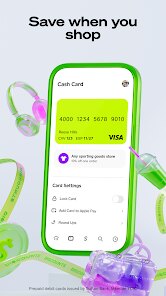
- 📱 Cash Card with Boosts – You can order a free customizable Visa debit card linked to your Cash App balance. Its standout feature is the Boosts program, which gives you instant discounts at specific stores (like 10% off at a local burrito shop). No other P2P app like Venmo offers this sort of integrated perk system directly tied to everyday spending.
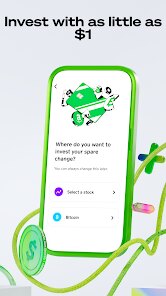
- 📱 Bitcoin and Stock Investing – Directly from the app, you can buy fractions of stocks or Bitcoin with as little as $1. Venmo also offers crypto, but Cash App makes it feel less like a side gimmick. The interface for buying and selling is dead simple, with no extra accounts or broker fees, which sets it apart from Robinhood or traditional broker apps.
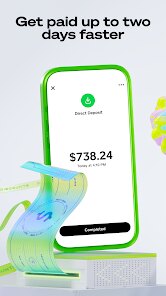
- 📱 Direct Deposit with Early Access – You can set up your paycheck to deposit straight into Cash App. The app lets you access your funds up to two days early, which is a feature you'd normally expect from neobanks like Chime. Venmo doesn't offer early direct deposit at all, making this a legit banking substitute for gig workers or anyone living paycheck to paycheck.
- 📱 $Cashtag Username – Instead of sharing a phone number or email to get paid, you just use your $Cashtag (like $JohnDoe). It's more private and way easier to type than remembering someone's handle on PayPal. This small design choice actually makes receiving money from strangers or businesses feel smoother than on competitors.
pros
- 🌟 Speed of Transfers – Money between Cash App users lands instantly, and instant transfers to your bank card take only a few minutes for a small fee. Venmo can also do instant transfers, but Cash App feels slightly faster in practice, especially for standard deposits into your Cash App balance.
- 🌟 Cleaner Interface – The minimalist black and green design is far less cluttered than PayPal, which throws ads and financial news at you. Cash App keeps its focus on your balance and main actions, so you never feel overwhelmed.
- 🌟 Better for Investing Noobs – Buying a stock on Cash App takes two taps, no jargon-filled menus. Robinhood may be more powerful, but for a total beginner who just wants one share of Apple without fees, Cash App is more inviting.
cons
- ⚠️ Customer Support is Terrible – If you run into a problem, like a failed payment or a locked account, there is no phone number to call. You have to use the in-app email system, and wait times can stretch to days. Venmo and PayPal both offer quicker chatbot and live chat options, which is a clear advantage.
- ⚠️ Limited Purpose for Complex Needs – You cannot write checks, manage joint accounts, or deposit cash except at specific retailers (like Walgreens). Apps like Chime or a traditional bank offer these, so Cash App feels half-baked for anyone managing serious bills or family finances.
- ⚠️ Hidden Fees for Withdrawals – While sending money is free, withdrawing to a standard bank account takes 2 business days unless you pay a fee (1.75% for instant transfer). Venmo has the same issue, but Cash App's fees add up quickly if you need money in your checking account fast.
Recommended Apps
![]()
16Personalities
16Personalities4
![]()
Zodiac Palm Reader: MagicWay
Reatility Media4.6
![]()
Moblo - 3D furniture modeling
MYTIforge4.1![]()
Magnifier Plus with Flashlight
Digitalchemy, LLC4.6![]()
QR Code Scanner
QR Code Scanner & Barcode Reader4.7![]()
FalFal: Astrology, Tarot, Love
FalFal Team4.8![]()
Christmas Photo Frames
PhotoFramesApps4.6![]()
AI Video Art Creator - Livensa
FERASET4.5![]()
Horoscope of Birth
Denimaks4.4![]()
Make Me Bald Prank
AppTornado2.5![]()
Kling AI: AI Image&Video Maker
Lohas Games Pte. Ltd.4.4![]()
Japan Timetable & Route Search
NAVITIME JAPAN CO., LTD.4.3![]()
Prank Call & Funny Video
TeH Software0![]()
Parallax 3D Live Wallpapers
TarrySoft4.3![]()
AI Chatbot - Nova
ScaleUp4.7















Disclaimer
1.AppInfoLibrary does not represent any developer, nor is it the developer of any App or game.
2.AppInfoLibrary provide custom reviews of Apps written by our own reviewers, and detailed information of these Apps, such as developer contacts, ratings and screenshots.
3.All trademarks, registered trademarks, product names and company names or logos appearing on the site are the property of their respective owners.
4. AppInfoLibrary abides by the federal Digital Millennium Copyright Act (DMCA) by responding to notices of alleged infringement that complies with the DMCA and other applicable laws.
5.If you are the owner or copyright representative and want to delete your information, please contact us info@appinfolibrary.com.
6.All the information on this website is strictly observed all the terms and conditions of Google Ads Advertising policies and Google Unwanted Software policy .














