

Messenger

5,000,000,000+
Installs
Meta Platforms, Inc.
Developer
-
Social
Category
-
Rated for 12+
Content Rating
-
android-support@fb.com
Developer Email
-
https://m.facebook.com/policy.php
Privacy Policy
Screenshots
editor reviews
Messenger is a standalone instant messaging and communication app developed by Meta Platforms, the same company behind Facebook. It started as a feature within the main Facebook app, but now it exists as its own separate download on both Google Play and the App Store. People use it primarily to send texts, photos, videos, and voice messages to their Facebook friends, but it also supports voice and video calls. With over a billion installs, it's one of the most widely used messaging apps out there. It's free to download and install, and you don't need a phone number to sign up; instead, you log in with your Facebook account. You do not need to pay anything to use the basic messaging features, but there are in-app purchases for things like stickers and games, and you will see ads if you browse stories or certain sections. The first thing that strikes you after launching the app is how familiar and integrated everything feels if you already have Facebook. It pulls in your friend list automatically, so you can start talking right away without asking anyone for contact permissions.
When you open Messenger, the main screen shows a list of your recent conversations at the top, with an active stories row below that. Tapping on any conversation opens a chat window that looks simple and clean. The text input bar sits at the bottom, and next to it are shortcuts to attach photos or open the camera. Typing a message and hitting send is pretty instant. What might feel a little cluttered at first is the number of extra icons and buttons scattered around: there are stickers, GIFs, voice message recorders, games, payments, and even a tiny "Go Live" button hidden in a conversation. For everyday use, most people just stick to sending texts or photos, and the app handles that smoothly. One practical tip: you can hold down the send button to change the message effect, like adding a heart or a loud sound. If you tap on someone's profile picture in the chat, you can see their active status and shared media. The onboarding process for new users is straightforward because it just pulls your existing Facebook contacts, but if you don't have a Facebook account, the sign-up feels a bit forced since you still need one to proceed.
After spending some time with Messenger, I can say it's incredibly convenient if you have a lot of friends on Facebook already. You don't need to convince people to switch to a new platform; they're already there. This is its strongest advantage over apps like WhatsApp or Telegram, where you have to share your phone number first. But there are trade-offs. The app can feel bloated compared to cleaner messengers like Signal or Telegram. There are ads, stories, games, and a "chat heads" feature that some people might find intrusive. If you value privacy, Messenger might not be your first choice because it ties everything back to your Facebook profile. Some people might keep it installed just because everyone they know uses it, but others might uninstall it because of battery drain or notification overload. Personally, I keep it around for group chats and quick calls with friends, but I wouldn't use it for sensitive conversations. It's a solid app for casual social messaging, but not the best for serious, private chats.
features
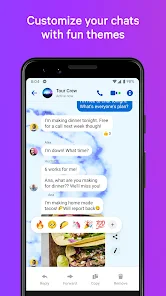
- 💬 Chat Customization and Extras – Unlike WhatsApp, which stick to a more plain chat experience, Messenger lets you change chat colors, set custom nicknames, use a library of stickers and GIFs, and even play games inside the conversation window. You can also send money or request payments directly in the chat, which WhatsApp only supports in a few countries with a dedicated wallet feature.
- 📹 Integrated Stories and Disappearing Media – Messenger borrows the Stories format from Instagram and Facebook. You can view your friends' Stories and post your own without leaving the app. It also has a "Vanish Mode" that clears messages after they're seen, similar to Snapchat. Telegram has a similar secret chat feature, but it doesn't offer the same social story feed integration.
- 🌐 No Phone Number Required – The biggest standout feature is that you don't need a phone number to set up Messenger. You just log in with your Facebook account. This makes it easy to use on tablets or devices where you don't have a SIM card, unlike WhatsApp or Signal which require SIM verification. It's also helpful for people who want to keep their phone number private from new contacts.
pros
- ✅ Huge User Base – Because it comes bundled with Facebook, practically everyone with a Facebook account already has access to Messenger. You don't have to convince friends to download a new app like you might with Telegram or Signal. It's already there, which means your contact list is instantly populated.
- ✅ Cross-Platform Sync – You can use Messenger on your phone, tablet, or computer browser, and all your messages sync seamlessly. Compared to iMessage, which locks you into Apple devices, Messenger works on Android, iOS, and the web without any restrictions.
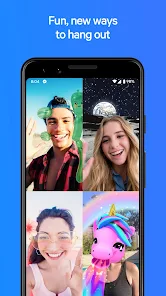
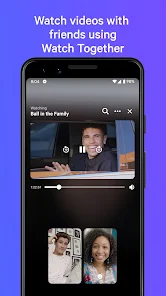
- ✅ Free Voice and Video Calls – The call quality is solid, even on slower internet connections. It supports group video calls with up to 50 people, which beats WhatsApp's 32-person limit and puts it closer to Zoom or Google Meet for casual gatherings.
cons
- ❌ Privacy Concerns – Since Messenger is owned by Meta, your conversations are tied to your Facebook profile. This makes it less appealing for private chats compared to end-to-end encrypted apps like Signal or WhatsApp. Even though some chats are encrypted, the metadata is still collected for ads and data mining.
- ❌ App Bloat and Ads – The app feels heavy and cluttered with features you might never use, like games, stories, and a "Marketplace" tab. Ads appear in the Stories section and between conversations, which is not something you'll see in Telegram or WeChat, where the chat experience stays cleaner.
- ❌ Battery and Data Usage – Messenger is known for draining battery faster than lighter alternatives like Telegram X or WhatsApp. It also uses background data to keep the connection alive, which might be a downside for people on limited data plans or using older phones.
Recommended Apps
![]()
16Personalities
16Personalities4
![]()
Zodiac Palm Reader: MagicWay
Reatility Media4.6
![]()
Moblo - 3D furniture modeling
MYTIforge4.1![]()
Magnifier Plus with Flashlight
Digitalchemy, LLC4.6![]()
QR Code Scanner
QR Code Scanner & Barcode Reader4.7![]()
FalFal: Astrology, Tarot, Love
FalFal Team4.8![]()
Christmas Photo Frames
PhotoFramesApps4.6![]()
AI Video Art Creator - Livensa
FERASET4.5![]()
Horoscope of Birth
Denimaks4.4![]()
Make Me Bald Prank
AppTornado2.5![]()
Kling AI: AI Image&Video Maker
Lohas Games Pte. Ltd.4.4![]()
Japan Timetable & Route Search
NAVITIME JAPAN CO., LTD.4.3![]()
Prank Call & Funny Video
TeH Software0![]()
Parallax 3D Live Wallpapers
TarrySoft4.3![]()
AI Chatbot - Nova
ScaleUp4.7















Disclaimer
1.AppInfoLibrary does not represent any developer, nor is it the developer of any App or game.
2.AppInfoLibrary provide custom reviews of Apps written by our own reviewers, and detailed information of these Apps, such as developer contacts, ratings and screenshots.
3.All trademarks, registered trademarks, product names and company names or logos appearing on the site are the property of their respective owners.
4. AppInfoLibrary abides by the federal Digital Millennium Copyright Act (DMCA) by responding to notices of alleged infringement that complies with the DMCA and other applicable laws.
5.If you are the owner or copyright representative and want to delete your information, please contact us info@appinfolibrary.com.
6.All the information on this website is strictly observed all the terms and conditions of Google Ads Advertising policies and Google Unwanted Software policy .














