
LINE: Calls & Messages

500,000,000+
Installs
LINE Corporation
Developer
-
Social
Category
-
Rated for 3+
Content Rating
-
line-support@line.me
Developer Email
-
https://terms.line.me/line_rules/
Privacy Policy
Screenshots

editor reviews
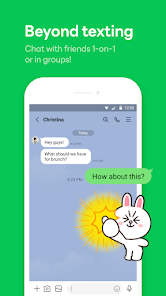
LINE is a messaging and social media app that basically does everything you'd expect from a modern communication tool. It's not just for sending texts or making calls; it's a whole ecosystem with stickers, news feeds, payment services, and even games built right in. You might download LINE, which you can grab for free from the Google Play or the App Store, because a friend in another country recommended it, or maybe because you want those cute stickers that everyone's always sending. After installation and a quick, straightforward sign-up using your phone number, the first impression is pretty polished. It looks clean, the interface feels snappy, and there are no immediate subscription demands or obnoxious ads popping up. The fact that it boasts over 500 million installs on Android alone gives you some confidence that you're not jumping into some obscure, buggy app.
Using LINE daily feels familiar if you've ever used WhatsApp or WeChat. The home screen shows your chats, and tapping a contact lets you send texts, photos, or voice messages. The onboarding is simple: you add friends by syncing your contacts or by using a unique ID. A cool little trick is that you can back up your chat history to the cloud, which saved me a lot of headache when I switched phones. During calls, the audio quality is crystal clear most of the time, and video calls work well even on shaky Wi-Fi. The sticker store is surprisingly fun, though it's a bit of a maze to find free ones. One slightly annoying moment was navigating the “Timeline” feature; it's basically a social feed that feels a bit cluttered compared to just scrolling through chats. Overall, the daily routine is smooth: open app, check new messages, send a sticker, maybe peek at a group chat, and close it.
After spending a few weeks with LINE, I think it really shines for people who love little digital trinkets or who have friends in Asia, where it's huge. If you just want a bare-bones texting app, you might roll your eyes at all the extra stuff – like the built-in games or the shopping tab. It stands out from apps like Telegram because of its sticker ecosystem and its integration with local services in Japan and Thailand. Someone might keep it installed because their entire group chat uses it for planning parties, while someone else might uninstall it because they get tired of the occasional promotional notification. It's not a life-changer, but it does the job well with a bit more personality than the competition.
features
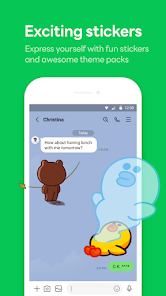
- 🎨 Stickers and themes are the biggest draw. Compared to WhatsApp, which has basic emoji and a handful of sticker packs, LINE has a massive marketplace with licensed characters like Brown and Cony. It makes conversations feel more lively and personalized, almost like a language of its own.
- 📞 Free voice and video calls are solid. Unlike some apps that struggle with latency, LINE's call quality is reliably crisp, even when you're not on the strongest connection. It's on par with Skype but feels less bloated for quick calls.
- 🛡️ Security with letter sealing. LINE offers end-to-end encryption for messages and calls, similar to Signal. It's turned on by default, so you don't have to fiddle with settings, which is a huge plus for privacy-conscious users.
pros
- 👍 The sticker ecosystem is unmatched. You can buy or earn stickers for every mood, which makes chatting more expressive than on Telegram or Signal, where custom stickers require manual importing.
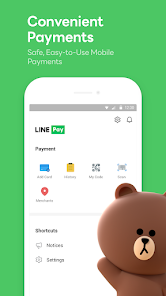
- 👍 Integrated services are a big perk. You can pay for coffee, read news, or play mini-games without leaving the app. That's something WhatsApp doesn't offer, making LINE more of a daily hub in places like Taiwan.
- 👍 Group chat management is intuitive. You can easily pin messages, set group icons, and create polls. It feels more organized than Messenger, which often buries important info in a sea of replies.
cons
- 👎 Bloatware feeling. The Home tab and Timeline are full of ads and sponsored content. Telegram keeps things cleaner with no ads unless you use public channels, so LINE can feel overwhelming for minimalists.
- 👎 Backup can be confusing. Restoring chat history across devices isn't as seamless as iMessage. If you switch from Android to iPhone, you might lose your conversation history unless you paid for cloud backup.
- 👎 Limited free cloud storage. Unlike WhatsApp or Telegram, which give you generous free cloud storage, LINE's free tier is stingy, and you'll get prompt warnings to buy more space if you share many photos or videos.
Recommended Apps
![]()
16Personalities
16Personalities4
![]()
Zodiac Palm Reader: MagicWay
Reatility Media4.6
![]()
Moblo - 3D furniture modeling
MYTIforge4.1![]()
Magnifier Plus with Flashlight
Digitalchemy, LLC4.6![]()
QR Code Scanner
QR Code Scanner & Barcode Reader4.7![]()
FalFal: Astrology, Tarot, Love
FalFal Team4.8![]()
Christmas Photo Frames
PhotoFramesApps4.6![]()
AI Video Art Creator - Livensa
FERASET4.5![]()
Horoscope of Birth
Denimaks4.4![]()
Make Me Bald Prank
AppTornado2.5![]()
Kling AI: AI Image&Video Maker
Lohas Games Pte. Ltd.4.4![]()
Japan Timetable & Route Search
NAVITIME JAPAN CO., LTD.4.3![]()
Prank Call & Funny Video
TeH Software0![]()
Parallax 3D Live Wallpapers
TarrySoft4.3![]()
AI Chatbot - Nova
ScaleUp4.7















Disclaimer
1.AppInfoLibrary does not represent any developer, nor is it the developer of any App or game.
2.AppInfoLibrary provide custom reviews of Apps written by our own reviewers, and detailed information of these Apps, such as developer contacts, ratings and screenshots.
3.All trademarks, registered trademarks, product names and company names or logos appearing on the site are the property of their respective owners.
4. AppInfoLibrary abides by the federal Digital Millennium Copyright Act (DMCA) by responding to notices of alleged infringement that complies with the DMCA and other applicable laws.
5.If you are the owner or copyright representative and want to delete your information, please contact us info@appinfolibrary.com.
6.All the information on this website is strictly observed all the terms and conditions of Google Ads Advertising policies and Google Unwanted Software policy .














