
DIY Coloring: Pixel Art Number

500K+
Installs
DIY Paper Doll Dress Up Games
Developer
-
Puzzle
Category
-
Everyone
Content Rating
-
quangvu@nexargames.com
Developer Email
-
https://nexargames.com/privacy-policy
Privacy Policy
Screenshots
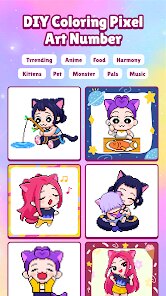
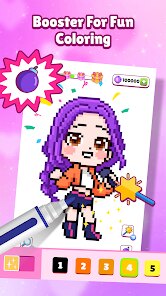
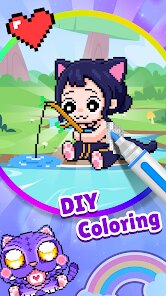


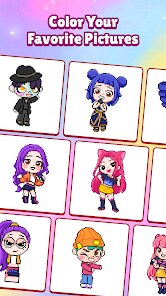
editor reviews
Alright, let me break down DIY Coloring: Pixel Art Number for you. This is a classic number-based pixel coloring game, the kind you've probably seen a hundred times on the Google Play Store. It's purely a mobile app, so don't expect to find it on Steam, Xbox, or Switch – this is strictly an Android affair. The game first launched a while back, and it's been quietly building its install base; I think it's sitting somewhere in the 500k to 1 million download range on Google Play. The best part? It's completely free to download and play. There are in-app purchases, but they're mostly for removing ads or unlocking specific premium coloring packs. The typical cost for those is like $1.99 to $4.99, which is pretty standard for this genre. You'll run into the occasional banner ad or a short video ad between coloring sessions, but it's not aggressive enough to ruin the experience.
Playing this game is about as straightforward as it gets. You pick a pixel art template, and each numbered cell corresponds to a specific color in your palette. Just tap on the number, then tap on the cell – it's that simple. The best part of the app for me is the sheer variety of images. They've got everything from cute animals to detailed landscapes and even some pop culture references that are clearly inspired by big franchises without stepping on any copyright toes. My favorite part, honestly, is the Zen mode. When I'm stuck on a long commute or just need to unwind after a stressful day, popping open this app and slowly filling in a pixel art piece is incredibly soothing. It's like a digital version of those "paint by numbers" kits you did as a kid, but without the mess and cleanup.
Compared to other pixel coloring games on Google Play, like Pixel Art - Color by Number or Happy Color, DIY Coloring: Pixel Art Number holds its own but isn't revolutionary. Happy Color has a much bigger library and slicker animations, but it also bombards you with more aggressive ads. Pixel Art - Color by Number has better social features, but it feels bloated sometimes. This app strikes a nice middle ground – it's lean, the ad frequency is reasonable, and the core coloring mechanic works flawlessly. I recommend it specifically because it doesn't try to do too much. Some coloring apps try to shove in mini-games, daily challenges, and a million pop-ups, but this one just lets you color. If you're someone who just wants to install a simple, stress-free coloring app on your Android phone and get lost in the numbers, this is a solid pick. It's not the flashiest, but it's reliable, and sometimes that's exactly what you want from a mobile game.
features
- Color-by-Number Logic 🎨: You match numbered cells to their corresponding colors in the palette. It's the classic pixel art formula – super intuitive and perfect for relaxing without needing to think too hard.
- Huge Template Library 🖼️: There are hundreds of images to color, ranging from cute animals to intricate patterns. That said, it's not as massive as what you'll find in Happy Color, but it covers enough ground to keep you busy for weeks.
- One-Tap Fill System 👆: You don't have to drag your finger across each pixel. Just tap the number, then tap the cell, and it fills instantly. It's much faster and less frustrating than the tap-hold systems in games like Pixel Art - Color by Number, where you have to hold your finger down to color larger areas.
pros
- Perfect for Quick Sessions ⏱️: Each image can be completed in 10-20 minutes, making it ideal for killing time on a commute or during a short break. I've finished a whole pixel art piece just while waiting for my coffee to brew.
- Completely Free to Play 💰: You can download and play the entire game without spending a cent. The in-app purchases are for extras, not essential features. Compare that to some other apps that lock basic color palettes behind a paywall.
- No Wi-Fi Needed 📶: Once you download the templates, you can play entirely offline. This is a huge plus for me when I'm on the subway or traveling through areas with spotty signal, unlike the online-only coloring apps that force you to stay connected.
cons
- Ad Interruptions Are Annoying 🛑: You'll get a full-screen video ad every time you finish a template, and sometimes banner ads pop up mid-coloring. Happy Color is notorious for this too, but it's still a downside. I wish there was a one-time purchase option to nuke them entirely, like how Color by Number handles it.
- Limited Social Features 👤: There's no way to share your creations directly from the app or compete with friends. Pixel Art - Color by Number has a community gallery where you can show off your work, but here you're painting in a vacuum. It feels a bit lonely after a while.
- Zoom Can Be Clunky 🔍: When you zoom in on a large template, the scrolling gets a little laggy on older Android phones. It's not a dealbreaker, but it's noticeable if you've tried smoother implementations like the one in Happy Color, which handles zoom and pan like butter.
Recommended Apps
![]()
BMX Cycle Extreme Bicycle Game
PlayFlix4.7

![]()
Save the Doge
WONDER GROUP4.2![]()
Mystical Mixing
CrazyLabs LTD4.7![]()
Yarn Fever! Unravel Puzzle
Brave HK Limited4.7![]()
Steal n Catch the Brainrot
BMH VN Game4.4![]()
I Am Security
Estoty4.6![]()
Geometry Dash SubZero
RobTop Games4.5![]()
Soulmate Sketch
WhatsGood1.7![]()
Mini Block Craft 3D RealmCraft
Tellurion Mobile4![]()
MONOPOLY GO!
Scopely4.6![]()
FamilySearch Africa
FamilySearch International0![]()
Agent Hunt – Hitman Shooter
Homa4.5![]()
Hyper Heroes: Marble-Like RPG
HyperJoy3.5![]()
Brainrot Filter: Fun Challenge
Braly JSC0![]()
Shining Princess Style Hub
Happy Go Game4.4













Disclaimer
1.AppInfoLibrary does not represent any developer, nor is it the developer of any App or game.
2.AppInfoLibrary provide custom reviews of Apps written by our own reviewers, and detailed information of these Apps, such as developer contacts, ratings and screenshots.
3.All trademarks, registered trademarks, product names and company names or logos appearing on the site are the property of their respective owners.
4. AppInfoLibrary abides by the federal Digital Millennium Copyright Act (DMCA) by responding to notices of alleged infringement that complies with the DMCA and other applicable laws.
5.If you are the owner or copyright representative and want to delete your information, please contact us info@appinfolibrary.com.
6.All the information on this website is strictly observed all the terms and conditions of Google Ads Advertising policies and Google Unwanted Software policy .