Solitaire - Classic Card Games

10M+
Installs
Oakever Games
Developer
-
Puzzle
Category
-
Everyone
Content Rating
-
support@oakevergames.com
Developer Email
-
https://oakevergames.com/pp.html
Privacy Policy
Screenshots
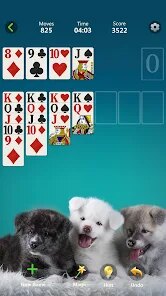
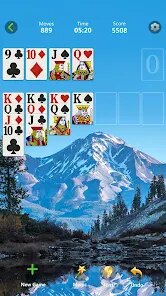
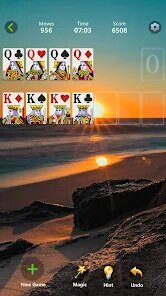
editor reviews
So, I've been spending a fair bit of time with Solitaire - Classic Card Games on my Android, and honestly, it's become my go-to time killer. For anyone who doesn't know, this is a pure mobile game you can download directly from the Google Play Store. It's not available on Steam, Xbox, or Switch—it's strictly an app for your phone or tablet, which makes sense for the type of casual, pick-up-and-play experience it offers. The game launched a while back and has racked up over 10 million installs, which tells you a lot about its staying power. The best part? It's completely free to download and install. There are in-app purchases, but they're mostly for cosmetics like card backs and backgrounds, or to remove the ads. The ads themselves are pretty standard for a free game—optional rewarded ads for extra moves or hints, and a small banner here and there. If you want to skip the ads entirely, a small purchase does the trick, but you can absolutely enjoy the full game without spending a dime.
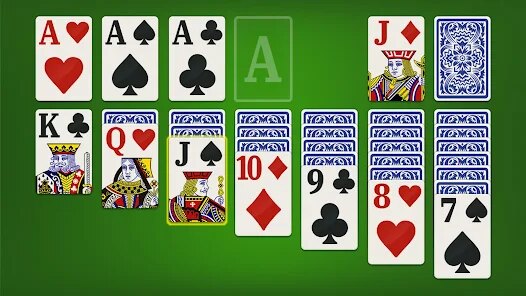
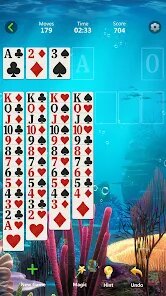
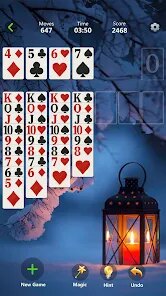
Playing Solitaire - Classic Card Games is exactly what you'd expect, but with a really polished feel. You get all the standard variants: Klondike, Spider, FreeCell, Pyramid, and a few others. The touch controls are smooth on Android, making dragging cards feel natural. The best part for me is the sheer variety. If I get bored of classic Klondike, I can switch to a more strategic game like FreeCell or a faster-paced challenge like TriPeaks. My personal favorite has to be the daily challenges. They give you a fresh puzzle every day with a unique layout or rule tweak, which keeps things from getting stale. It's the perfect game for when you're waiting for a coffee or winding down at night. I love that I can jump in, play a quick hand, and put my phone down without feeling like I'm in the middle of something huge. The clean, uncluttered design also helps—no crazy animations or pop-ups ruining the vibe.
Compared to other Solitaire apps on the Google Play Store, like the famous Microsoft Solitaire Collection or the ad-heavy Solitaire by Brainium, this one hits a sweet spot. The Microsoft version is great but can feel a bit bloated with its Xbox Live integration and daily goals. Brainium's version is pretty, but it pushes ads really hard. Solitaire - Classic Card Games feels more like a pure, respectful adaptation of the card game. It doesn't try to sell you a subscription every five minutes, and the interface is just more intuitive to me. I'd recommend it over those others because it strikes a balance between being feature-rich and being simple. You get lots of game modes, daily challenges, and achievements, but it never gets in your own way. Plus, the visuals are crisp and modern without being distracting. If you're just looking for a solid, reliable Solitaire app on your phone without all the extra nonsense, this one's a no-brainer. Just install it from the store and you're good to go.
features
- Game Variety 🃏: Unlike some packs that only offer Klondike and Spider, this one includes 12 different solitaire modes. You've got the classics like FreeCell and Pyramid, plus more niche ones like Yukon and Golf. It's like having a whole deck of games in one app.
- Smart Hint System 💡: Other games often have a useless hint button, but this one actually helps. It doesn't just highlight a card move; it suggests the best strategic play based on the current board. This is a lifesaver when you're stuck on a tough daily challenge.
- Gesture Support ✋: You can tap to auto-place a card or use a quick swipe to flip from the stock pile. It's small but makes the play-by-play feel much faster than having to tap every single button. On a phone, these little shortcuts make a huge difference in flow.
pros
- Friendly Deal Options 😊: You can customize your game with things like draw 1 or draw 3 in Klondike, which is a basic feature but not always present. Also, if you lose, you can undo moves or restart without penalty, which takes the edge off a bad hand.
- Clean and Fast Interface 👌: The app loads instantly and the animations don't lag. Compare that to the Microsoft Solitaire app, which can stutter on older devices. Everything feels responsive on my Android, from menu navigation to card flipping.
- Active Daily Challenges 🏆: The daily puzzles are genuinely well-designed and not just random deals. They often have specific goals, like completing a game with a set number of moves or under a time limit. It adds a competitive layer without leaderboards or pressure, similar to what you see in premium puzzle games.
cons
- Inconsistent Ad Frequency 📺: While the game is free, sometimes a video ad pops up right after you finish a hand, right as you're about to start a new one. It can break the flow a bit. I've seen similar apps, like Solitaire by Brainium, handle ad placement a bit more discreetly between games.
- No Landscape Mode on Phones 📱: On Android tablets, it switches, but on a regular phone, you're stuck in portrait mode. Some players prefer landscape to see more of the cards at once without scrolling. The classic Windows solitaire experience always felt better in landscape, so this is a miss.
- Limited Sound Options 🔇: The background music is okay but repetitive, and there's no way to adjust volume sliders for effects vs. music separately. You basically have to mute the whole sound or listen to the same loop. Other card games offer more granular audio settings.
Recommended Apps
![]()
BMX Cycle Extreme Bicycle Game
PlayFlix4.7

![]()
Save the Doge
WONDER GROUP4.2![]()
Mystical Mixing
CrazyLabs LTD4.7![]()
Yarn Fever! Unravel Puzzle
Brave HK Limited4.7![]()
Steal n Catch the Brainrot
BMH VN Game4.4![]()
I Am Security
Estoty4.6![]()
Geometry Dash SubZero
RobTop Games4.5![]()
Soulmate Sketch
WhatsGood1.7![]()
Mini Block Craft 3D RealmCraft
Tellurion Mobile4![]()
MONOPOLY GO!
Scopely4.6![]()
FamilySearch Africa
FamilySearch International0![]()
Agent Hunt – Hitman Shooter
Homa4.5![]()
Hyper Heroes: Marble-Like RPG
HyperJoy3.5![]()
Brainrot Filter: Fun Challenge
Braly JSC0![]()
Shining Princess Style Hub
Happy Go Game4.4












Disclaimer
1.AppInfoLibrary does not represent any developer, nor is it the developer of any App or game.
2.AppInfoLibrary provide custom reviews of Apps written by our own reviewers, and detailed information of these Apps, such as developer contacts, ratings and screenshots.
3.All trademarks, registered trademarks, product names and company names or logos appearing on the site are the property of their respective owners.
4. AppInfoLibrary abides by the federal Digital Millennium Copyright Act (DMCA) by responding to notices of alleged infringement that complies with the DMCA and other applicable laws.
5.If you are the owner or copyright representative and want to delete your information, please contact us info@appinfolibrary.com.
6.All the information on this website is strictly observed all the terms and conditions of Google Ads Advertising policies and Google Unwanted Software policy .