Amazing Circus Pixel Coloring

10K+
Installs
ValentinaDev
Developer
-
Puzzle
Category
-
Everyone
Content Rating
-
valentina432630@gmail.com
Developer Email
-
https://sites.google.com/view/marbleprivacypolicy/home
Privacy Policy
Screenshots


editor reviews
Alright, let's talk about Amazing Circus Pixel Coloring, a game I stumbled upon on the Google Play Store while looking for something to kill time. This is a straightforward pixel art coloring book game, pure and simple. It's available exclusively on Android via the Google Play app, so don't bother looking for it on Steam or a console like the Switch or Xbox – it's a mobile-only experience. The app first launched a while back, and it's racked up over 100,000 installs, which is respectable for a niche title in this genre. The best part? It's completely free to download and play. There are no forced in-app ads while you're working on a picture, which I really appreciate, but you will see occasional banner ads. They do have in-app purchases, mostly to remove those ads permanently (usually around $2.99) or to unlock special packs of images, but you can absolutely play through the whole thing without spending a dime.
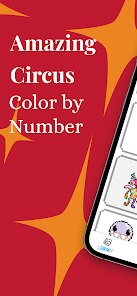
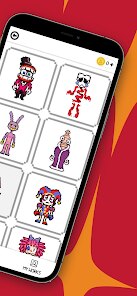
Playing Amazing Circus Pixel Coloring is about as zen as it gets on your phone. You're presented with a grid of tiny numbered cells, and a color palette below. Tap on a color, tap on a cell, and it fills in. The game auto-zooms for precision, which is a lifesaver on a small screen. The best part for me is the theme – it's all circus and carnival imagery. You're coloring elephants, clowns, big tops, popcorn, and those old-school carnival games. It's refreshing to not just be coloring another boring flower or a generic mandala. My favorite part is finishing a piece like the lion tamer or a colorful tent and seeing all those pixels snap into a recognizable, vibrant image. It gives you a little burst of satisfaction, like completing a tiny, digital puzzle. There's no timer, no score to beat, no energy system – you just sit and color. It's a fantastic way to unwind after a long day.
Comparing it to other games in this genre, like Pixel Art Coloring or Color by Number, is easy. Those apps often bombard you with ads every 30 seconds, or they require you to watch a video just to unlock the next color. Amazing Circus Pixel Coloring feels more respectful of your time. The ad frequency is much lower, and you never feel like you're being punished for playing. Other similar games often have a generic library of images, but this one sticks to its unique circus theme, which gives it personality. If you've tried Happy Color and got tired of the same old images, or if you're looking for a more focused and less predatory experience that you can just download, install, and enjoy without hassle, then this is a solid recommendation. It's not trying to be a huge, complex game; it knows exactly what it is: a simple, relaxing coloring app with a fun theme. If that's what you're after, it's one of the better options on the Google Play store right now.
features
- Unique Thematic Unity 🎪: Unlike many pixel coloring apps on the Google Play store that just throw together random images, Amazing Circus Pixel Coloring commits to its theme 100%. Every single picture you color – from a howling clown to a caramel apple booth – belongs under the big top. This gives the whole collection a cohesive, nostalgic feel that other apps with scattered topics lack.
- Respectful Ad Model 🚫: This is the biggest standout for me compared to apps like Pixel Art. There are no annoying interstitial ads that pop up in the middle of your work. You get small banner ads off to the side, and a short video you can watch if you want a new image pack. It doesn't interrupt your flow, which is a huge win for a relaxing game like this.
- Simple, Clean Interface 🖌️: The UI is incredibly basic. You tap a number on the palette, tap the corresponding cell, and it fills in. No confusing menus, no multi-step tools, no social media clutter. It gets out of your way and lets you just color. This focus on simplicity makes it perfect for quick sessions during a commute or for extended relaxing play.
pros
- Relaxing and Stress-Free Atmosphere 🧘: This is the core strength. There is no timer, no points, no fail state. You can literally drop into a coloring page, do five cells, and close the app. It saves your progress instantly. For a gamer who's tired of competitive shooters or complex RPGs, this is a fantastic palette cleanser that doesn't demand anything from you.
- Consistent and Fun Art Style 🎨: The art is charming and not too complex. The pixel counts are just right for a mobile screen. You aren't tackling a 500x500 grid that takes a week. Each picture is a manageable chunk that you can finish in one or two sittings, giving you that rewarding "complete" feeling frequently.
- Great Value for Free Players 💰: You can download and install the app, open up a decent selection of pictures, and color them all for free. The in-app purchase to remove ads is optional and reasonably priced. You're not locked out of core content, and you aren't being tricked into spending money on extra "premium" colors or brushes like in some games.
cons
- Limited Content Variety 🧩: While the circus theme is great, it also means you're mostly coloring the same types of subjects – tents, animals, performers, and food. Unlike massive coloring apps like Colorfy that have hundreds of categories, this game will only last you a few dozen pictures before you've seen everything it has to offer. It's a specialized niche, for better or worse.
- No Soundtrack or Sound Effects 🔊: It's a completely silent app. There is no background music or satisfying "pop" sound when you fill in a cell. For a game aimed at relaxation, a simple, looping circus tune or a gentle fill sound would have been a fantastic improvement. As it is, you have to play your own music, which feels like a missed opportunity.
- No Zoom or Pan Memory 🔍: Each time you tap away from the picture, the zoom resets. If you're working on a fine detail, you have to zoom back in to the exact spot, and it can be a little tedious. More polished apps in the same genre remember your last zoom level and position, which this one does not. It's a minor quality-of-life flaw that accumulates over longer sessions.
Recommended Apps
![]()
BMX Cycle Extreme Bicycle Game
PlayFlix4.7

![]()
Save the Doge
WONDER GROUP4.2![]()
Mystical Mixing
CrazyLabs LTD4.7![]()
Yarn Fever! Unravel Puzzle
Brave HK Limited4.7![]()
Steal n Catch the Brainrot
BMH VN Game4.4![]()
I Am Security
Estoty4.6![]()
Geometry Dash SubZero
RobTop Games4.5![]()
Soulmate Sketch
WhatsGood1.7![]()
Mini Block Craft 3D RealmCraft
Tellurion Mobile4![]()
MONOPOLY GO!
Scopely4.6![]()
FamilySearch Africa
FamilySearch International0![]()
Agent Hunt – Hitman Shooter
Homa4.5![]()
Hyper Heroes: Marble-Like RPG
HyperJoy3.5![]()
Brainrot Filter: Fun Challenge
Braly JSC0![]()
Shining Princess Style Hub
Happy Go Game4.4













Disclaimer
1.AppInfoLibrary does not represent any developer, nor is it the developer of any App or game.
2.AppInfoLibrary provide custom reviews of Apps written by our own reviewers, and detailed information of these Apps, such as developer contacts, ratings and screenshots.
3.All trademarks, registered trademarks, product names and company names or logos appearing on the site are the property of their respective owners.
4. AppInfoLibrary abides by the federal Digital Millennium Copyright Act (DMCA) by responding to notices of alleged infringement that complies with the DMCA and other applicable laws.
5.If you are the owner or copyright representative and want to delete your information, please contact us info@appinfolibrary.com.
6.All the information on this website is strictly observed all the terms and conditions of Google Ads Advertising policies and Google Unwanted Software policy .