Idol Draw: Coloring Master

1M+
Installs
JUMBO GAMES Studio
Developer
-
Casual
Category
-
Everyone
Content Rating
-
nhungpt1601@gmail.com
Developer Email
-
https://jumbo-game.netlify.app/privacy
Privacy Policy
Screenshots

editor reviews
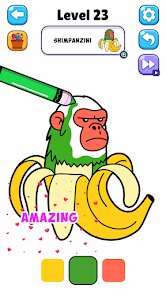
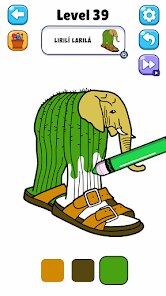
Alright gamers, let's talk about Idol Draw: Coloring Master, a mobile title from JUMBO GAMES Studio that has carved out its own cozy corner on Android. This is a casual coloring book game at its core, but with a specific hook for anyone who loves K-pop or J-pop idol aesthetics. It's a pure mobile app, so don't go looking for it on Steam, Xbox, or Switch—this one's strictly for your phone. It first launched way back in 2019 on the Google Play Store and the App Store, and honestly, it's racked up a solid presence with over 10 million downloads, which tells you it's doing something right. The best part? It's completely free to download and play. No upfront cost to install the app. But like most mobile titles these days, it relies on in-app purchases and, yep, those pesky in-app ads. You can buy some currency to unlock premium coloring pages or remove ads entirely if the constant pop-ups drive you nuts. Prices for those packs are pretty standard for a casual android game—usually a few bucks for a starter pack, maybe up to ten for a big bundle of unlockables. It's not a wallet-buster, but the ad frequency can be annoying if you're trying to zone out and color.
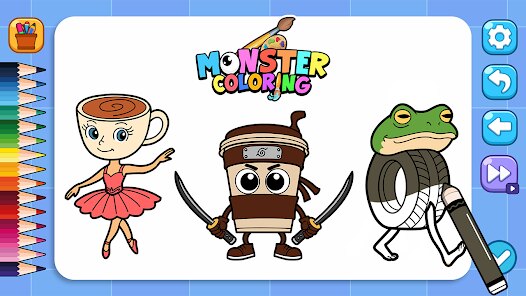
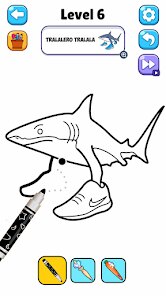
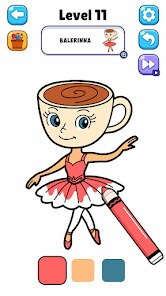
So how do you actually play this thing? It's super straightforward and honestly perfect for winding down. You choose a line art portrait of an idol character—they've got that cute, anime-inspired look—and then you just tap to fill in the sections with colors. The app gives you a palette, and you can zoom in to get the tiny details right. What makes this game stand out for me is the sheer variety of colors and paint styles. You can use glitter, watercolor effects, and even gradient fills, which makes each piece feel less like a cheap coloring page and more like a mini art project. My absolute favorite part? The process is incredibly relaxing. It's one of those android games where you can pop in a quick session during a break and forget about the stress of the day. The sound effects and music are chill too, which helps. It's not a deep game, and there's no complex story—you just color, unlock new pages, and color some more. For a casual gaming session on Google Play, that's all I need sometimes.
Compared to other coloring games on the market, like say Color by Number or Happy Color, Idol Draw: Coloring Master feels more focused and stylish. Those other apps are great, don't get me wrong, but they often throw a million random images at you—flowers, landscapes, food, whatever. This game sticks to its theme: idol characters with vibrant fashion and expressive poses. It feels curated for a specific audience who loves that style. If you're into cute anime girls or boy band aesthetics, you'll get a kick out of it. Another plus? The premium content isn't shoved down your throat. You can earn enough currency by playing to unlock new packs over time, so you don't feel forced to spend money. It's a solid download if you're looking for a low-commitment, high-relaxation app. Just be ready to sit through a 30-second ad every few pages, or consider a small purchase to support the devs and ditch those interruptions. Honestly, for a free android game, it's a fun little time waster that scratches that creative itch without requiring any real skill.
features
- Diverse Coloring Tools 🖌️: Unlike basic coloring apps that only offer flat colors, this game gives you glitter, watercolor, and gradient brushes. It makes each piece look polished, way better than in similar casual android apps like Colorfy.
- Idol-Themed Artwork 💖: The game focuses entirely on cute idol character line art, from school uniforms to stage outfits. This specialization beats generic apps like Coloring Book for Adults, which have scattered topics. If you love K-pop aesthetics, this is for you.
- Offline Play Capability 📴: You can color without an internet connection once the images are downloaded. This is a lifesaver compared to apps like Color by Number that often stream everything and need a constant data signal on Google Play.
pros
- Relaxing and Stress-Free 😌: The simple tap-to-fill mechanic combined with chill background music makes this one of the most relaxing apps I've installed on my android. Compared to frantic puzzle games on Google Play, it's a pure calm session.
- Constant Content Updates 🆕: JUMBO GAMES Studio regularly drops new character packs for free. This keeps the app fresh, unlike some older games where you get bored after a week. You'll always find something new to download and color.
- Generous Free-to-Play Model 💰: I've been playing for weeks without spending a cent. You earn in-game currency by completing images and watching optional ads. This is far more generous than similar apps on the App Store that lock everything behind a paywall.
cons
- Frequent Forced Ads 📺: The biggest downside is the constant ad breaks after nearly every completed page. It really breaks the flow of coloring. Apps like Happy Color handle ad frequency much better, letting me finish a session without interruption.
- Limited Image Variety 🎨: While the idol theme is the game's charm, it's also a curse. If you aren't into that specific anime-inspired look, you'll quickly run out of images you enjoy. Other coloring apps on Google Play offer landscapes or animals for more variety.
- Unskippable Wait Times ⏳: To unlock new pages with currency, you sometimes have to wait for timers. It's a common free-to-play trick, but compared to a paid download like Pigment where you have instant access, it feels restrictive for a coloring game.
Recommended Apps
![]()
BMX Cycle Extreme Bicycle Game
PlayFlix4.7

![]()
Save the Doge
WONDER GROUP4.2![]()
Mystical Mixing
CrazyLabs LTD4.7![]()
Yarn Fever! Unravel Puzzle
Brave HK Limited4.7![]()
Steal n Catch the Brainrot
BMH VN Game4.4![]()
I Am Security
Estoty4.6![]()
Geometry Dash SubZero
RobTop Games4.5![]()
Soulmate Sketch
WhatsGood1.7![]()
Mini Block Craft 3D RealmCraft
Tellurion Mobile4![]()
MONOPOLY GO!
Scopely4.6![]()
FamilySearch Africa
FamilySearch International0![]()
Agent Hunt – Hitman Shooter
Homa4.5![]()
Hyper Heroes: Marble-Like RPG
HyperJoy3.5![]()
Brainrot Filter: Fun Challenge
Braly JSC0![]()
Shining Princess Style Hub
Happy Go Game4.4











Disclaimer
1.AppInfoLibrary does not represent any developer, nor is it the developer of any App or game.
2.AppInfoLibrary provide custom reviews of Apps written by our own reviewers, and detailed information of these Apps, such as developer contacts, ratings and screenshots.
3.All trademarks, registered trademarks, product names and company names or logos appearing on the site are the property of their respective owners.
4. AppInfoLibrary abides by the federal Digital Millennium Copyright Act (DMCA) by responding to notices of alleged infringement that complies with the DMCA and other applicable laws.
5.If you are the owner or copyright representative and want to delete your information, please contact us info@appinfolibrary.com.
6.All the information on this website is strictly observed all the terms and conditions of Google Ads Advertising policies and Google Unwanted Software policy .