Prank Video Call - Fake Chat

10M+
Installs
Bravestars Casual
Developer
-
Action
Category
-
Everyone
Content Rating
-
account@bravestars.com
Developer Email
-
https://publish.bravestars.com/privacy.txt
Privacy Policy
Screenshots
editor reviews
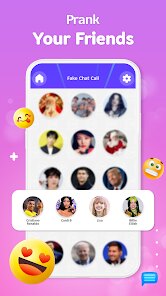
Prank Video Call - Fake Chat is a hyper-casual simulation game that's been carving out a niche in the prank-call and social-simulation space on Android. I first stumbled upon this app while browsing the Google Play Store, and I gotta say, it's a weirdly specific kind of fun. This is a pure mobile game—no PC release on Steam or console ports for Xbox or Switch—so if you want to mess with your friends, you're doing it on your phone. The game launched a while back and has managed to rack up over 10 million installs on Google Play alone, which is impressive for a free-to-download app. And yes, it's completely free to download and play, but there are in-app purchases and in-app ads. The ads are the usual mobile-game fare, popping up between prank attempts, but you can pay to remove them. The in-app purchases generally range from $0.99 to $4.99 for coin packs or ad-free versions, so it's not breaking the bank unless you're really trigger-happy with the virtual currency.
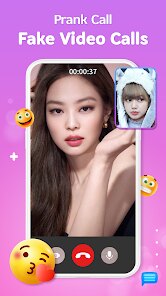
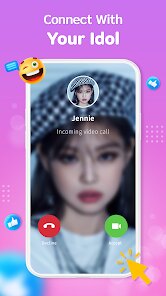
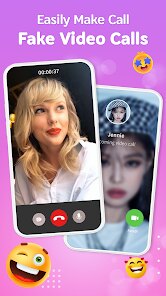
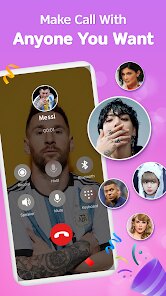
Playing this game is straightforward: you get a fake incoming video call from a celebrity, influencer, or even a random character. The "call" screen looks incredibly realistic, mimicking the interface of WhatsApp or a standard dialer. The best part? You can start recording the screen or show it to a friend live, and they'll honestly think someone important is calling you. The game has a roster of characters—like famous singers, YouTubers, or even fictional funny characters—and each one has a pre-recorded video clip that plays when you "answer." My personal favorite part is using it during awkward silences in a group conversation. I'll casually pretend I'm getting a call from a rapper, and the reactions from people are priceless. The simulation is smooth, and the app doesn't lag on my mid-range Android device, which is a big plus for a cheap mobile download. It's not deep gameplay—no levels, no progression—but as a party trick, it's gold.
Compared to other prank call simulators on the Google Play Store, like "Fake Video Call" or "Prank Call App," this one stands out because of the sheer quality of the video clips and the realistic interface. Other games in this genre often use low-resolution still images or loop the same 10-second audio, but Prank Video Call - Fake Chat gives you full video loops that actually look like a real incoming call. I've tried "Fake Call" before, and it was buggy—frequent crashes and poor Android optimization. This app, however, runs stable on Google Play services. If you're looking for a quick laugh and enjoy simulating social situations, I'd recommend this over most alternatives. Just don't expect any deep strategy or RPG elements—it's a one-trick pony, but that trick is executed well. For a casual download to kill time or troll your buddies, this is a solid choice.
features
- Realistic Call Interface 📱: The game replicates the exact look of a video call app on Android, complete with the green answer button and the contact name. When you "receive" a call from a celebrity, it looks identical to a real incoming call from your phone's default dialer. This makes the prank super convincing, especially if you have an Android device where the UI is faithfully copied.
- Diverse Character Roster 🌟: Unlike other prank apps that offer only generic options, this one includes a wide range of characters—from pop stars to comedians. Each character has a unique, looped video clip that plays when you answer the fake call. This variety keeps the prank fresh; I've used it on different friends with different characters, and no one suspected it was from the same app.
- Screen Recording Integration 🎥: The app cleverly lets you screen record the fake call without showing any app UI elements. When you share the recorded video, it looks like you're actually taking a call. Other similar games on Google Play often fail to hide the "Prank" watermark or the app's control buttons, ruining the illusion. This game hides everything perfectly for that seamless prank effect.
pros
- High-Quality Video Clips 👍: The video quality of the callers is actually good—smooth 30fps playback with decent audio. Compared to "Fake Call Free" which uses pixelated images, this app feels premium. The clips don't stutter on my Android phone, making the prank believable.
- Easy to Use Interface 🎯: The app is dead simple to navigate. You select a character, hit a button, and instantly get a fake call. No complicated settings or tutorials. For a casual gamer on Google Play, that's a big win. It respects your time—you can install, use it in 30 seconds, and then uninstall if you want.
- Offline Functionality 🔋: You don't need an internet connection to use the calls once they're downloaded. This is huge for parties or trips. Many comparable apps require a live Wi-Fi or data connection to stream the video, but this one saves the clips locally after the initial install from Google Play.
cons
- Repetitive Content 😐: After using it a few times, the novelty wears off. The same video loops play, and there's no new content added regularly. Compared to prank apps like "Prank Caller" that update their library weekly, this one feels stagnant. You'll get bored of the same ten characters pretty fast.
- Ad Frequency Issues 📢: The in-app ads are intrusive. After every prank call or two, a full-screen video ad pops up, and sometimes there's a banner ad at the bottom of the main menu. On Google Play, I've seen cleaner implementations in similar games, like "Fake Video Call Lite" where ads are only at launch. Here, they disrupt the flow.
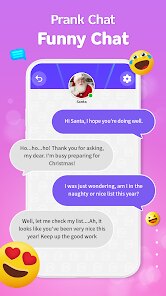
- No Real Multiplayer ❌: This is a solo prank tool—there's no way to interact with the callers or customize them beyond basic name changes. Games like "Prank Chat Simulator" on the App Store allow you to create your own fake conversations with text and images, offering more depth. This app is strictly one-way video, which limits its replay value for a demanding user like me.
Recommended Apps
![]()
BMX Cycle Extreme Bicycle Game
PlayFlix4.7

![]()
Save the Doge
WONDER GROUP4.2![]()
Mystical Mixing
CrazyLabs LTD4.7![]()
Yarn Fever! Unravel Puzzle
Brave HK Limited4.7![]()
Steal n Catch the Brainrot
BMH VN Game4.4![]()
I Am Security
Estoty4.6![]()
Geometry Dash SubZero
RobTop Games4.5![]()
Soulmate Sketch
WhatsGood1.7![]()
Mini Block Craft 3D RealmCraft
Tellurion Mobile4![]()
MONOPOLY GO!
Scopely4.6![]()
FamilySearch Africa
FamilySearch International0![]()
Agent Hunt – Hitman Shooter
Homa4.5![]()
Hyper Heroes: Marble-Like RPG
HyperJoy3.5![]()
Brainrot Filter: Fun Challenge
Braly JSC0![]()
Shining Princess Style Hub
Happy Go Game4.4














Disclaimer
1.AppInfoLibrary does not represent any developer, nor is it the developer of any App or game.
2.AppInfoLibrary provide custom reviews of Apps written by our own reviewers, and detailed information of these Apps, such as developer contacts, ratings and screenshots.
3.All trademarks, registered trademarks, product names and company names or logos appearing on the site are the property of their respective owners.
4. AppInfoLibrary abides by the federal Digital Millennium Copyright Act (DMCA) by responding to notices of alleged infringement that complies with the DMCA and other applicable laws.
5.If you are the owner or copyright representative and want to delete your information, please contact us info@appinfolibrary.com.
6.All the information on this website is strictly observed all the terms and conditions of Google Ads Advertising policies and Google Unwanted Software policy .