Blox World

10M+
Installs
Thinkplay
Developer
-
Simulation
Category
-
Everyone
Content Rating
-
support@thinkplay.co
Developer Email
-
https://thinkplay.co/posts/privacy-policy/
Privacy Policy
Screenshots

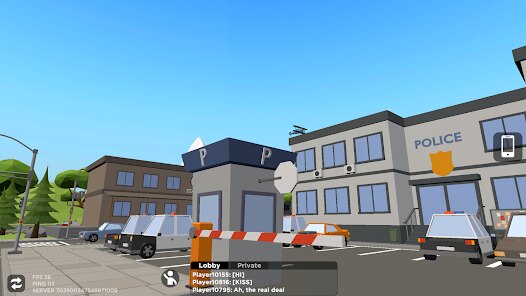
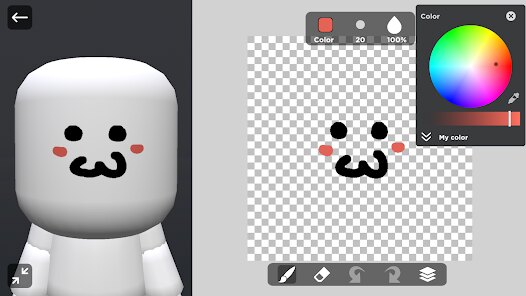
editor reviews
Alright, let's talk about Blox World on Android. I've been playing this sandbox builder game for a few weeks now, and it's clearly trying to tap into that creative, block-building vibe we all know from bigger titles. Developed by Thinkplay, this is a pure mobile game—no ports to Steam, Xbox, or Switch that I've seen. You just download it from the Google Play store and install it directly on your phone. It's been around for a little while, and from what I can see, it's racked up over 10 million installs, which is decent for this crowded niche. The best part? It's completely free to download and play. There are in app purchases, mostly for cosmetic skins, texture packs, or small boosts, and they typically range from $0.99 to $4.99. You'll also encounter in app ads, usually optional ones you can watch for extra resources, so it's not too intrusive.
When you first fire up the app, it drops you into a procedurally generated world where you can punch trees, mine ores, and craft tools. The core loop is simple: explore, gather, build. What really stands out to me is how streamlined it feels for Android. The touch controls are actually decent—there's a virtual joystick for movement and a tap-to-interact system that works well on smaller screens. My favorite part is the sheer freedom. I spent an afternoon building a massive castle with a working drawbridge and hidden tunnels, and the game didn't crash or lag, which is saying something for a mobile sandbox. The crafting recipes are intuitive, and you can switch between creative and survival modes easily. Creative mode gives you unlimited blocks, perfect for experimenting, while survival keeps you on your toes with hunger and enemy mobs at night.
Compared to other sandbox games I've played on Google Play, like Block Craft 3D or Minecraft Pocket Edition, Blox World holds its own. Block Craft 3D feels more polished in terms of graphics, but it's heavily monetized with constant pop-ups. Minecraft PE is the gold standard, but it costs money upfront and can be a bit heavy for older phones. Blox World hits a sweet spot: it's free, lightweight, and respects your time. The building mechanics are satisfying, and the multiplayer mode lets you join random servers or host your own with friends, which adds a ton of replay value. If you're looking for a solid sandbox experience without spending a dime, this is a no-brainer. Just be ready for some rough edges—the textures aren't the sharpest, and the audio can be repetitive. But for a free install on your phone, it's more than worth your time.
features
- Intuitive Touch Controls 🎮 – Unlike other mobile builders like Block Craft 3D, the controls here are responsive and customizable. You can adjust sensitivity and button layout, making it easy to build complex structures without accidental taps.
- Lightweight Performance 🚀 – The game runs smoothly on mid-range Android devices, even with lots of blocks on screen. Compare that to Minecraft PE, which can stutter on older phones, this is a big plus for casual players.
- Free to Play with Fair Monetization 💰 – No paywalls for basic features. You can unlock everything by playing, unlike Block Craft 3D where premium blocks are locked behind real money. The optional ads give you a small resource boost, but you don't need them to progress.
pros
- Creative Freedom Unlimited 🧱 – You can build anything you imagine without restrictions. I've crafted sprawling cities and intricate underground bases, and the block variety is solid. In Minecraft PE, the creative mode is similar, but Blox World lets you fly and place blocks faster, which speeds up big projects.
- Active Multiplayer Community 🌍 – Joining servers feeinstant gratification. You can trade resources, team up for builds, or just explore others' worlds. Block Craft 3D has multiplayer too, but the servers here feel less laggy and more populated during peak hours.
- Regular Updates 🔄 – The developers push updates every few weeks, adding new blocks, mobs, and events. This keeps the game fresh, unlike some other free sandboxes that get abandoned after launch. I've seen seasonal themes like spooky Halloween blocks that add variety.
cons
- Graphics Are a Bit Dated 🎨 – The textures look blocky and flat compared to Minecraft PE's more polished visuals. On a high-end phone, it can feel like a step back in terms of aesthetics, but it's not a dealbreaker for gameplay.
- Occasional Glitches and Bugs 🐛 – I've experienced a few crashes when loading large worlds, and mobs sometimes get stuck in blocks. Block Craft 3D is more stable in this regard, but the developer's frequent updates suggest they're working on fixes.
- Limited Tutorial for Beginners 📚 – The game throws you in without much guidance. New players might feel lost about crafting recipes or survival mechanics, whereas Minecraft PE has a built-in tutorial. I had to watch a few YouTube videos to get the hang of it.
Recommended Apps
![]()
BMX Cycle Extreme Bicycle Game
PlayFlix4.7

![]()
Save the Doge
WONDER GROUP4.2![]()
Mystical Mixing
CrazyLabs LTD4.7![]()
Yarn Fever! Unravel Puzzle
Brave HK Limited4.7![]()
Steal n Catch the Brainrot
BMH VN Game4.4![]()
I Am Security
Estoty4.6![]()
Geometry Dash SubZero
RobTop Games4.5![]()
Soulmate Sketch
WhatsGood1.7![]()
Mini Block Craft 3D RealmCraft
Tellurion Mobile4![]()
MONOPOLY GO!
Scopely4.6![]()
FamilySearch Africa
FamilySearch International0![]()
Agent Hunt – Hitman Shooter
Homa4.5![]()
Hyper Heroes: Marble-Like RPG
HyperJoy3.5![]()
Brainrot Filter: Fun Challenge
Braly JSC0![]()
Shining Princess Style Hub
Happy Go Game4.4













Disclaimer
1.AppInfoLibrary does not represent any developer, nor is it the developer of any App or game.
2.AppInfoLibrary provide custom reviews of Apps written by our own reviewers, and detailed information of these Apps, such as developer contacts, ratings and screenshots.
3.All trademarks, registered trademarks, product names and company names or logos appearing on the site are the property of their respective owners.
4. AppInfoLibrary abides by the federal Digital Millennium Copyright Act (DMCA) by responding to notices of alleged infringement that complies with the DMCA and other applicable laws.
5.If you are the owner or copyright representative and want to delete your information, please contact us info@appinfolibrary.com.
6.All the information on this website is strictly observed all the terms and conditions of Google Ads Advertising policies and Google Unwanted Software policy .