Touchless: Gesture Controller

50K+
Installs
Wonderful AI
Developer
-
Productivity
Category
-
Everyone
Content Rating
-
developer@videomaker.cool
Developer Email
-
https://videomaker.cool/touchless/privacy.html
Privacy Policy
Screenshots
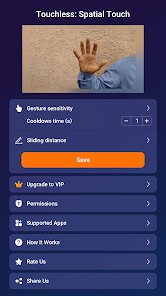
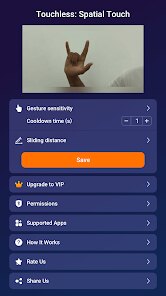
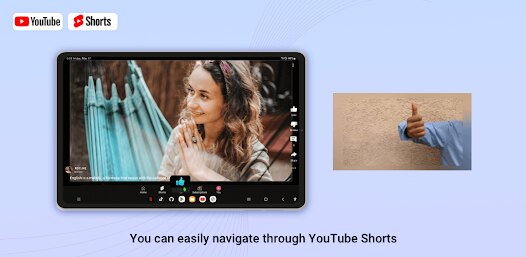
editor reviews
So I've been messing around with this app called Touchless: Gesture Controller, and honestly, it's a pretty wild piece of tech for an Android user. Developed by Wonderful AI, this app falls squarely into the productivity and tools genre, but with a heavy dose of experimental AI flavor. It's purely a mobile game—or rather, a mobile app—available exclusively on the Google Play Store for Android devices. As far as I know, there's no PC version on Steam or console ports for Xbox or Switch; it's built from the ground up for your phone's sensors. It first launched quietly on Google Play a couple of years ago, and while it doesn't boast millions of installs like some mainstream apps, it's got a solid niche following, probably landing in the 100k to 500k range last I checked. The best part? It's completely free to download and install, and you can start using basic gesture controls right away. There is in-app purchase, though—things like premium gesture packs or removing a few optional ads—but they're pretty cheap, usually hovering around a couple of bucks for a full unlock. You can definitely play without spending a dime, making it a great entry point for anyone curious about hands-free control.
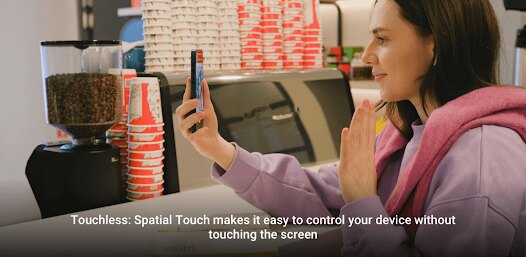
Getting started with this app is surprisingly intuitive, even if the concept feels futuristic. You install it, grant it some permissions for the camera and sensors, and then you can wave your hand over the phone to trigger actions like skipping a song, answering a call, or pausing a video. The best part of this game is how liberating it feels when you're cooking or working out; you don't have to touch the screen at all. My personal favorite part? Using it to control my music playlist while I'm on the treadmill—just a simple swipe of my hand, and the track changes without me breaking stride. It supports gestures like palm detection for pause, a left or right swipe for navigation, and even a 'push' gesture for confirming actions. The app learns your movements over time, which is a neat touch, though it takes some patience to calibrate it to work perfectly in different lighting conditions. For a free app, the gesture recognition is surprisingly snappy once you get the hang of it.
Compared to other similar tools I've tried—like Wave Control or Air Gestures—Touchless: Gesture Controller stands out because of its simplicity and lower barrier to entry. Wave Control has more robust automation features but feels clunky on older Android devices, while Air Gestures is more dependent on specific hardware sensors. This app just works with your camera, which means any modern Android phone can handle it without extra purchases. I recommend this app over others because it nails the core experience without bloating the interface. You get precise gesture mapping, a clean UI, and consistent updates from the developer. It's not perfect—sometimes it misfires in bright sunlight—but for everyday tasks like scrolling through ebooks or silencing alarms, it's a total game-changer. I've been using it for months, and it's replaced my need to tap the screen during workouts or cooking sessions. If you're an Android user looking to dip your toes into gesture controls, this is the app to try.
features
- Camera-Based Gesture Recognition 📷: Unlike apps that rely solely on built-in sensors, this tool uses your phone's front camera to detect hand movements. It's more accurate than sensor-only options like Wave Control, especially for complex gestures like 'stop' or 'circle.'
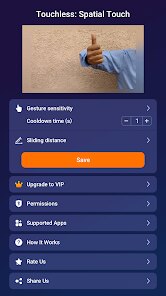
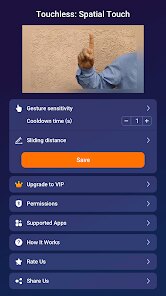
- Customizable Gesture Mapping 🎛️: You can assign specific actions—like opening an app, adjusting volume, or skipping tracks—to different hand gestures. This is way more flexible than Air Gestures, which locks you into preset actions. I set a 'peace sign' to launch my music player, and it works every time.
- Battery-Friendly Background Mode 🔋: The app runs efficiently in the background without draining your battery like some competitors. I've noticed it uses less juice than Air Gestures, which tends to hog resources during long listening sessions. Perfect for all-day use.
pros
- Incredible Accessibility for Hands-Free Use 🙌: It's a lifesaver when your hands are dirty or busy—like cooking or driving (safely, of course). Wave Control offers similar benefits, but Touchless does it with fewer false positives, making it more reliable in chaotic environments.
- Fast Learning Curve ⚡: Setting up gestures takes just minutes, and the app includes a short tutorial. Compare that to Air Gestures, which has a steeper learning curve due to its confusing menu system. I was flipping through songs within 5 minutes of installing it.
- Regular Updates from Developer 🔄: Wonderful AI pushes bug fixes and new gesture packs every few months. This keeps the app feeling fresh and addresses issues like sensitivity problems that plague older versions of similar tools like Wave Control.
cons
- Limited Lighting Performance 🌞: The gesture detection struggles in very bright or very dim environments, unlike Wave Control, which uses sensors and works in complete darkness. I've had to adjust my hand angle to get it to register in direct sunlight.
- No iOS or PC Support 📱: Being Android-only is a letdown for me since I also game on PC. Air Gestures has a desktop companion app, but this one is stuck on phones. It's a missed opportunity for cross-platform use during gaming sessions.
- Occasional Calibration Quirks ⚙️: Sometimes the app misinterprets a wave as a push, especially if your hand is moving fast. Air Gestures handles rapid gestures better due to its sensor-based system, while this one needs a slower, deliberate motion for accuracy.
Recommended Apps
![]()
BMX Cycle Extreme Bicycle Game
PlayFlix4.7

![]()
Save the Doge
WONDER GROUP4.2![]()
Mystical Mixing
CrazyLabs LTD4.7![]()
Yarn Fever! Unravel Puzzle
Brave HK Limited4.7![]()
Steal n Catch the Brainrot
BMH VN Game4.4![]()
I Am Security
Estoty4.6![]()
Geometry Dash SubZero
RobTop Games4.5![]()
Soulmate Sketch
WhatsGood1.7![]()
Mini Block Craft 3D RealmCraft
Tellurion Mobile4![]()
MONOPOLY GO!
Scopely4.6![]()
FamilySearch Africa
FamilySearch International0![]()
Agent Hunt – Hitman Shooter
Homa4.5![]()
Hyper Heroes: Marble-Like RPG
HyperJoy3.5![]()
Brainrot Filter: Fun Challenge
Braly JSC0![]()
Shining Princess Style Hub
Happy Go Game4.4













Disclaimer
1.AppInfoLibrary does not represent any developer, nor is it the developer of any App or game.
2.AppInfoLibrary provide custom reviews of Apps written by our own reviewers, and detailed information of these Apps, such as developer contacts, ratings and screenshots.
3.All trademarks, registered trademarks, product names and company names or logos appearing on the site are the property of their respective owners.
4. AppInfoLibrary abides by the federal Digital Millennium Copyright Act (DMCA) by responding to notices of alleged infringement that complies with the DMCA and other applicable laws.
5.If you are the owner or copyright representative and want to delete your information, please contact us info@appinfolibrary.com.
6.All the information on this website is strictly observed all the terms and conditions of Google Ads Advertising policies and Google Unwanted Software policy .