Bluey: Let's Play!

10M+
Installs
Budge Studios
Developer
-
Adventure
Category
-
Everyone
Content Rating
-
support@budgestudios.com
Developer Email
-
https://budgestudios.com/en/legal/privacy-policy/
Privacy Policy
Screenshots

editor reviews
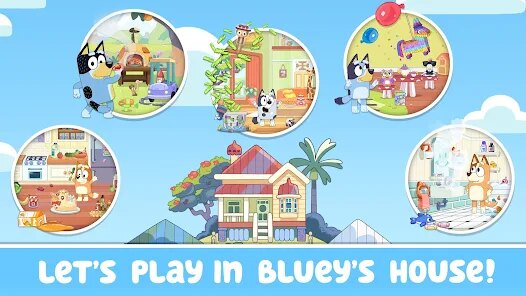
Alright, so I've been diving into Bluey: Let's Play! on my Android phone, and I gotta say, it's a surprisingly solid little game. If you're not familiar, this is a kids' game based on the hit TV show Bluey, and it's essentially a digital playset where you control Bluey, Bingo, and their family through everyday adventures. It's a pure mobile app, available on Google Play and the App Store, so no PC or console versions like Steam or Xbox here—it's strictly a touchscreen experience. The game first launched in 2023, and on Android alone, it's racked up over 10 million installs, which tells you how popular the show is. The best part? It's completely free to download and play, with no forced in-app purchases or paywalls. Sure, there's an optional in-game shop for cosmetic items or extra stickers, but it's not shoved in your face, and costs are minimal—like a buck or two for a sticker pack. No in-app ads either, which is a godsend for a kids' game, since you don't want your kid accidentally clicking on some random ad. It's a polished, safe experience right out of the box.
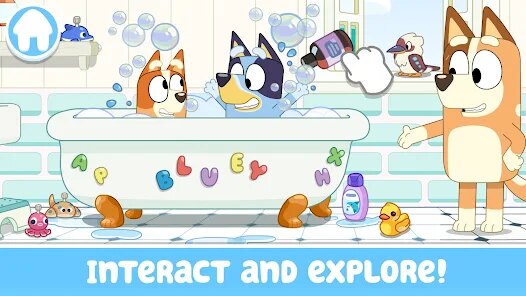
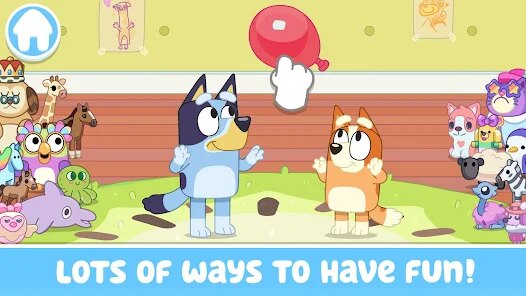
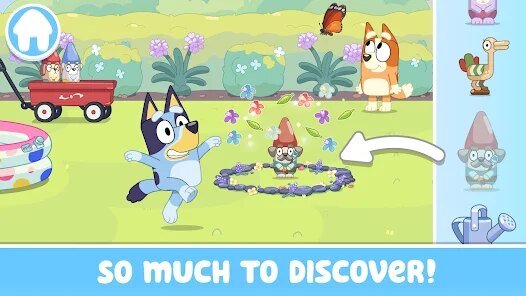
So how do you actually play this thing? It's simple, and that's the beauty of it. You pick a character, like Bluey or her sister Bingo, and then you're dropped into these mini-game worlds based on episodes of the show. For example, you can play “Keepy Uppy” where you tap to keep a balloon afloat, or “Grannies” where you pretend to be old ladies—yeah, it's as goofy as it sounds. The best part is how it encourages creativity; there's no right or wrong way to play. You can just free-roam around the Heeler house, interact with objects, and trigger little animations. My favorite part is definitely the “Floor is Lava” mode. You're jumping from furniture to furniture, and if you touch the floor, you lose. It's chaotic and hilarious, especially when you play with a kid. The touch controls are super intuitive—just drag to move or tap to interact—so even my 4-year-old niece can pick it up without a fuss. It's not about winning or losing; it's about having that imaginative play you'd expect from the show.
Comparing it to other kids' games on Android, like Paw Patrol: Rescue World or Peppa Pig: Golden Boots, Bluey: Let's Play! stands out because it doesn't feel like a cash grab. Paw Patrol games often bombard you with ads or premium currency, and Peppa Pig can feel too linear. This one keeps it pure—no pressure to buy anything, just solid, replayable fun. If you've got a little one who loves the show, or you just want a chill game to mess around in, I'd say download it from Google Play for free and give it a shot. It's not a hardcore game, but it nails what it's trying to do: capture that innocent, playful spirit of Bluey's world. Trust me, you'll be laughing at the silly sounds and animations even as an adult.
features
- Imaginative Free-Play Mode 🏠: Instead of forcing you through a story, this game lets you roam the Heeler house and yard freely. You can pick up items, dress up characters, or just make them dance. It's like a digital dollhouse, which is way more engaging than Peppa Pig: Happy Mrs. Chicken's linear tap-and-win approach.
- No In-App Ads or Paywalls 🚫: This is huge for a free kids' game. Unlike Paw Patrol: Rescue World, which shoves ads for gem packs every few minutes, Bluey: Let's Play! on Google Play has zero interruptions. The optional purchases are for extra sticker packs, but you get tons of content for free.
- Replayable Mini-Games 🎈: Games like “Keepy Uppy” and “Escape” are based on show episodes and have randomized elements, so they feel fresh each time. It's not like PJ Masks: Hero Academy where you grind the same levels—these mini-games change difficulty dynamically, keeping kids hooked.
pros
- Perfect for Young Players 👶: The controls are super simple—just tap and swipe—which makes it accessible for toddlers. Compare this to Toca Life: World, which has complex menus; Bluey: Let's Play! on Android is straightforward and kid-proof.
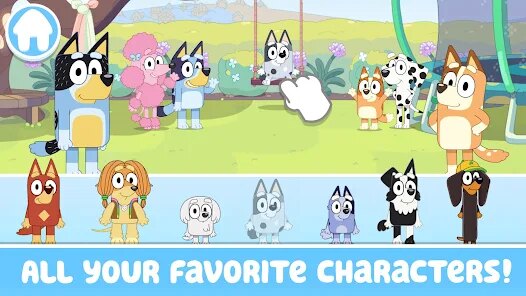
- Immersive World and Characters 🐕: The game looks and sounds just like the show, with original voice actors and bright, cartoony graphics. It's like stepping into an episode, whereas Masha and the Bear: Learn to Read feels generic in comparison.
- Encourages Cooperative Play 🤝: You can play side-by-side with a kid on the same device, like taking turns in “Go Fetch.” It's a rare feature for a mobile game, and it builds bonding moments. Most free games on Google Play are solo-focused, so this is a win.
cons
- Limited Long-Term Content 📉: After a week, you've seen all the mini-games and areas. It lacks the depth of My Town: Family House, which has more locations and objects to interact with. You'll be waiting for updates to add fresh fun.
- No Multiplayer Options 🌐: Unlike Pokémon GO or even Lego Tower, there's no online play or shared world. It's strictly a solo offline experience, so your kid can't play with friends remotely. That's a letdown if you're looking for social interaction.
- Loading Times on Older Androids 🕐: On my budget tablet, loading into a new game mode takes a bit too long—around 10 seconds. Games like Bimi Boo's Puzzles are snappier. It's not a dealbreaker, but it disrupts the flow, especially for impatient little players.
Recommended Apps
![]()
BMX Cycle Extreme Bicycle Game
PlayFlix4.7

![]()
Save the Doge
WONDER GROUP4.2![]()
Mystical Mixing
CrazyLabs LTD4.7![]()
Yarn Fever! Unravel Puzzle
Brave HK Limited4.7![]()
Steal n Catch the Brainrot
BMH VN Game4.4![]()
I Am Security
Estoty4.6![]()
Geometry Dash SubZero
RobTop Games4.5![]()
Soulmate Sketch
WhatsGood1.7![]()
Mini Block Craft 3D RealmCraft
Tellurion Mobile4![]()
MONOPOLY GO!
Scopely4.6![]()
FamilySearch Africa
FamilySearch International0![]()
Agent Hunt – Hitman Shooter
Homa4.5![]()
Hyper Heroes: Marble-Like RPG
HyperJoy3.5![]()
Brainrot Filter: Fun Challenge
Braly JSC0![]()
Shining Princess Style Hub
Happy Go Game4.4












Disclaimer
1.AppInfoLibrary does not represent any developer, nor is it the developer of any App or game.
2.AppInfoLibrary provide custom reviews of Apps written by our own reviewers, and detailed information of these Apps, such as developer contacts, ratings and screenshots.
3.All trademarks, registered trademarks, product names and company names or logos appearing on the site are the property of their respective owners.
4. AppInfoLibrary abides by the federal Digital Millennium Copyright Act (DMCA) by responding to notices of alleged infringement that complies with the DMCA and other applicable laws.
5.If you are the owner or copyright representative and want to delete your information, please contact us info@appinfolibrary.com.
6.All the information on this website is strictly observed all the terms and conditions of Google Ads Advertising policies and Google Unwanted Software policy .