
RFS - Real Flight Simulator

5M+
Installs
RORTOS
Developer
-
Adventure
Category
-
Everyone
Content Rating
-
rfs@rortos.com
Developer Email
-
https://www.rortos.com/privacy/
Privacy Policy
Screenshots





editor reviews
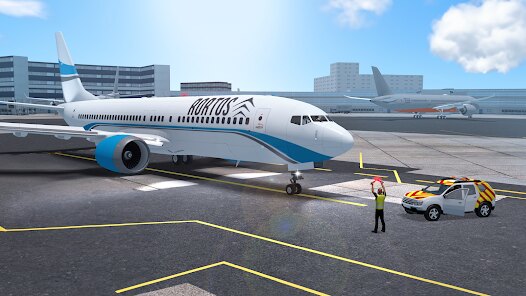
RFS - Real Flight Simulator is, as the name suggests, a hardcore flight simulation game that has carved out a serious niche for itself on mobile. It's a pure mobile game, available exclusively on Android and iOS devices. You can grab it from the Google Play Store and the Apple App Store. Unlike some sim-lite titles, this isn't on Steam, Xbox, or Switch; it's built specifically for touchscreens, though you can connect a controller. The game first launched years ago and has since racked up over 10 million installs on the Google Play store alone, which is a solid indicator of its staying power. The base app is free to download and play, which is a great way to test the waters. However, it does feature in-app purchases, and these can get pricey. You're looking at spending anywhere from a few dollars for a single premium aircraft to over $100 if you want to unlock the complete hangar of high-fidelity planes. There are also optional in-app ads, but they're not intrusive; usually just a small banner or a video you can watch for a temporary boost.
Playing RFS is all about the love of aviation. You start by choosing an airport and an aircraft—from a tiny Cessna to a massive Airbus A380—and then you just fly. The best part is the sheer depth of the simulation. You're not just tapping buttons; you're managing a full flight plan, navigating via waypoints, dealing with real-world weather pulled from live data, and using a comprehensive autopilot system. My absolute favorite part of this app is the community-driven content. Players can create and share liveries, and the multiplayer mode is surprisingly robust. Flying formation with a friend over the Grand Canyon or doing a shared approach into a tricky airport like Innsbruck just feels incredible on a phone. The sense of scale and realism, especially with a good pair of headphones, is something I rarely find in other games. The graphics, while not as sharp as a PC sim, are still impressive for a mobile device, with detailed cockpits and night lighting that looks fantastic.
I've played my fair share of mobile sims, including the ubiquitous Infinite Flight. While Infinite Flight is polished, it feels a bit more like a streamlined arcade simulation compared to RFS. RFS feels grittier and more technical. For example, the cold-and-dark start procedure in RFS is more involved, which I appreciate as a real aviation enthusiast. Another popular one is X-Plane Mobile, but that one's a paid app, and the install base is smaller. RFS offers a similar level of depth for free (initially), which is a huge win. I recommend RFS over the others because it strikes the best balance between depth and accessibility. The free content is generous enough to let you decide if this is your thing before you spend a dime. The constant updates from the developers show they're committed to the game, and the sheer variety of aircraft and airports you can download for free or purchase is staggering. If you're looking for a serious flight sim that you can whip out on your commute, this is the one. The download is worth it, just be ready to spend some time learning the ropes.
features
- Flight Model Fidelity ✈️: The physics model in RFS is significantly more detailed than in casual sims like Infinite Flight. It simulates torque, P-factor, and weight distribution, meaning a crosswind landing in a taildragger feels genuinely challenging, not just like a visual effect. Other games often simplify this to feel smoother.
- Multiplayer Experience 🌐: Unlike X-Plane Mobile's more isolated experience, RFS has a dedicated, always-on multiplayer server. You can see other players in real-time, communicate via text chat, and even fly shared flights. It transforms the game from a solo hobby into a social world, something the competition lacks to this degree.
- Livery and Mod Support 🎨: The ability to download and install community-created liveries directly through the game's interface is a killer feature. Infinite Flight locks this behind a subscription tier, while RFS makes it open to all players. You can be flying a custom paint job minutes after you install the app.
pros
- Unmatched Aircraft Diversity 🛩️: Compared to a game like Infinite Flight, which focuses on commercial jets, RFS gives you everything from vintage prop planes to modern bizjets and heavy cargo. You can go from flying a DC-3 over the jungle to a 787 over the Atlantic without switching games. This variety keeps the gameplay fresh for hundreds of hours.
- Free-to-Play Generosity 🎁: The sheer amount of content you get for the initial download is fantastic. You have access to dozens of airports and several fully functional aircraft without spending a dime. X-Plane Mobile, in contrast, is a paid app with additional aircraft locked behind further paywalls. RFS gives you the core experience for free.
- Real-Time Weather System ⛈️: The live weather integration is top-tier. The game pulls in real METAR data, so if it's stormy at Heathrow, it's stormy in the game. This adds a layer of unpredictability and realism that many mobile sims, like the older versions of Infinite Flight, simply don't offer. Flying an approach in low visibility because of real-world fog is a thrill.
cons
- Premium Aircraft Cost 💸: While the base app is free, some of the best and most detailed aircraft are locked behind a steep paywall. A single high-quality airliner can cost as much as a full game on a different platform. Compared to Infinite Flight's subscription model, which gives you access to everything for a monthly fee, RFS's per-plane pricing can feel costly if you want a full hangar.
- Occasional Performance Stutters 🐌: On mid-range Android devices, the game can sometimes chug, especially at complex airports like JFK or Heathrow with high graphic settings. The optimization isn't as smooth as Infinite Flight, which runs like butter on most hardware. You might need to lower the graphics quality to get a consistent frame rate during your approach.
- UI and Tutorial Depth 📖: For a new player, the interface can be overwhelming. There are a lot of buttons and menus without much explanation. Games like Infinite Flight have a much more guided, interactive tutorial system. RFS basically throws you into the cockpit and expects you to learn from external resources or trial and error. This can be a major barrier for someone who just wants to install and fly immediately.
Recommended Apps
![]()
BMX Cycle Extreme Bicycle Game
PlayFlix4.7

![]()
Save the Doge
WONDER GROUP4.2![]()
Mystical Mixing
CrazyLabs LTD4.7![]()
Yarn Fever! Unravel Puzzle
Brave HK Limited4.7![]()
Steal n Catch the Brainrot
BMH VN Game4.4![]()
I Am Security
Estoty4.6![]()
Geometry Dash SubZero
RobTop Games4.5![]()
Soulmate Sketch
WhatsGood1.7![]()
Mini Block Craft 3D RealmCraft
Tellurion Mobile4![]()
MONOPOLY GO!
Scopely4.6![]()
FamilySearch Africa
FamilySearch International0![]()
Agent Hunt – Hitman Shooter
Homa4.5![]()
Hyper Heroes: Marble-Like RPG
HyperJoy3.5![]()
Brainrot Filter: Fun Challenge
Braly JSC0![]()
Shining Princess Style Hub
Happy Go Game4.4















Disclaimer
1.AppInfoLibrary does not represent any developer, nor is it the developer of any App or game.
2.AppInfoLibrary provide custom reviews of Apps written by our own reviewers, and detailed information of these Apps, such as developer contacts, ratings and screenshots.
3.All trademarks, registered trademarks, product names and company names or logos appearing on the site are the property of their respective owners.
4. AppInfoLibrary abides by the federal Digital Millennium Copyright Act (DMCA) by responding to notices of alleged infringement that complies with the DMCA and other applicable laws.
5.If you are the owner or copyright representative and want to delete your information, please contact us info@appinfolibrary.com.
6.All the information on this website is strictly observed all the terms and conditions of Google Ads Advertising policies and Google Unwanted Software policy .