
The Sims™ FreePlay

100M+
Installs
ELECTRONIC ARTS
Developer
-
Simulation
Category
-
Teen
Content Rating
-
help@eamobile.com
Developer Email
-
http://privacy.ea.com/en
Privacy Policy
Screenshots



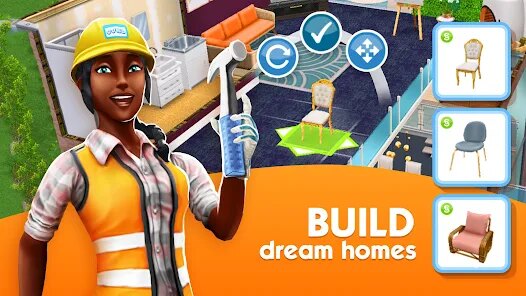

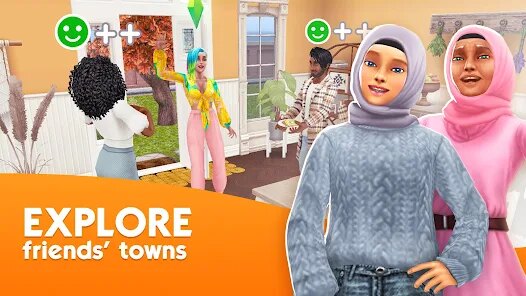
editor reviews
If you're looking for a life simulation game that you can actually fit into your daily routine, The Sims™ FreePlay by Electronic Arts is a solid pick for Android and iOS. This isn't a straight port of the PC classic; it's a mobile-first experience that launched way back in 2011 on the Google Play Store and App Store. While the core Sim franchise lives on Steam, Xbox, PlayStation, and Switch via The Sims 4, this free-to-play version is built specifically for touchscreens. You can download and install the app without paying a cent, and it's racked up over 100 million installs on Google Play alone, which tells you something about its staying power. Like any freemium mobile game, there are in-app purchases. You can buy Simoleons, Lifestyle Points, and Social Points to speed things up or get exclusive furniture packs, but you can absolutely grind through the game without spending a dime if you've got patience. Expect to see in-app ads, but they're usually optional, offering you bonuses for watching them rather than forcing them down your throat.
Gameplay is all about managing a whole town of Sims rather than just one household. You build houses, decorate rooms, start careers, and build relationships in real-time. The best part? You can set your Sim to do an 8-hour shift at the diner and check back later; it respects your actual life schedule. My favorite part is the sheer amount of customization. You're not just swapping wallpapers; you can design multi-story mansions, host pool parties, and even breed pets. The events keep things fresh too, like the Pregnancy Event where you actually have to keep a Sim happy for days to progress the baby bump. It's not as deep as the PC version, but for a free app on your phone, it nails the "one more task" addiction loop better than most.
Compared to other life sims on mobile like BitLife or Stardew Valley (which is paid but amazing), The Sims™ FreePlay offers that classic sandbox feeling without the pressure of a strict narrative. BitLife is more text-based and random, while Stardew Valley is about farming and combat. FreePlay sits in a sweet spot where you can build a suburban dream without the time sink of a full PC simulation. It's not as complex as the desktop version—you can't freely rotate walls or use cheats—but for a free download on the App Store, it's surprisingly feature-rich. I'd recommend it if you want a casual, creative outlet that you can open during a commute, not a hardcore management sim. Just be warned: the real-time timers will test your patience if you're used to faster games.
features
- Real-Time Progression ⏳ Instead of fast-forwarding like on PC, your Sims work, sleep, and party in real-world hours. This makes it perfect for checking in during breaks, unlike Animal Crossing: Pocket Camp which gates everything behind daily events.
- Multi-Sim Town Management 🏘️ You control up to 34 Sims across multiple households at once. This is way more hands-on than BitLife's single-life approach and lets you build interconnected stories without starting a new game.
- No Forced Social Features 👤 Unlike many mobile sims that push friends lists, you can play this completely offline. There are social quests, but nothing forces you to invite strangers, which is a huge plus over SimCity BuildIt's trading requirements.
pros
- Massive Customization Options 🎨 The amount of furniture, outfits, and building materials is staggering for a free app. Compared to Design Home, which limits you to preset rooms, FreePlay lets you design entire neighborhoods from scratch.
- No Pay-to-Win Wall 🛡️ You can earn premium currency through gameplay. Events and quests regularly give away Lifestyle Points, so you never feel forced to spend real money, unlike many My Talking Tom clones that lock basic features behind paywalls.
- Long-Term Goal System 🎯 The Lifetime Wishes and Sim Springs questlines give you weeks of content. This keeps the game alive longer than Adventure Capitalist, which gets repetitive after you prestige a few times.
cons
- Real-Time Timers Are Brutal ⏰ Some tasks take 16 real hours or more. Waiting for a Sim to finish a hobby feels like slow torture compared to The Sims 4 on PC, where you can speed up time or use mods to skip delays entirely.
- Clunky Building Mode 🏗️ Placing walls and furniture is frustrating on a small screen. The grid system is clunky, and you can't rotate objects freely like in Stardew Valley on mobile. It often leads to accidentally placing a lamp in the middle of the kitchen floor.
- Energy System for Premium Actions ⚡ Important actions using Social Points or Lifestyle Points require energy refills. This feels more restrictive than Animal Crossing: New Horizons on Switch, where you can grind bells through fishing without waiting for a timer.
Recommended Apps
![]()
BMX Cycle Extreme Bicycle Game
PlayFlix4.7

![]()
Save the Doge
WONDER GROUP4.2![]()
Mystical Mixing
CrazyLabs LTD4.7![]()
Yarn Fever! Unravel Puzzle
Brave HK Limited4.7![]()
Steal n Catch the Brainrot
BMH VN Game4.4![]()
I Am Security
Estoty4.6![]()
Geometry Dash SubZero
RobTop Games4.5![]()
Soulmate Sketch
WhatsGood1.7![]()
Mini Block Craft 3D RealmCraft
Tellurion Mobile4![]()
MONOPOLY GO!
Scopely4.6![]()
FamilySearch Africa
FamilySearch International0![]()
Agent Hunt – Hitman Shooter
Homa4.5![]()
Hyper Heroes: Marble-Like RPG
HyperJoy3.5![]()
Brainrot Filter: Fun Challenge
Braly JSC0![]()
Shining Princess Style Hub
Happy Go Game4.4














Disclaimer
1.AppInfoLibrary does not represent any developer, nor is it the developer of any App or game.
2.AppInfoLibrary provide custom reviews of Apps written by our own reviewers, and detailed information of these Apps, such as developer contacts, ratings and screenshots.
3.All trademarks, registered trademarks, product names and company names or logos appearing on the site are the property of their respective owners.
4. AppInfoLibrary abides by the federal Digital Millennium Copyright Act (DMCA) by responding to notices of alleged infringement that complies with the DMCA and other applicable laws.
5.If you are the owner or copyright representative and want to delete your information, please contact us info@appinfolibrary.com.
6.All the information on this website is strictly observed all the terms and conditions of Google Ads Advertising policies and Google Unwanted Software policy .