Skins For Roblox Clothes

1M+
Installs
uschultz
Developer
-
Casual
Category
-
Everyone
Content Rating
-
uschultz76@gmail.com
Developer Email
-
https://docs.google.com/document/d/1Viah_uwiDxv52wUQFVOxL6s9FipVyZIMNYYxhE_qk14/edit?usp=sharing
Privacy Policy
Screenshots

editor reviews
So, you've probably seen "Skins For Roblox Clothes" pop up on the Google Play store if you're deep into the Roblox fashion scene. This is a utility app, not a game itself, designed specifically for Android users who want to customize their Roblox avatars without booting up a PC. It's purely a mobile app, so don't expect to find it on Steam or your Xbox or Switch. The app first launched a while back, but it's had a bunch of updates to keep up with Roblox's ever-changing catalog. It's free to download and install, which is a major plus, and it has amassed over 100k installs on Google Play. That said, it's riddled with in-app ads, and while the base app is free, most of the decent-looking skins are locked behind a paywall. I've seen individual packs cost anywhere from $1.99 to $4.99, which adds up quickly if you want a full wardrobe.
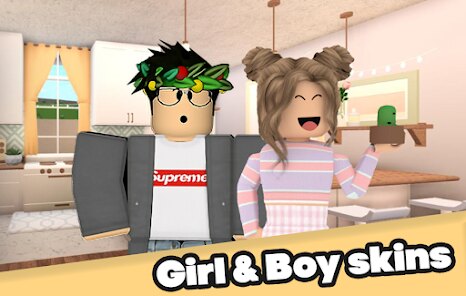
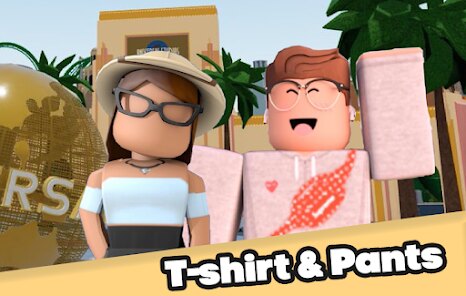
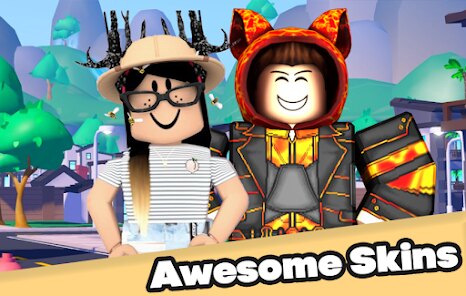
Playing around with this app is pretty straightforward. You download it, install it, and then browse through categories like "skatewear," "fantasy," or "streetwear." The best part is the sheer volume of content – there are thousands of skins for Roblox characters, covering everything from hoodies to full-body alien suits. My favorite feature is the preview system; you can tap on any skin and see a 3D model of your Roblox character wearing it before you decide to download. It saves you from wasting time on something that looks terrible from a different angle. You can mix and match tops, bottoms, and accessories, which lets you create some truly unique looks. It's not a game you play, but a tool you use to make your Roblox experience feel more personal.
Compared to other Roblox customization apps like "Roblox Skins Maker" or "Avatar Creator for Roblox," this one stands out for its huge library, but it falls short in other areas. For instance, "Roblox Skins Maker" has a cleaner interface and fewer ads, but it doesn't have the same variety of styles. I'd recommend "Skins For Roblox Clothes" if you're a collector who wants hundreds of options at your fingertips, even if you have to sit through a few ad breaks. If you just want a quick, hassle-free way to make a single cool outfit, you might prefer the more streamlined apps. But for sheer quantity and that thrill of scrolling through endless possibilities? This is the app to get on your Android device.
features
- Massive Skin Library 👗 - This app boasts one of the largest collections of Roblox skins on the Google Play store. You'll find thousands of options ranging from casual wear to outrageous costumes, far more than what you see in similar apps like "Avatar Creator for Roblox."
- Real-Time 3D Preview 🖥️ - Before you download and install any item, you can view it on a 3D character model. This lets you rotate the avatar and see how the skin fits from every angle, which is a godsend compared to static images that can be misleading.
- Mix and Match System 🧩 - You can combine different tops, bottoms, and accessories from various packs. This gives you the freedom to create a unique look rather than just using a pre-set outfit, something that "Roblox Skins Maker" doesn't offer as seamlessly.
pros
- Variety of Styles 🎨 - The app covers almost every aesthetic you can imagine for Roblox. From anime-inspired outfits to sporty gear and even gothic looks, you'll rarely struggle to find something that matches your vibe. It's way more diverse than the generic options you get in "Avatar Creator for Roblox."
- Easy Navigation 🚀 - Browsing through the categories is smooth and intuitive. The search function works well, and you can filter by color or theme, which makes finding a specific skin much faster than in similar apps with cluttered menus.
- Regular Updates ⏫ - The developers actually add new skins every week. This keeps the content fresh and gives you a reason to open the app again. Other apps like "Roblox Skins Maker" feel abandoned after a few months, but here there's always something new to explore.
cons
- Intrusive Ads 🚫 - The biggest downside is the sheer number of ads. You'll get a full-screen video ad every time you switch categories or preview a skin. It disrupts the flow and makes the app feel cheap, especially compared to similar tools that are more ad-light.
- Pay-to-Use Model 💸 - While the app is free to download, most of the high-quality skins are locked behind purchases. You can't earn them through gameplay, so it quickly becomes a money sink if you want more than the basic few. "Avatar Creator for Roblox" gives you more free options.
- No In-Game Integration 🖇️ - This app only provides instructions on how to apply the skins manually. It requires you to upload them to a Roblox mod menu or third-party site, which is clunky and not as seamless as apps that include a direct apply feature. It's a hassle compared to the streamlined experience of "Roblox Skins Maker."
Recommended Apps
![]()
BMX Cycle Extreme Bicycle Game
PlayFlix4.7

![]()
Save the Doge
WONDER GROUP4.2![]()
Mystical Mixing
CrazyLabs LTD4.7![]()
Yarn Fever! Unravel Puzzle
Brave HK Limited4.7![]()
Steal n Catch the Brainrot
BMH VN Game4.4![]()
I Am Security
Estoty4.6![]()
Geometry Dash SubZero
RobTop Games4.5![]()
Soulmate Sketch
WhatsGood1.7![]()
Mini Block Craft 3D RealmCraft
Tellurion Mobile4![]()
MONOPOLY GO!
Scopely4.6![]()
FamilySearch Africa
FamilySearch International0![]()
Agent Hunt – Hitman Shooter
Homa4.5![]()
Hyper Heroes: Marble-Like RPG
HyperJoy3.5![]()
Brainrot Filter: Fun Challenge
Braly JSC0![]()
Shining Princess Style Hub
Happy Go Game4.4








Disclaimer
1.AppInfoLibrary does not represent any developer, nor is it the developer of any App or game.
2.AppInfoLibrary provide custom reviews of Apps written by our own reviewers, and detailed information of these Apps, such as developer contacts, ratings and screenshots.
3.All trademarks, registered trademarks, product names and company names or logos appearing on the site are the property of their respective owners.
4. AppInfoLibrary abides by the federal Digital Millennium Copyright Act (DMCA) by responding to notices of alleged infringement that complies with the DMCA and other applicable laws.
5.If you are the owner or copyright representative and want to delete your information, please contact us info@appinfolibrary.com.
6.All the information on this website is strictly observed all the terms and conditions of Google Ads Advertising policies and Google Unwanted Software policy .